8
Link Simple Home account to Echo
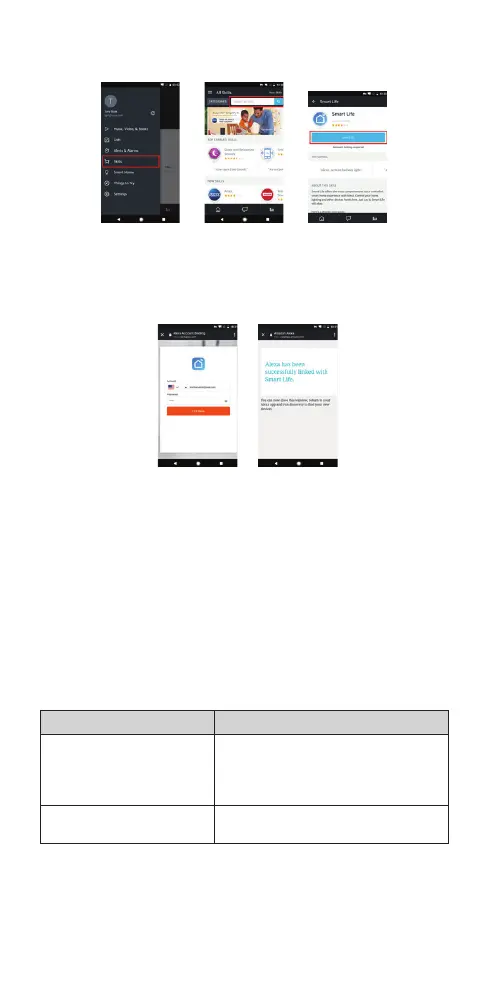
1) Tap Skills in the slide menu, then search and select Simple Home or Smart Life
and tap ENABLE to enable the Skill.
2) You will be re-directed to the account link page. Type in your Simple Home
account and password; don’t forget to select the country/region where your
account belongs to. Then tap Link Now to link your Simple Home account. The
country/region, the account, and the password must match exactly/be the
same with the Simple Home account. Close the window when Alexa has been
successfully linked with Simple Home notice is prompted out.
Now you can control your smart devices with your voice.
For Google Assistant:
Ok Google, is the front door open?
Ok Google, is the front door closed?
For Amazon Alexa:
Alexa, is the front door locked?
Alexa, is the front door unlocked?
Safety instructions
• Do not disassemble the product or remove any parts.
• Do not put the product into water or any liquid.
• Do not put the product close to heat source or expose it to high temperature.
• This product is intended for indoor use only.
Troubleshooting
Problem Solution
Not getting notications • Makesurethatallpermissionsaregiven
for your, application in phone settings.
• Checkyoursettingsmenuandmakesure
that notications are allowed for Simple
Home application.
Tampered alarm
notications appear often
• Makesurethatyourdeviceismounted
and closed properly.



 To Next Page