Chapter3 Installation / 19
ISA SLOT1
FAN1
down :
up
K/B
:Mouse
USB
COM1
COM2
Printer
MIDI/
GAME/
AUDIO
FAN2
FAN 3
JP1
IDE
FDC
SOCKET
J3
LAN
82443BX
JP5
1
IR
J2
12
PCI1PCI2PCI3PCI5 PCI4
ISA SOLT
AGP1
AGP SOLT
J6
1
JP7
1
1
JP6
DIMM
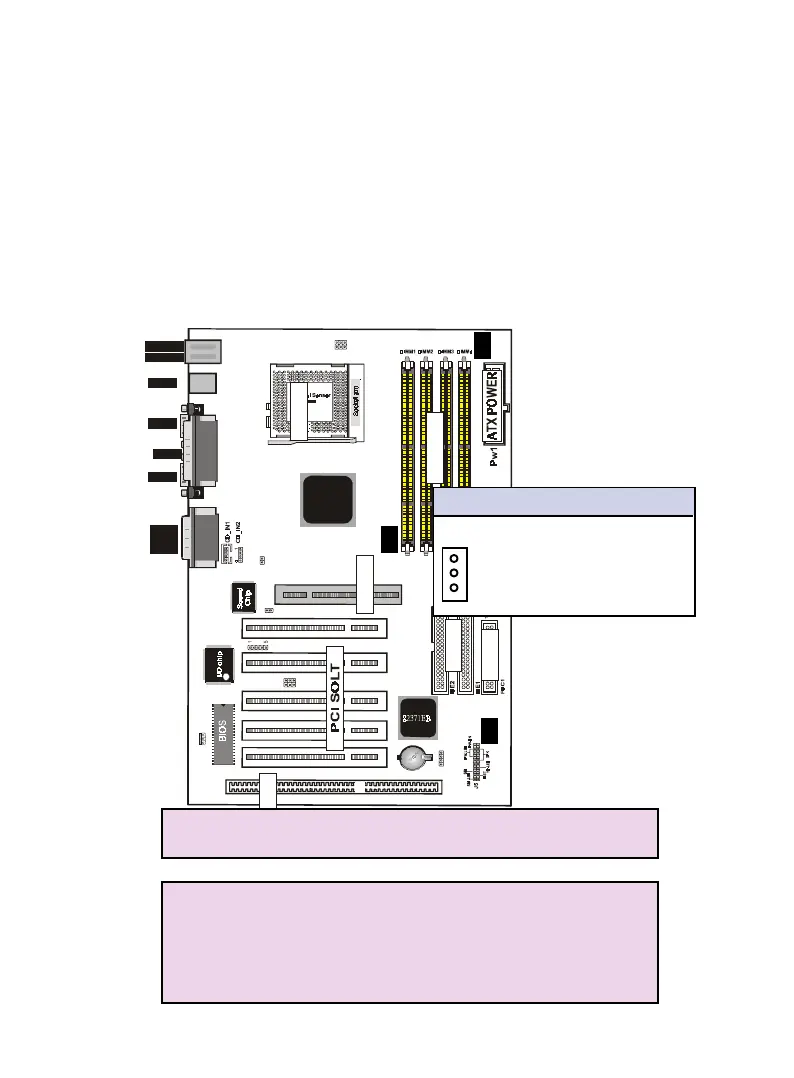
7. FAN1 , FAN2 , FAN3 CPU Cooling Fan (FAN/PWR)
These connectors support cooling fans of 500mAmp
(6Watt) or less. Orientate the fans so that the heatsink
fins allow airflow to go across the onboard heat sink(s)
instead of the expansion slots. Depending on the fan
manufacturer, the wiring and plug may be different. The
red wire should be positive, while the black should be
ground. Connect the fan’s plug to the board taking into
consideration the polarity of this connector.
NOTE :
The "Rotation" signal is to be used only by a specially
designed fan with rotation signal.
WARNING :
The CPU and/or motherboard will overheat if there is
no air flowing across the CPU and onboard heatsinks.
Damage may occur to the motherboard and/or the CPU
fan if these pins are incorrectly used. These are not
jumpers, do not place jumper caps over these pins.
FAN1/2/3 CPU Cooling FAN
Pin Description
1 Ground
2 +12VDC
3 Signal
P1
P3
P2


 To Next Page