charged, the light will be solid if the device is on, or will turn off
if the device is off. Charge time is 2–4 hours depending on
power source. Charge time is approximately 1.5 hours if you use
a USB-C charger and a USB-C to USB-C cable.
TECH SPECS
Battery Type: Lithium Ion Polymer
Battery Size: 1400 mAh
Battery Life: Up to 120 hrs standard operation at default setting
Optimal Operating Temperature: 10F - 105F
Dimensions: 1 ⁄ in / 45 mm wide, 4 ⁄ in / 111.5 mm tall,
⁄ in / 20.5 mm thick
Weight: 3.35 oz / 95 g
Ingress Protection Rating: IPX7
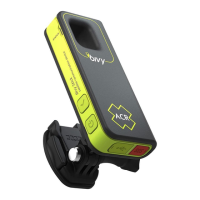
UNDERSTANDING THE LIGHTS ON THE BIVY STICK
1. Power indicator light: The light next to the power button
will show the device is on. It will normally be dim to preserve
battery life. Pressing the power button quickly will brighten
the light for better visibility.
Green = 50 – 100% | Yellow = 20 – 50% | Red = 0 – 20%
You can charge your device with any USB-C cable by plugging
it into the port on the bottom of the Bivy Stick.
2. Signal light: The Signal light indicates satellite visibility status.
Green = Strong | Yellow = Medium/Weak | Red = Weak/None
The Signal light will turn off after a few minutes to preserve
battery. Quickly push the power button to turn the Signal light
back on. Occasionally, you may see the Signal light flashing
green. This means the device is acquiring a GPS location lock
and should only last a few seconds if you are out in the open. It
will not get a GPS lock if you are inside.
WARNING
The Bivy Stick uses a standard USB voltage of 5V DC and
consumes up to 1A. Applying a voltage higher than 5V
may damage the device.
8


 To Next Page