
 Need help?
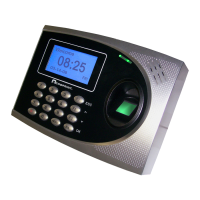
Do you have a question about the Acroprint timeQplus TQ600 and is the answer not in the manual?
Explains the process of capturing and storing a user's fingerprint for identification.
Details how the terminal verifies a user's identity using enrolled fingerprint data.
Provides recommendations for optimal fingerprint capture and enrollment quality.
Guides the process of adding new users via fingerprint, password, or both.
Step-by-step instructions for enrolling a user's fingerprint on the terminal.
Procedure for enrolling a user's password for authentication.
Covers the procedure for enrolling users with both fingerprint and password.
Explains the different ways users can be authenticated using fingerprints.
Details the process of comparing a fingerprint against all stored templates for identification.
How to authenticate a user using their enrolled password.
Steps for registering proximity cards for user authentication on the TQ600P.
Guide to enrolling users with both proximity cards and passwords.
Procedure for safely cleaning the fingerprint sensor to ensure accurate reads.
Diagnoses and solutions for when fingerprint verification fails.
Troubleshooting steps for when the terminal cannot communicate with other devices.
Identifies causes and corrections for frequent fingerprint rejection.
 General
| Data Storage | Internal memory |
|---|---|
| Display Type | LCD |
| Model | TQ600 |
| Type | Biometric Time Clock |
| Biometric Technology | Fingerprint |
| Connectivity Technology | USB |
| Power Source | AC adapter |
| Category | Time and Attendance |
| Connectivity | USB, Ethernet |

 To Next Page