13. REMOTE CONTROLLER OPERATION GUIDE
84
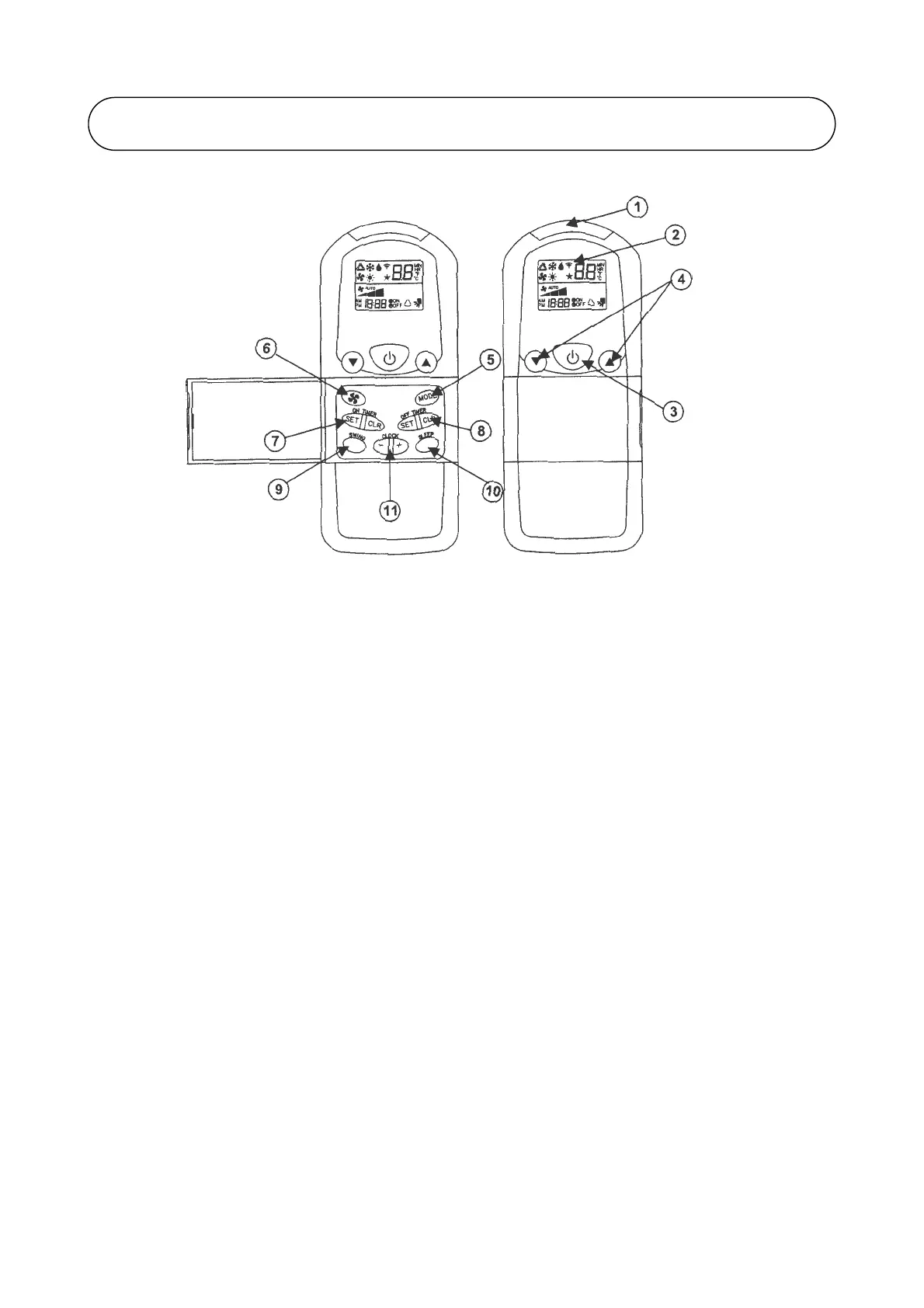
G8 REMOTE CONTOLLER
1. Transmission source
• The source where the signal will be transmitted. • Set the desired off time by pressing the SET
button continuosly.
2. Signal Transmission indication • Press the CLR button to cancel the off timer setting.
• Blink to confirm the last setting has been send to
the unit. 9. Automatic air swing
• Press the SWING buttton to activate the autoatic air
3. On/Off Button swing function.
• Press once to start the air conditioner. • To distribute the air to a specific direction, press the
• Press again to stop the unit. SWING button and wait until the louver move to the
desired direction and press the button once again.
4. Temperature setting
• To set the desired room temperature, press the 10. Sleep mode setting
button to increase or decrease the set • Press the button to activate sleep mode. This function
temperature. is available under COOL, HEAT & AUTO mode.
• The temperature setting range is from 16°C to • When it is activated in COOL mode, the set temperature
30°C (Optional setting 18°C to 30°C). will be increased 0.5°C after 30 minutes, 1°C after 1 hour
• Press both buttons simultaneously to toggle the and 2 after 2 hours.
temperature setting between °C and °F. • When it is activated in HEAT mode, the set temperature
will be decreased 1°C after 30 minutes, 2°C after 1 hour
5. Operation mode and 3°C after 2 hours.
• Press the MODE button to select the type of
operating mode. 11. Clock time setting
• For cooling only unit, the available modes are : • Press button + or - to increase or decrease the clock time.
COOL, DRY & FAN.
• For heat pump unit, the available modes are :
AUTO, COOL, DRY, FAN & HEAT.
6. Fan speed selection
• Press the button until the desired fan speed is
achieved.
7. ON timer setting
• Press the SET button will activate the on timer
function.
• Set the desired on time by pressing the SET
button continuously. If the timer is set to 7.30am,
the air conditioner will turn on at 7.30am sharp.
• Press the CLR button to cancel the on timer
setting.
8. OFF timer setting
• Press the SET button will activate the off timer function.



 To Next Page