4 Non ACT MIFARE Cards:
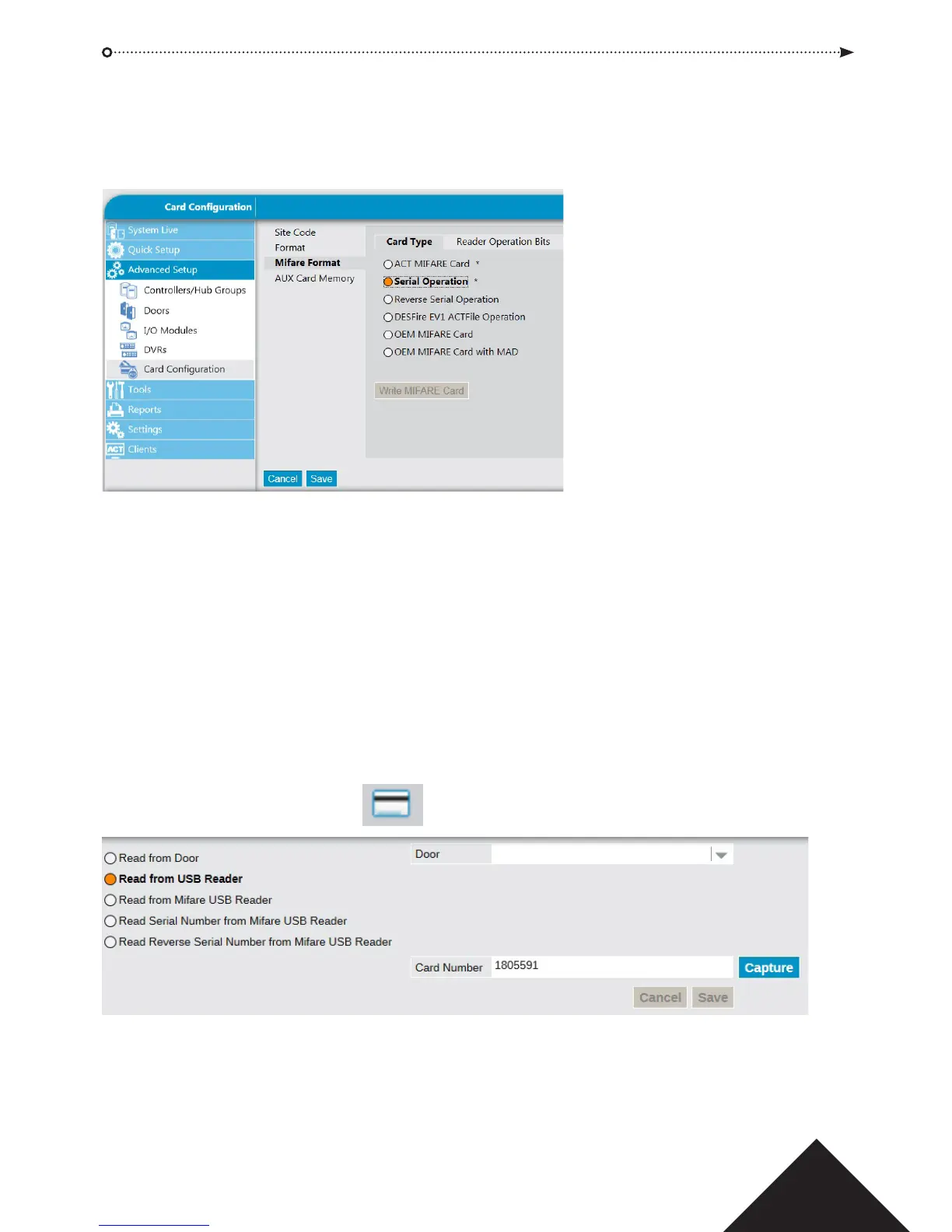
The reader may be programmed to read non ACT MIFARE cards. From ACTInstall,
GotoACTInstall->AdvancedSetup->CardConguration->MifareFormat
Select the appropriate MIFARE card type then press Save:
ACT MIFARE Card: This is the default setting to read ACT MIFARE Cards
Serial Operation: Returns the MIFARE serial number
Reverse Serial Operation: Returns the MIFARE serial number in reverse
DESFire EV1 ACT File Operation: Set when using ACT DESFire EV1 cards
OEM MIFARE card: Non-ACT MIFARE cards
OEM MIFARE card with MAD: Non-ACT MIFARE cards
5 Capture Cards:
For cards with both 125 kHz and MIFARE technology, cards should be enrolled using the
capture card facility in ACTManage -> Users
Click on the Capture card icon beside the card number.
To read the 125kHz number on the card, select “Read from USB Reader” and click
capture.
To read the ACT MIFARE number on the card, select “Read from MIFARE USB”
Reader and click capture.
2
Operating & Installation Instructions
Copyright © 2016 Access Control Technology Ltd. Part No.18-00095 Iss 4









 To Next Page