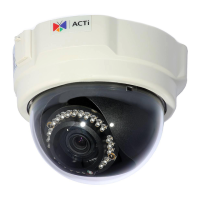
Need help?
Do you have a question about the ACTi A41 and is the answer not in the manual?
Guides on preparing the installation site, including memory card insertion and drill template usage.
Instructions for physically mounting the camera to the prepared surface using screws.
Details on waterproofing the network cable connection using tape for specific models.
Specific steps for waterproofing the A49 camera's 'pigtail' using the provided cable gland.
Connects the camera to the network via Ethernet cable and PoE injector or switch.
Instructions on how to access the camera's live video feed via a web browser.
 General
| Sensor Type | CMOS |
|---|---|
| Aperture | F2.0 |
| IR Night Vision | Yes |
| Infrared Distance | 30 m |
| Day/Night | Yes |
| Frame Rate | 30 fps |
| Connectivity Technology | Wired |
| Ingress Protection | IP66 |
| Device Type | IP Camera |
| Lens Type | Fixed |
| Iris Type | Fixed |
| Video Compression | H.264, MJPEG |
| Network Interface | 10/100 Mbps Ethernet |
| Power Supply | PoE |
| Power Device | PoE |
| Protocols | HTTP, TCP/IP, UDP, SMTP, FTP, DHCP, DNS, DDNS, NTP, RTSP, RTP, RTCP, IGMP, ICMP, ARP |
| Compliant Standards | CE, FCC |
| Optical Zoom | No |


 To Next Page