Need help?
Do you have a question about the ACTi E54 and is the answer not in the manual?
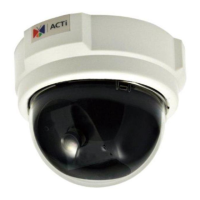
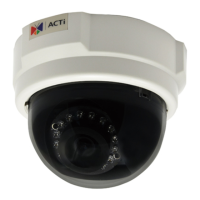
The ACTi E54 is a 5MP indoor dome camera designed for intelligent IP surveillance systems. It offers a range of features for capturing high-quality video, managing data, and ensuring reliable operation in various indoor environments.
The primary function of the E54 is to provide cutting-edge digital video surveillance. It captures real-time images and transmits them over a standard TCP/IP network. The camera supports dual streaming with H.264 High Profile and MJPEG compression formats, allowing for flexible video quality and bandwidth management. It can achieve superior image quality at 15 frames per second (fps) for resolutions up to 2592 x 1944 pixels and 2048 x 1536 pixels. For Full HD 1080p (1920 x 1080), 720p (1280 x 720), and VGA (640 x 480) resolutions, the device can reach 30 fps. This multi-codec capability ensures compatibility with various recording and viewing platforms while optimizing storage and network usage.
A key feature of the E54 is its built-in hardware motion detection, eliminating the need for external sensors. Users can define up to three video motion detection areas and adjust object size and sensitivity to reliably detect movement within the camera's view. Hardware motion detection offers improved sensitivity and faster response times compared to software-based solutions.
The camera is designed for easy integration into existing surveillance infrastructures. It connects to the Ethernet via a standard RJ45 connector, supporting NWAY for auto-detection of network speed (10Base-T/100Base-TX Ethernet). Power over Ethernet (PoE) support simplifies installation by allowing both power and data to be transmitted over a single Ethernet cable, reducing wiring complexity and costs.
For comprehensive surveillance management, the E54 comes bundled with powerful surveillance software. This software allows users to convert an existing PC into a digital video recorder, enabling scheduled and manual recording to a local hard disk. It also facilitates reliable and accurate motion detection with instant warning capabilities, ensuring immediate response to events. The software includes quick and simple search and playback functions for efficient retrieval of recorded images and video.
The E54 also supports software development through an available Software Development Kit (SDK), including a Streaming Library and ActiveX control. This allows third-party software developers to integrate and control the IP camera with their own applications, saving considerable development effort. The device is fully compatible with ACTi software and is ONVIF compliant, ensuring interoperability with a wide range of network video products.
The E54 offers flexible installation options, including ceiling and wall mounts, to suit different indoor environments. The installation process involves using a drill template to mark screw holes, securing a mounting plate, connecting necessary cables, and then fastening the camera to the plate. For ceiling mount, the camera is fastened by turning it clockwise. For wall mount, a wall mount bracket is first secured to the wall, then the mounting plate is attached to the bracket, and finally, the camera is fastened to the wall mount kit by turning it clockwise. Care must be taken to ensure screws are flat on the plate to avoid protrusion.
Adjusting the viewing angle and focus is straightforward. Users can remove the front cover by turning it counterclockwise. The viewing angle can then be adjusted by panning and tilting the camera based on the live view. A lens focus tuner is provided to precisely adjust the focus of the lens. Once adjustments are complete, the dome cover is reattached by pushing it into the groove until it clicks.
Network configuration is a crucial aspect of using the E54. If a DHCP server or router is present in the network, the camera will automatically acquire an IP address. Users can then find and access the device using ACTi's IP Utility program. If no DHCP server is available, users must manually configure their PC's IP address to the same subnet as the camera's default IP (192.168.0.100). It is critical to ensure that no two devices on the network use the same IP address. After initial access, users can change the camera's IP mode to Static and assign a unique IP address, especially when deploying multiple devices, to prevent conflicts.
The camera's interface is accessed via a web configurator through Internet Explorer (version 6.0 or above). After typing in the camera's IP address, users are prompted to log in with default credentials (User: Admin, Password: 123456). Once logged in, the live video feed is displayed, and access to the main menu is available via a "Setup" button. The web interface allows for various configurations, including IP settings, connection type, and video settings. After making changes, users must apply them and reboot the device for the settings to take effect.
Maintenance of the E54 primarily involves ensuring proper installation and handling. Users are explicitly warned not to open the housing of the product, as this may expose them to dangerous voltage or other hazards. All servicing should be referred to qualified service personnel.
Cleaning the device requires disconnecting it from the power supply first. Attachments not recommended by the manufacturer should not be used, as they may cause hazards. The device should not be used near water or in wet environments, and it must only be installed in a dry place protected from weather.
In case of damage, such as a damaged power-supply cord or plug, liquid spills, objects falling into the device, or direct exposure to rain or water, the device should be immediately disconnected from the power supply, and servicing should be referred to qualified personnel. If the device does not operate normally by following the operating instructions, users should only adjust controls covered in the manual; improper adjustment of other controls can lead to damage requiring extensive professional repair.
After any service or repairs, a safety check should be performed by the service technician to confirm the device is in proper operating condition. Regular firmware updates, when available, can also contribute to the camera's stability, security, and performance. The web configurator provides an option for firmware upload. The camera's reset button allows users to restore the device to its factory default settings if needed, which can be useful for troubleshooting or reconfiguring the device. This process involves pressing and holding the reset button for 15 seconds while the unit is powered on, then releasing it after the Ethernet LED flashes, allowing the unit to restart with default settings.
 General
| Model | E54 |
|---|---|
| Form Factor | Bullet |
| Environment | Indoor/Outdoor |
| Sensor Type | CMOS |
| Sensor Resolution | 2 MP |
| Resolution | 1920 x 1080 |
| Aperture | F2.0 |
| Day/Night | Yes |
| IR LED | Yes |
| IR Distance | 30 m |
| Frame Rate | 30 fps |
| Multiple Streaming | Yes |
| Audio Compression | G.711 |
| Two-way Audio | Yes |
| Built-in Microphone | Yes |
| Built-in Speaker | Yes |
| Network Interface | RJ-45 |
| Wireless | No |
| ONVIF | Yes |
| Operating Temperature | -10°C to 50°C |
| Weatherproof | Yes |
| Ingress Protection | IP66 |
| Vandal Proof | IK10 |
| Device Type | Network Camera |
| Lens Type | Fixed |
| Minimum Illumination | 0.1 Lux |
| Video Compression | H.264 |
| Local Storage | MicroSD |
| Ethernet | 10/100 Mbps |
| Protocols | HTTP, HTTPS, TCP, UDP, RTSP, RTP, FTP, DHCP, DNS, NTP |
| Power Supply | DC 12V |


 To Next Page