Need help?
Do you have a question about the ACU-RITE 00829 and is the answer not in the manual?
Setting the A-B-C switch inside the sensor battery compartment for synchronization.
Guides on installing batteries in the outdoor sensor.
Setting the A-B-C switch inside the display unit battery compartment for synchronization.
Guides on installing batteries in the display unit.
Provides steps to configure time zone, DST, date, and unit preferences.
Solutions for when the outdoor sensor signal is not received.
Addresses issues with outdoor temperature flashing or showing dashes.
Explains potential causes and solutions for forecast inaccuracies.
Tips for correcting inaccurate temperature or humidity readings.
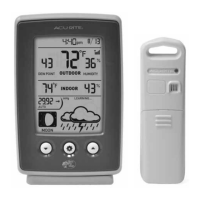
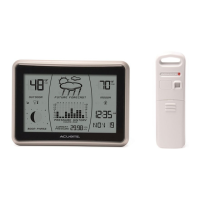
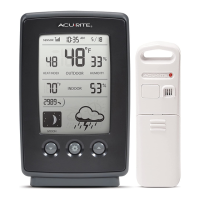
The AcuRite Weather Forecast Station, model 00829, is a comprehensive device designed to provide personalized weather forecasts and environmental data. It consists of two main components: an outdoor sensor and a display unit.
The primary function of this weather station is to offer a 12 to 24-hour weather forecast, personalized to your exact location. This is achieved through AcuRite's patented Self-Calibrating Forecasting technology, which analyzes changes in barometric pressure over time. The outdoor sensor collects crucial environmental data, including outdoor temperature and humidity, and wirelessly transmits it to the display unit. The display unit then processes this data, along with its own indoor temperature and humidity readings, to generate a forecast and present a wide array of environmental information.
A key feature is the "Learning Mode," during which the station self-calibrates its pressure readings over a 14-day period to determine your altitude. Once this process is complete, the "Learning Mode" icon disappears, and the unit is ready to provide highly accurate weather predictions. The forecast is visually represented by intuitive icons such as "RAIN/SNOW MIX LIKELY," "SNOW LIKELY," "LIGHT RAIN LIKELY," "CLOUDY," "PARTLY CLOUDY," and "SUNNY," with additional indicators for windy, lightning, and stormy conditions.
Beyond forecasting, the station monitors and displays current outdoor and indoor temperatures and humidity levels. It also calculates and shows the Heat Index, Dew Point, or Frost Point, providing a more complete picture of perceived outdoor conditions. Barometric pressure is displayed with an arrow icon, indicating whether the pressure is trending (FALLING, STEADY, or RISING), which is crucial for understanding weather changes. The device also tracks and displays the current Moon Phase through a series of simple lunar icons, from "WAXING CRESCENT" to "NEW."
The display unit incorporates an Intelli-Time® Clock, which is pre-programmed with the correct time and date and automatically updates for Daylight Saving Time. Users only need to select their Time Zone and DST preferences during initial setup. The clock also displays the current date.
Setting up the AcuRite Weather Forecast Station involves a few straightforward steps for both the outdoor sensor and the display unit. For the outdoor sensor, users need to set an A-B-C switch, which must match the setting on the display unit to ensure proper synchronization. Two AA batteries are then installed. AcuRite recommends high-quality alkaline batteries for optimal performance, or lithium batteries for temperatures below -4°F / -20°C, as alkaline batteries may function improperly in extreme cold. The sensor features an integrated hanger for easy placement.
The display unit also requires setting an A-B-C switch to match the sensor's setting, followed by the installation of three AA alkaline batteries. Once batteries are installed in both units, they will automatically attempt to synchronize. It may take a few minutes for this process to complete.
The display unit offers a user-friendly interface with UP, DOWN, and SET buttons for navigating setup preferences and viewing data. During initial setup, users can configure the Time Zone, DST (ON or OFF), Clock Hour, Clock Minute, Calendar Month, Calendar Date, Calendar Year, Temperature Units (°F or °C), and Pressure Units (inHg or hPa). The unit automatically exits setup mode after 30 seconds of inactivity, but can be re-entered at any time by pressing the SET button.
The station records daily high and low temperatures and humidity for both indoor and outdoor environments. These records automatically clear at 12:00 AM midnight each day. Users can view high records by pressing the "UP" button and low records by pressing the "DOWN" button. To manually clear today's LOW recorded values, the "DOWN" button can be pressed and held for 2 seconds. Similarly, to clear today's HIGH recorded values, the "UP" button can be pressed and held for 2 seconds.
For optimal accuracy, proper placement of both units is crucial. The display should be in a dry, dirt-free area, suitable for tabletop use or wall-mounting. The outdoor sensor should be placed outside, protected from direct weather elements, ideally 4 to 8 feet above the ground in permanent shade with good air circulation. To maximize wireless range and prevent interference, both units should be within 330 feet (100 meters) of each other and at least 3 feet (0.9 meters) away from electronic devices and large metallic objects.
The AcuRite Weather Forecast Station includes features for calibration and battery replacement to ensure long-term accuracy and functionality.
Both indoor and outdoor temperature and humidity readings can be calibrated on the display unit. This is particularly useful if sensor placement or environmental factors affect data accuracy. To enter calibration mode, users press and hold the UP, DOWN, and SET buttons for at least 5 seconds. Once in calibration mode, the currently selected preference will blink, allowing users to adjust the data value higher or lower using the UP or DOWN buttons. Pressing the SET button confirms the adjustment, and a "calibration" icon will illuminate next to the calibrated value. The display will automatically save adjustments and exit calibration mode after 20 seconds of inactivity. It's important to note that calibrations will be erased if the display is reset or if batteries are removed.
Barometric pressure can also be manually calibrated. While the default "AUTO" mode allows the pressure to self-calibrate over the 14-day Learning Mode, users can enter manual pressure mode by pressing and holding the SET button for at least 10 seconds. The un-calibrated pressure will be displayed, and users can adjust it using the UP or DOWN buttons after pressing and holding the UP, DOWN, and SET buttons for at least 5 seconds. Confirming the adjustment with the SET button will illuminate a "calibration" icon. To exit manual pressure mode and return to auto mode, the SET button should be pressed and held for at least 10 seconds.
The display unit is equipped with an Intelli-Time® coin-cell battery (CR2032) that powers its memory. If the display unit remains without power for an extended period, this battery may need replacement to ensure the Intelli-Time feature continues to function correctly. Replacing this battery involves removing a small screw to access the compartment and installing a new CR2032 battery with the positive terminal facing out.
For general care, both the display and outdoor sensor should be cleaned with a soft, damp cloth. Caustic cleaners or abrasives should be avoided. The display's ventilation ports should be regularly cleaned with a gentle puff of air to prevent dust and dirt buildup. The outdoor sensor is water-resistant but benefits from placement in an area protected from direct weather elements to extend its lifespan.
Troubleshooting guidance is provided for common issues such as no outdoor sensor reception, flashing or dashed outdoor temperature readings, and inaccurate forecasts or temperature/humidity readings. These steps often involve relocating units, checking A-B-C switch settings, replacing batteries, or allowing sufficient time for synchronization and learning mode completion.
 General
| Display Type | LCD |
|---|---|
| Temperature Range | -40°F to 158°F (-40°C to 70°C) |
| Humidity Range | 1% to 99% RH |
| Power Source | 2 AA batteries for sensor, 3 AAA batteries for display |
| Features | Indoor/outdoor temperature and humidity |
| Wireless Transmission Range | 330 feet (100 meters) |
| Dimensions | Sensor: 4.8" H x 1.6" W x 0.9" D |

 To Next Page