6
SENC 150 Reading Head Replacement Instructions
Center
support
1
1
M6 x 25 mm
(1/4”-20 x 3/4” BHCS)
M6 flat washer
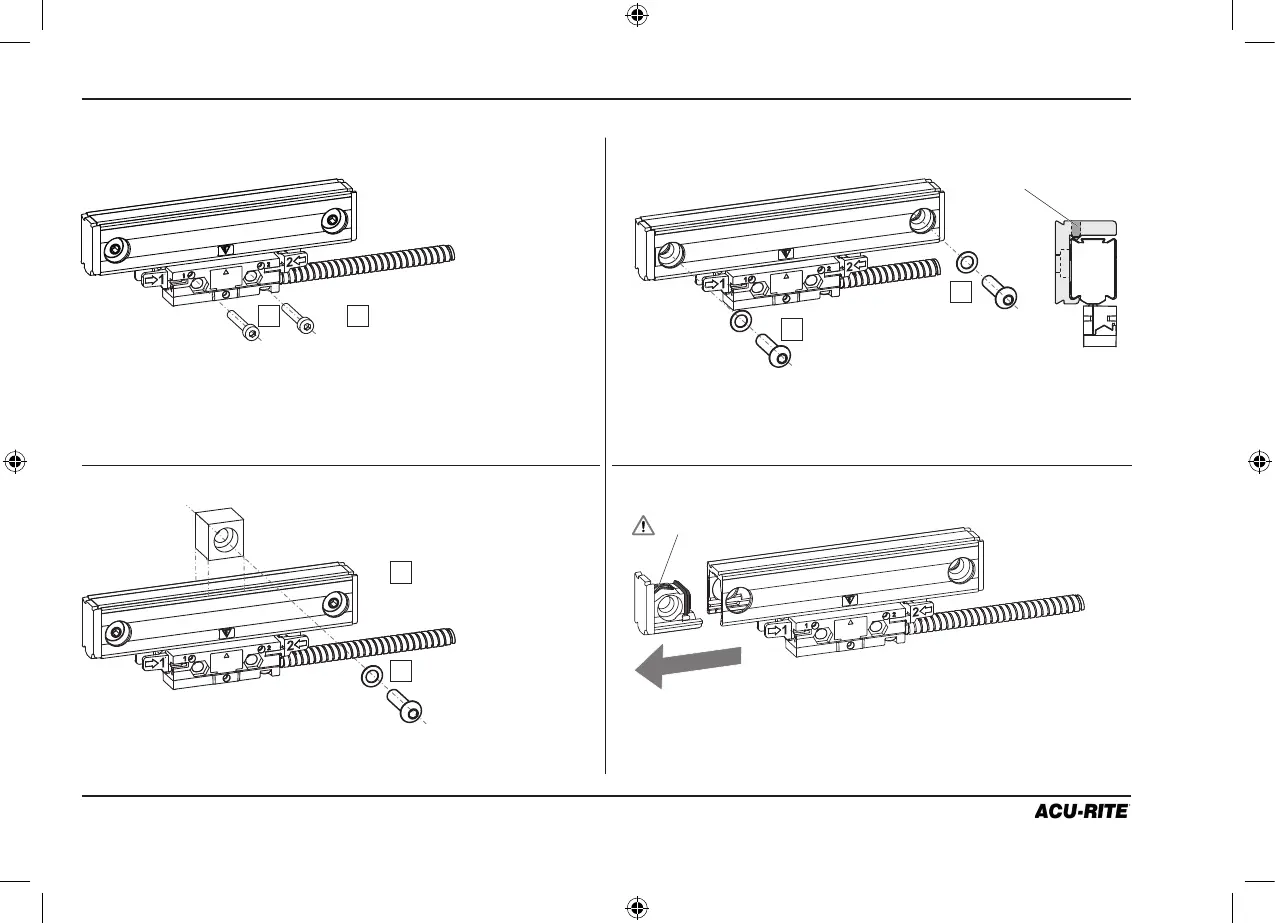
Removing the reading head screws Removing the end hole or set screws
Removing the end cap(s)Removing the center support
M4 x 25 mm SHCS low head
(8-32 x 5/8” SHCS low head)
(8-32 x 3/4” SHCS low head)
11
Do not remove any mounting brackets unless it is completely
unavoidable.
Remove the two reading head mounting fasteners.
Remove the end hole mounting fasteners unless encoder is
spar mounted, then loosen the set screws and remove the
scale case from the spar.
The reading head can be removed from either end. The view
shown is for illustration only. Use caution not to lose the
spring clip during the end cap removal.
Remove the fastener from the center support if one is
present.
1
1
M6 x 25 mm
(1/4”-20 x 3/4” BHCS)
M6 flat washer
set screws
spring clip
3 Removing the encoder


 To Next Page