Below is the detailed explanation of the compressor
controls of this suite.
Unless expressly indicated each compressor control
will be available in both Titanium 3 compressor ver-
sions (single band and three band).
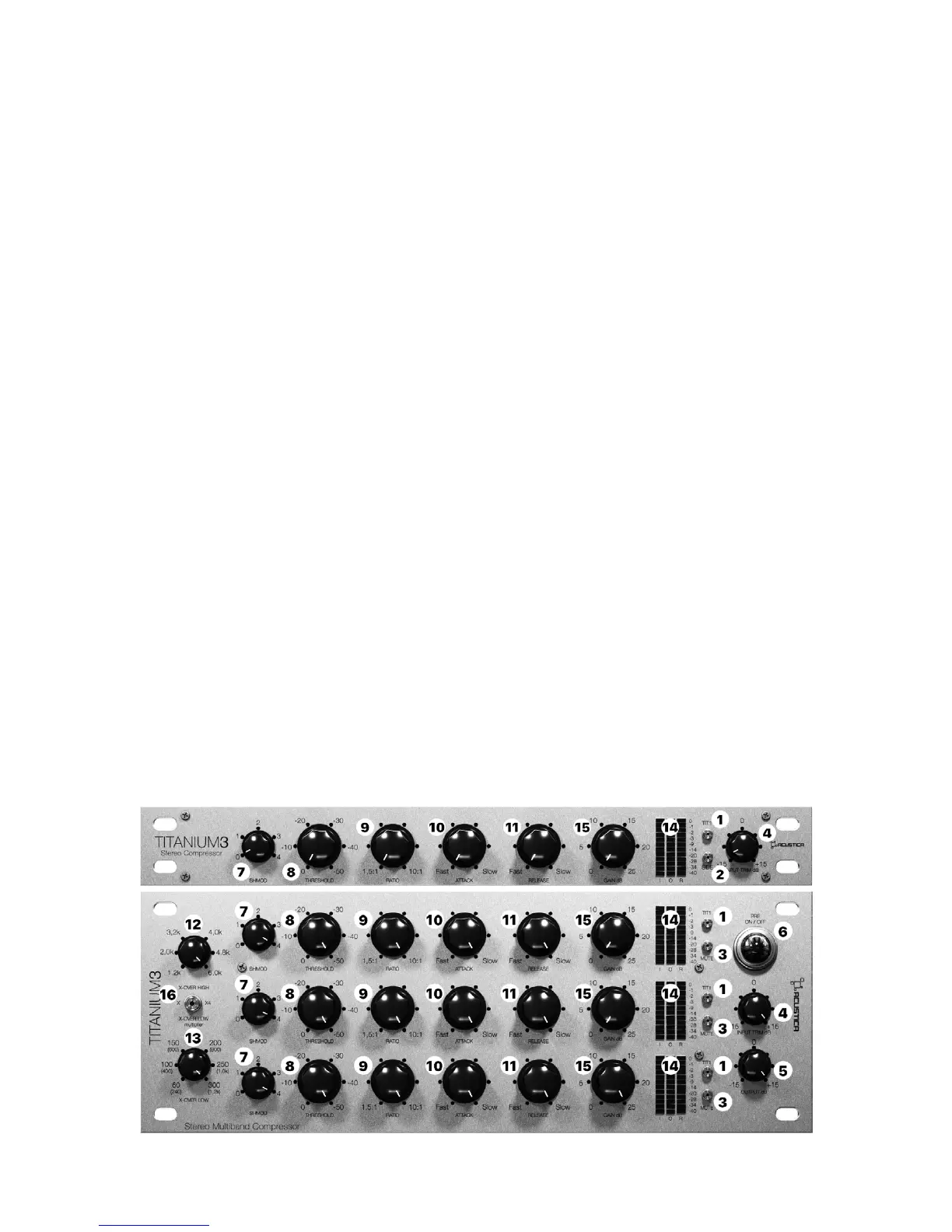
1 - TIT1: this button allows you to switch the com-
pressor from TITANIUM3 to TITANIUM1 (old version).
2 - SIDE: this button engages the external side-chain
of the compressor. (Only available in Titanium3 1B).
3 - MUTE: this button allows you to bypass the com-
pressor (of each band) (This control is included only in
the three-band compressor)
4 - INPUT TRIM: This knob sets the input level from
-15dB to +15dB, and is used to control the signal level
in the compressor, the output level is automatically
compensated by the same amount of gain. When you
run the plugin for the rst time, the input is set to en-
sure that you feed an appropriate level from the rst
stage of your signal path to the nal one.
5 - OUTPUT: this knob controls the plug-in output
gain from -15dB to +15dB. (this control is included
only in the three-band compressor version)
6 - ON/OFF: this button turns o each band and the
preamp. The crossover section is independent of this
control so if a band is muted, the crossover lters still
aect the incoming signal.
7 - SHMOD: The SH MODE is the shape modulation
of the compressor attack envelope. It allows you to
ne-tune the attack shape to really customize the at-
tack behavior for any audio source.
8 - THRESHOLD: this knob sets the threshold of the
compressor from 0dB to a minimum of -50dB.
9 - RATIO: this knob sets the compression ratio in 6
steps, available values range from 1.5:1 to 10:1.
10 - ATTACK: this knob sets the compressor’s attack
time, which is 0 ms for the rst fth of the knob rota-
tion, after that it ranges from 0.5 ms (fast) to 300 ms
(slow).
11 - RELEASE: TIT1 this knob sets the compressor’s
release time which ranges from 50 ms (fast) to 10 s
(slow); TIT2 (default): this knob sets the compressor’s
release time that ranges from 48 ms (fast) to 3.15 s
(slow).
12 - OVER HIGH: this knob selects the frequency of
high and mid band crossover. Available values are:
1.2kHz, 2kHz, 3.2kHz, 4kHz, 4.8kHz and 6kHz. (this
control is included only in the three-band compressor
version).
13 - OVER LOW: this knob selects the frequency of
low and mid band crossover. Available values are:
60Hz, 100Hz, 150Hz, 200Hz, 250Hz and 300Hz.(this
control is included only in the three-band compressor
version).
Over Low Multiplier button: this button allows you to
select between two frequency ranges: 60Hz-300Hz or
240Hz-1.2kHz (this control is included only in three-
band compressor version).
14 - METERS: there are three columns of meters, the
rst one measures the relative band input level, the
second one measures the output level and the third
one measures the reduction level applied by the com-
pressor. Each band has its own set of meters, inde-
pendent of each other (this control is included only in
the three-band compressor version).
15 - GAIN CONTROL: It provides a boost amount
depending on which band you are applying it to. You
have: -an approx 0/+25dB boost.
16 - OVER Low Multiplier button: It allows you to
select between two frequency ranges: 60Hz-300Hz or
240Hz-1.2kHz
13.1 Titanium3 1B/ 3BComp
31


 To Next Page
 Loading...