If editing manually, Mac users should delete all references to parallel port programmers
("type = par;").
Uploading with AVRdude
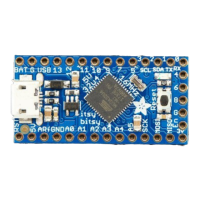
Now you're ready to use avrdude. Open up your command line and enter in this line (but
don't hit return)
avrdude -c usbtiny -p attiny85
Now plug in the Trinket into the computer's USB port and/or press the reset button to enter
the bootloader. You should see the red LED pulsing. Now press return, you should get the
memory "efuse"
size = 1;
write = "1 0 1 0 1 1 0 0 1 0 1 0 0 1 0 0",
"x x x x x x x x x x x x x x x i";
read = "0 1 0 1 0 0 0 0 0 0 0 0 1 0 0 0",
"x x x x x x x x o o o o o o o o";
min_write_delay = 9000;
max_write_delay = 9000;
;
memory "calibration"
size = 2;
read = "0 0 1 1 1 0 0 0 0 0 0 x x x x x",
"0 0 0 0 0 0 0 a0 o o o o o o o o";
;
;
© Adafruit
Industries
https://learn.adafruit.com/introducing-trinket Page 36 of 48



 To Next Page