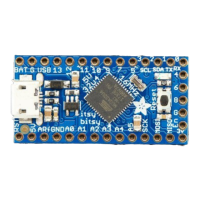
Breadboard friendly pins - You can easily plug this into a little breadboard and
have plenty of space for working and plugging stuff in
GPIO! - 5 GPIO pins, at 3 or 5V logic, check the next section for a detailed pinout
guide
3 or 5V output - an onboard regulator provides 3.3V or 5V output for powering
LEDs, sensors, small motors, etc.
Reset Button - an onboard reset button will launch the bootloader when pressed
and the Trinket is plugged into a computer. If it is not connected to a computer, it's
smart enough to go straight to the program.
External Reset Pin - we bring out the reset pin so you can reset or restart your
Trinket on the road. If the Trinket is in a box or otherwise hard to get to, you can wire
up a button to this pin for an external reset button.
Four mounting holes make it easy to attach with 2mm screws or even tiny zip-
ties, string, etc.



 To Next Page