EasyManua.ls Logo

Adastra CM30B - User Manual

Adastra CM30B
8 pages
Print Icon
To Next Page IconTo Next Page
Loading...
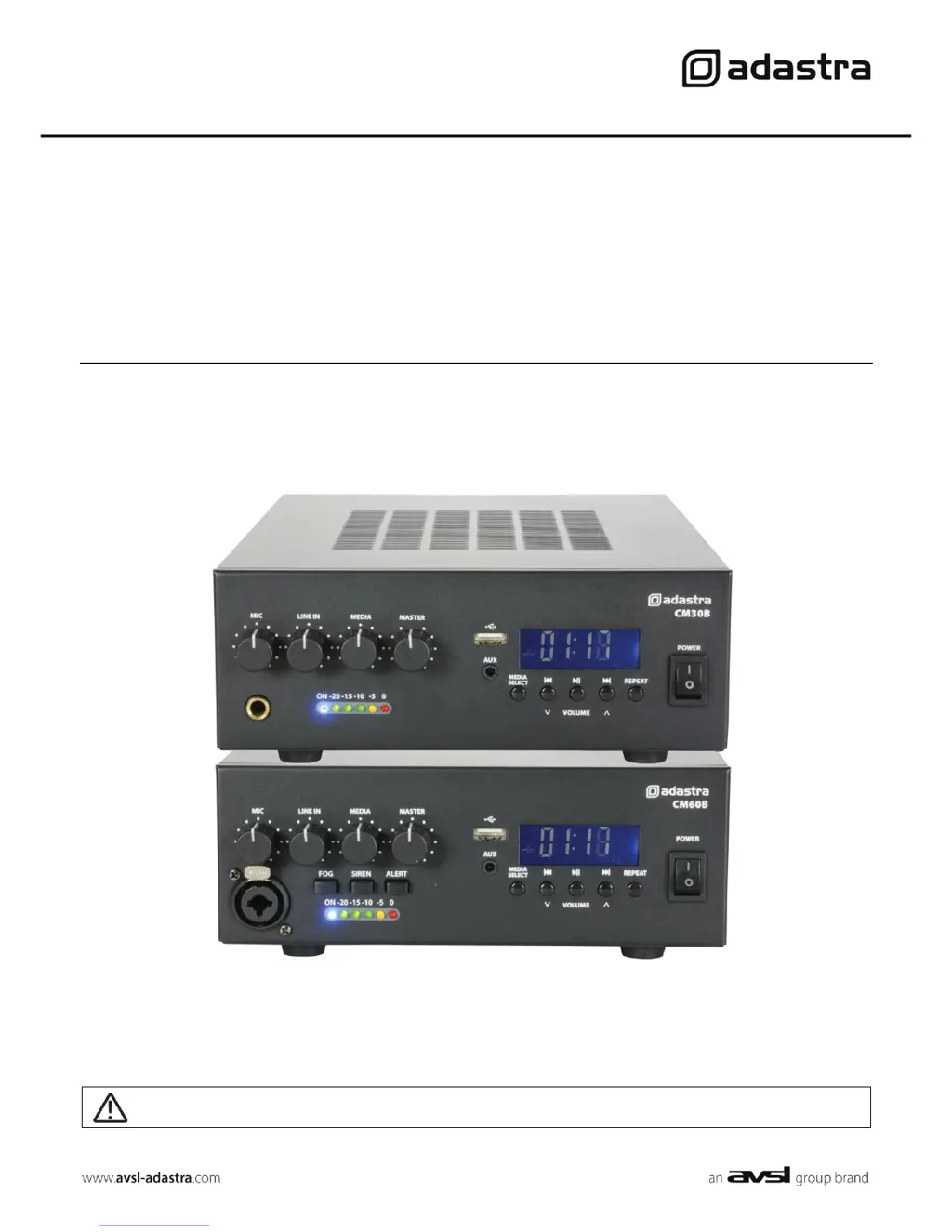
CM30B & CM60B
Compact 100V mixer-amplifiers with Bluetooth™
Item ref: 953.105UK, 953.106UK
User Manual
Caution: Please read this manual carefully before operating
Damage caused by misuse is not covered by the warranty

Questions and Answers

  • E
    Elizabeth HarveyAug 16, 2025
    Why is my Adastra CM30B Bluetooth not connecting?
    • K
      Kelsey LloydAug 16, 2025
      If your Adastra Recording Equipment isn't connecting via Bluetooth, first make sure Bluetooth is enabled on your sending device and that it's within 5-10 meters of the equipment. Check that the connected device is “adastra”. If multiple “adastra” devices are present, try connecting to each one individually. If there are many “adastra” devices, rename it on the sending device.
  • C
    Christy HarrisAug 19, 2025
    What to do if there is no audio from a connected Bluetooth device on my Adastra CM30B Recording Equipment?
    • W
      wrightreginaAug 19, 2025
      If you're not getting any sound from your Bluetooth device connected to the Adastra Recording Equipment, first check that the volume controls on your sending device are not turned down. Also, check the volume and Play/Pause buttons to ensure Bluetooth isn't muted.
  • B
    Bryce ArroyoAug 22, 2025
    How to fix loud or distorted output on Adastra Recording Equipment?
    • A
      Allen AdkinsAug 22, 2025
      If the output from your Adastra Recording Equipment is too loud or distorted, check that the input signal level isn't too high. Reduce the MIC, LINE IN, MEDIA, and/or MASTER levels. Also, ensure that Hi-Z line level inputs are not connected via the MIC input.
  • C
    Christine DelacruzAug 25, 2025
    How to stop microphone feedback on Adastra Recording Equipment?
    • S
      Scott MilesAug 26, 2025
      To stop microphone feedback with your Adastra Recording Equipment, face the microphone away from the speakers and monitors. Additionally, turn down the MIC and/or MASTER level.
  • D
    Danielle FloresAug 28, 2025
    Why is the output level very low on my Adastra Recording Equipment?
    • M
      Maria NelsonAug 28, 2025
      If the output level from your Adastra Recording Equipment is very low, first check that the input audio source level isn't too low. Increase the MIC, LINE IN, MEDIA, and/or MASTER level. Also, check for quiet recording of media files on USB.
  • K
    Kim PittsAug 31, 2025
    What causes amplifier overheating in Adastra CM30B?
    • J
      Jonathan MeltonAug 31, 2025
      If your Adastra Recording Equipment amplifier is overheating, make sure the cooling vents are free from obstructions. Verify that 8Ω speakers are not connected to the 100V terminals, and that the total 100V speaker wattage is less than the amplifier's rating. Ensure that you're not connecting both 100V and 8Ω speakers simultaneously and that the total load connected to the 8Ω output is not less than 8Ω.
  • S
    Suzanne MuellerSep 3, 2025
    What to do if USB player will not play audio from media on Adastra CM30B Recording Equipment?
    • C
      Colin BrewerSep 3, 2025
      If the USB player on your Adastra Recording Equipment won't play audio, press PLAY on the transport controls. Ensure the memory device is properly connected by removing and re-inserting it. Check that the files are standard compressed digital audio files and that the memory device works correctly on a PC or Mac.
  • L
    Lisa WilliamsSep 6, 2025
    Why is there no power LED on the control panel of my Adastra CM30B Recording Equipment?
    • A
      Alejandro CookSep 6, 2025
      If the power LED on your Adastra Recording Equipment control panel isn't lit, ensure the IEC lead is in good condition and properly connected. If using a 12Vdc power input, check that the battery is charged. Inspect the mains inlet fuse and make sure the POWER switch is turned on.
  • E
    Ellen AlvarezSep 9, 2025
    What to do if power LED is on but no other LEDs and no output on Adastra CM30B Recording Equipment?
    • A
      Alyssa McguireSep 9, 2025
      If the power LED is on but no other LEDs are lit and there's no output from your Adastra Recording Equipment, check the input signals and the condition of the input connection leads. Also, make sure the MASTER, MIC, LINE IN, or MEDIA controls are turned up.
  • S
    Stephanie RiddleSep 12, 2025
    What to do if power light and output LEDs are lighting but no output on Adastra CM30B?
    • C
      Chad ClarkSep 12, 2025
      If the power light and output LEDs are on but there is no output from your Adastra Recording Equipment, check that the speaker output terminals are correctly connected. You should also check that the speakers are working by testing them on another amplifier if possible.

Summary

Safety and Precautions

Safety Symbols and Conventions

Explains symbols indicating electrical hazards and important instructions.

Safety Notices and Warnings

Lists crucial precautions for safe operation and handling, including warnings.

Placement and Cleaning

Guidelines for unit placement, airflow, and cleaning procedures.

Product Overview and Controls

Front Panel Controls

Details all controls and indicators located on the front of the CM30B/CM60B amplifiers.

Rear Panel Connections

Identifies and explains all input and output terminals on the rear of the unit.

Setup and System Configuration

Connection and Setup

Guides on connecting power, microphones, and audio sources to the amplifier.

100 V Line Systems

Explains how to configure and connect speakers for 100V line operation.

Low Impedance Systems

Details the setup for connecting standard 8 Ohm speakers.

Operation and Media Playback

Amplifier Operation

Instructions on powering on, controlling volume, and using microphone inputs.

Media Player Functions

Covers Bluetooth, USB, FM tuner, and AUX input operations and controls.

Fog;Siren;Alert Buttons

Details the function of the warning sound buttons on the CM60 front panel.

Specifications and Troubleshooting

Specifications

Lists technical specifications for the CM30B and CM60B models.

Troubleshooting

Provides solutions for common operational issues and errors.

Adastra CM30B Specifications

General IconGeneral
Frequency range93 - 16300 Hz
Channels quantity2 channels
Amplifier includedYes
Amplifier output power30 W
Digital sound processing- bit
Line Signal-to-Noise Ratio (SNR)79 dB
Microphone input impedance1800 Ω
Output impedance8 Ω
Bluetooth version2.0
Line inputs (RCA)2
USB 2.0 ports quantityUSB 2.0 ports have a data transmission speed of 480 Mbps, and are backwards compatible with USB 1.1 ports. You can connect all kinds of peripheral devices to them.
Number of microphone inputs1
DJ mixer-
Product colorBlack
Rack capacity2U
Video capabilityNo
USB connector typeUSB Type-A
AC input voltage110 - 230 V
AC input frequency50 - 60 Hz
Weight and Dimensions IconWeight and Dimensions
Depth210 mm
Width329 mm
Height84 mm
Weight3700 g
Package depth315 mm
Package width395 mm
Package height130 mm