CM30B, CM60B User Manual
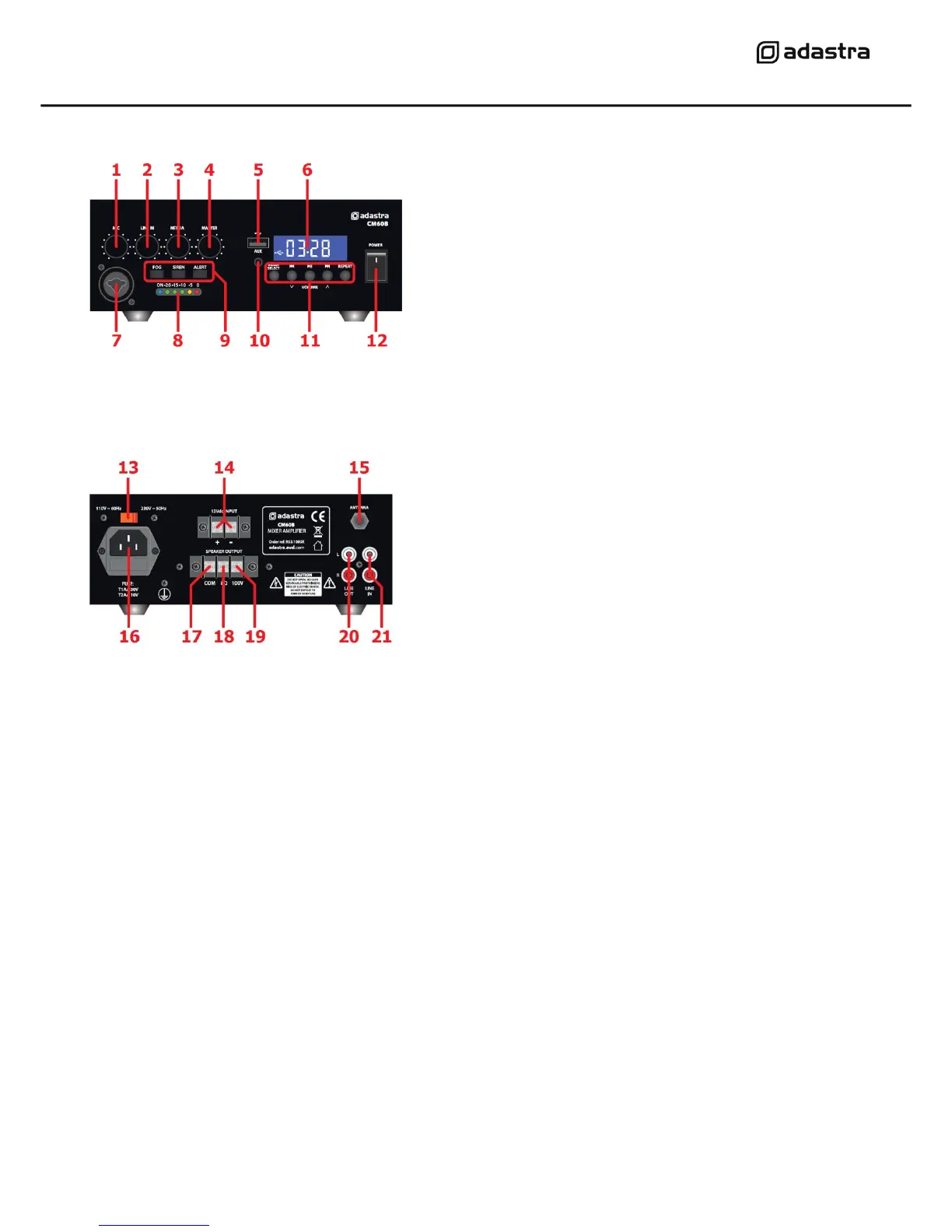
Front panel
Rear panel
Connection and setup
Connect the rear IEC inlet (16) to the mains using the supplied mains lead (or an equivalent
approved type). Ensure that the voltage is correct as indicated on the voltage selector (13) and that
the mains outlet is switched on. Alternatively, the amplifier can be powered by a 12V battery, such
as a car or boat battery, by connecting the “+” and “-” of the battery to the 12Vdc INPUT (14) on
the rear panel. Ensure that DC cables are capable of handling the current (6A min. recommended)
Connect a microphone (if required) to the front panel jack or combo input (7).
Connect any line level audio inputs to the LINE IN connectors (21) on the rear panel using good
quality RCA leads. An additional 3.5mm AUX line input (10) is provided on the front panel for
connecting a playback device such as a smart phone or MP3 player.
Further amplifiers can be connected from the rear LINE OUT sockets (20)
For stable FM radio reception, connect the Antenna ‘F’ type socket (15) to a suitable FM antenna.
The CM series amplifiers can be used either as 100V line amplifiers or standard low impedance power
amplifiers. These 2 configurations cannot be used together, so it is important to decide which
method will be used at the start.


 To Next Page