CM30B, CM60B User Manual
100V line systems
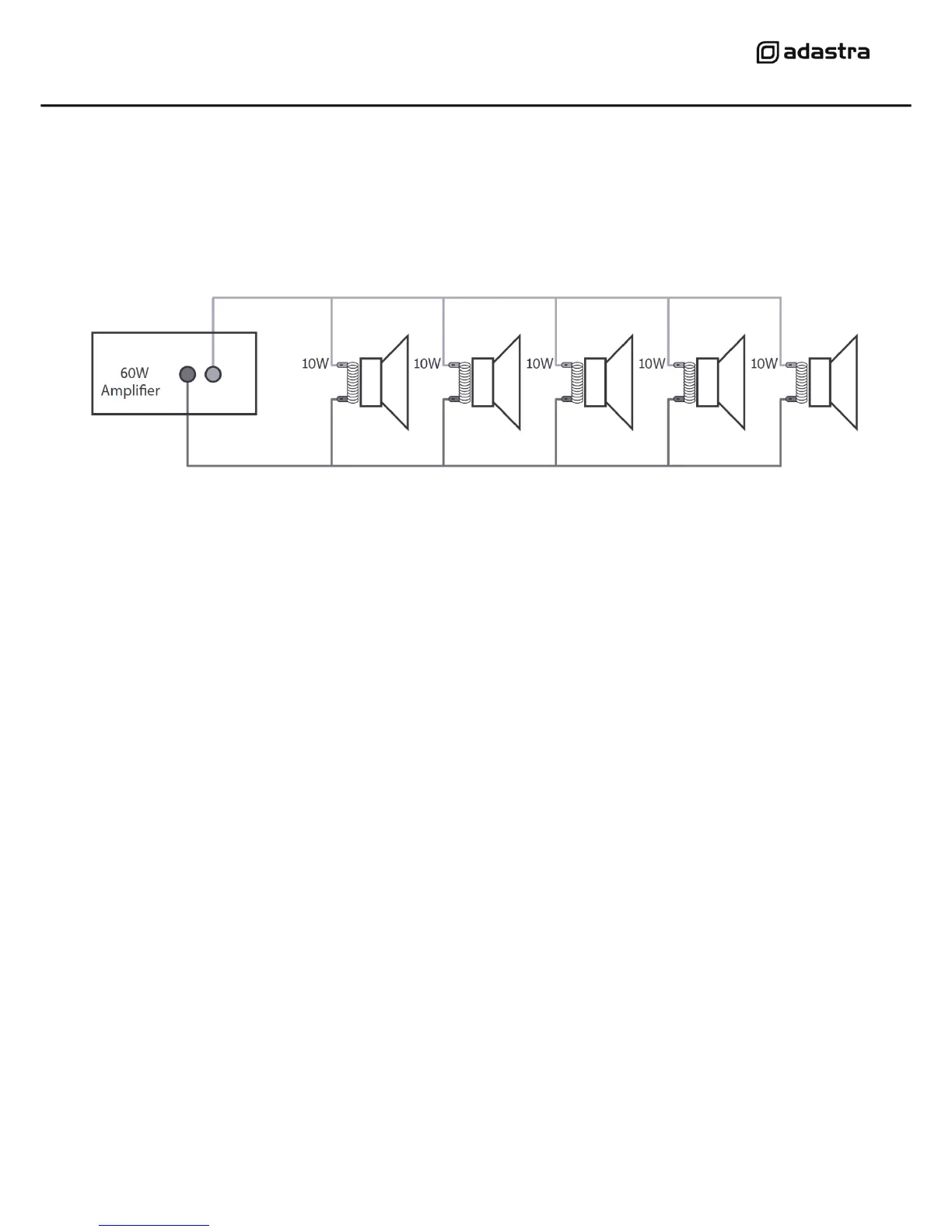
For 100V line systems, connect the amplifier to the first speaker in the system using double-insulated
speaker wire which has adequate current rating to handle the total output of the amplifier. Connect
the “100V” (19) output terminal to the positive (+) connection of the speaker and “COM” output (17)
to the negative (-) connection of the speaker. Connect further speakers in parallel to the first speaker
with all positive terminals connected together and all negative terminals connected together as
shown below.
A 100V line speaker system can comprise of many speakers connected together. The determining
factor for how many speakers can be used on a single amplifier is the power rating. For most
purposes, it is advised to connect as many speakers as needed with a combined wattage of no more
than 90% of the amplifier’s output power rating. The terminals of a 100V speaker are connected to a
transformer and in some cases, this transformer may be “tapped” for different power ratings. These
tappings can be used to adjust the wattage (and output volume) of each speaker in the system to
help achieve the ideal total power of the system for the amplifier.
Low impedance systems
The CM30/60B amplifiers can alternatively provide an output for a single 8Ω speaker by connecting
the “8Ω” output (18) to the positive (+) speaker connection and “COM” output (17) to the negative
(-) speaker connection. It is important to ensure that the speaker load is no lower than 8Ω and that
the power handling of the speaker is equal to or greater than the output power of the amplifier.
Operation
When all connections to the amplifier are made, turn all rotary controls down and switch on the
power (12) and a power LED will illuminate. Ensure a signal is being fed to the LINE IN connection
and gradually increase the MASTER rotary control (4) part way for testing. Increase the LINE IN
rotary (2) until the output is heard through the speakers. Turn up the MASTER to the maximum
required volume level and reduce the LINE IN control if necessary.
Note: If a line input is not connected to a CM series mixer-amplifier, the initial test can be made
using the built-in Media audio player. See section below for instructions.
If a microphone is connected, make sure it is switched on and gradually increase the MIC control (1)
whilst speaking into the microphone until the required volume level is reached. The microphone
should not be able to “hear” the speakers, which can cause feedback (squealing or howling noise).


 To Next Page
 Loading...