Need help?
Do you have a question about the Adata M.2 and is the answer not in the manual?
Gather tools, back up data, power off PC, and disconnect power before desktop installation.
Follow steps to remove case, locate slot, insert SSD, secure it, reassemble, and power on.
Gather tools, back up data, power off PC, and disconnect power/battery before laptop installation.
Follow steps to remove back plate, locate slot, insert SSD, secure it, reassemble, and power on.
 General
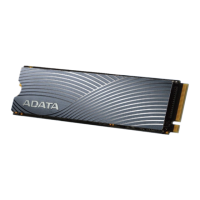
| Form Factor | M.2 2280 |
|---|---|
| MTBF | 2, 000, 000 hours |
| Interface | PCIe Gen3x4 |
| Capacity | 256GB, 512GB, 1TB, 2TB |
| Sequential Read Speed | Up to 3500 MB/s |
| Sequential Write Speed | Up to 3000 MB/s |
| Operating Temperature | 0°C to 70°C |
| Storage Temperature | -40°C to 85°C |
| Shock Resistance | 1500G |
| Vibration Resistance | 20G |
| Dimensions | 80 x 22 x 3.5 mm |

 To Next Page