EasyManua.ls Logo

ADEO Services WAP-357EM - Page 70

ADEO Services WAP-357EM
Print Icon
To Next Page IconTo Next Page
To Previous Page IconTo Previous Page
Loading...
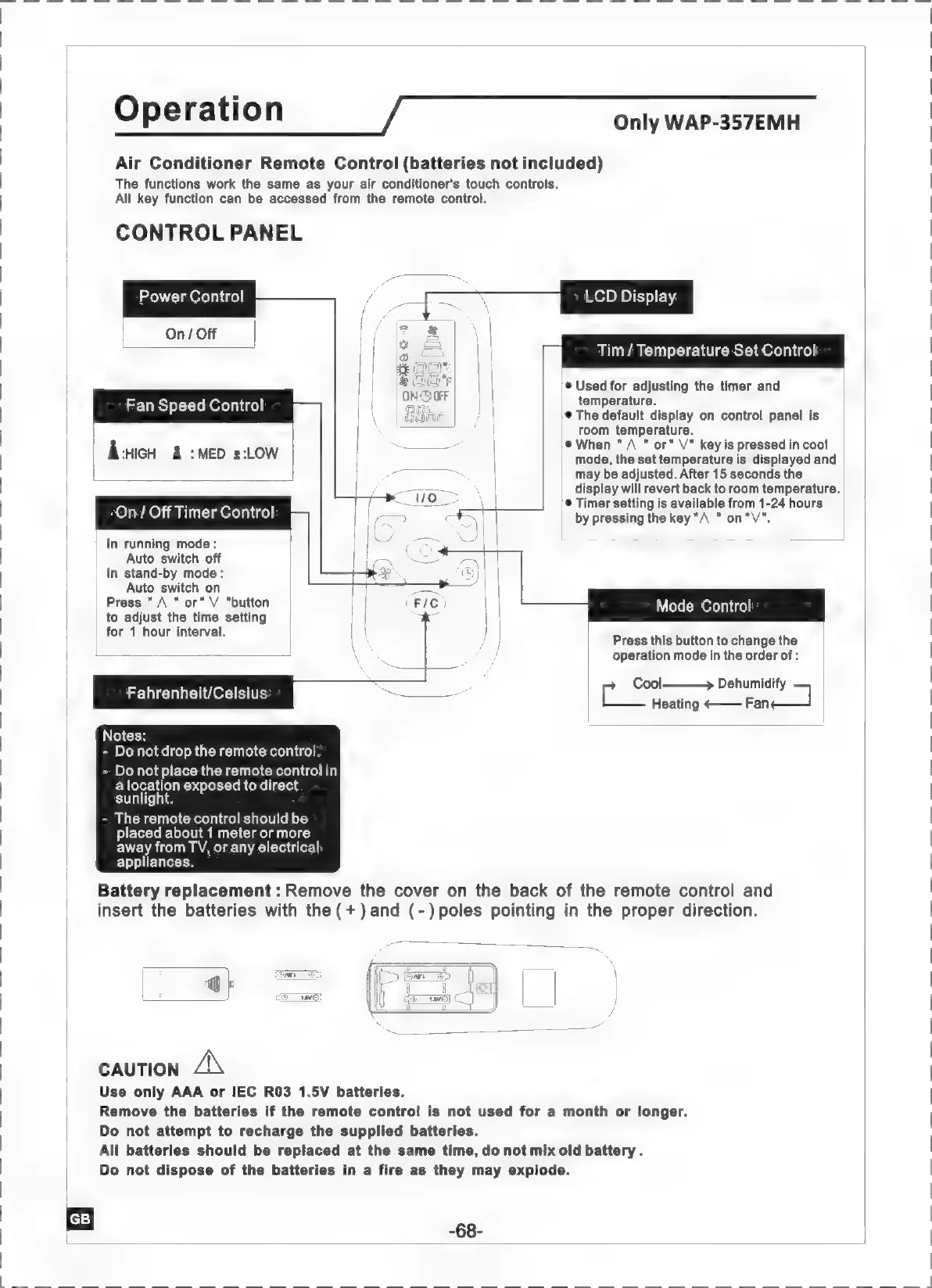
Operation
Only
WAP-357EMH
Air
Conditioner
Remote
Control
(batteries
not
included)
The
functions
work
the
same
as
your
air
conditioner's
touch
controls.
All
key
function
can
be
accessed
from
the
remote
control.
CONTROL
PANEL
TN
Έδρας
LCD
Display
Power
Control
Tim
/
Temperature
Set
Control
®
Used
for
adjusting
the
timer
and
temperature.
®
The
default
display
on
control
panel
is
room
temperature.
|
®
When
"
À
"
or”
V”
key
is
pressed
in
cool
|
mode,
the
set
temperature
is
displayed
and
may
be
adjusted.
After
15
seconds
the
display
will
revert
back
to
room
temperature.
---
5
Timer
setting
is
available
from
1-24
hours
σεν
by
pressing
the
key
"A
"
on
"V".
Fan
Speed
Control
À
:HIGH
:MED
2:LOW
On/
Off
Timer
Control
In
running
mode:
Auto
switch
off
In
stand-by
mode:
Auto
switch
on
Press
"A
"or"
V
"button
to
adjust
the
time
setting
|
for
1
hour
interval.
Mode
Control
Press
this
button
to
change
the
operation
mode
in
the
order
of
:
Fahrenheit/Celsius
tool
>
Penumnialty
Heating
<——
Fan
Notes:
-
Do
not
drop
the
remote
control.
-
Do
not
place
the
remote
control
in
a
location
exposed
to
direct
sunlight.
-
The
remote
control
should
be
placed
about
1
meter
or
more
away
from
TV,
or
any
electrical
appliances.
Battery
replacement:
Remove
the
cover
on
the
back
of
the
remote
control
and
insert
the
batteries
with
the
(+)
and
(-)poles
pointing
in
the
proper
direction.
CAUTION
ΔΝ
Use
only
AAA
or
IEC
R03
1.5V
batteries.
Remove
the
batteries
if
the
remote
control
is
not
used
for
a
month
or
longer.
Do
not
attempt
to
recharge
the
supplied
batteries.
All
batteries
should
be
replaced
at
the
same
time,
do
not
mix
old
battery.
Do
not
dispose
of
the
batteries
in
a
fire
as
they
may
explode.

Related product manuals