Industrial Electronic Devices
ADFweb.com S.r.l.
Document code: MN67507_ENG Revision 2.400 Page 32 of 45
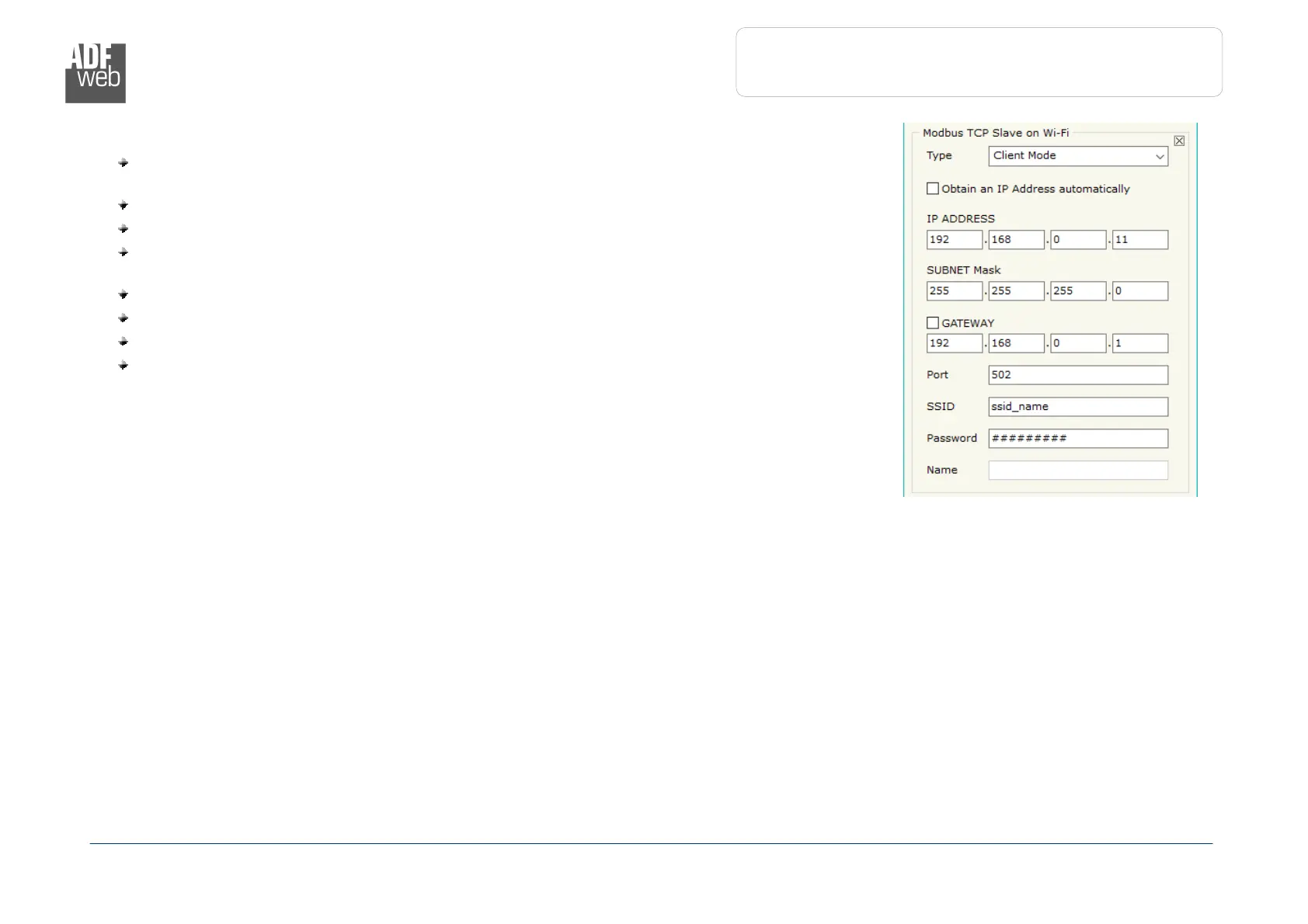
The means of the fields for “Modbus TCP Slave on Wi-Fi” for Client configuration are:
If the field “Obtain an IP Address automatically” is checked, the converter gets the IP
Address using DHCP. Otherwise, the IP Address is defined as static;
In the field “IP Address” the IP address of Modbus TCP side of the converter is defined;
In the field “Subnet Mask” the SubNet Mask of Modbus TCP side of the converter is defined;
In the fields “GATEWAY” the default gateway of the net is defined. This feature can be
enabled or disabled pressing the Check Box field. This feature is used for going out of the net;
In the field “Port” the port used for Modbus TCP communication is defined;
In the field “SSID” the name of the Wi-Fi network to connect is defined;
In the field “Password” the password used to connect to the Wi-Fi network is defined;
In the field “Name”, the host name for the Wi-Fi node is defined (only for DHCP).
Figure 3d: “Set Communication”


 To Next Page