3
1. Operation of the Controller (User Manual)
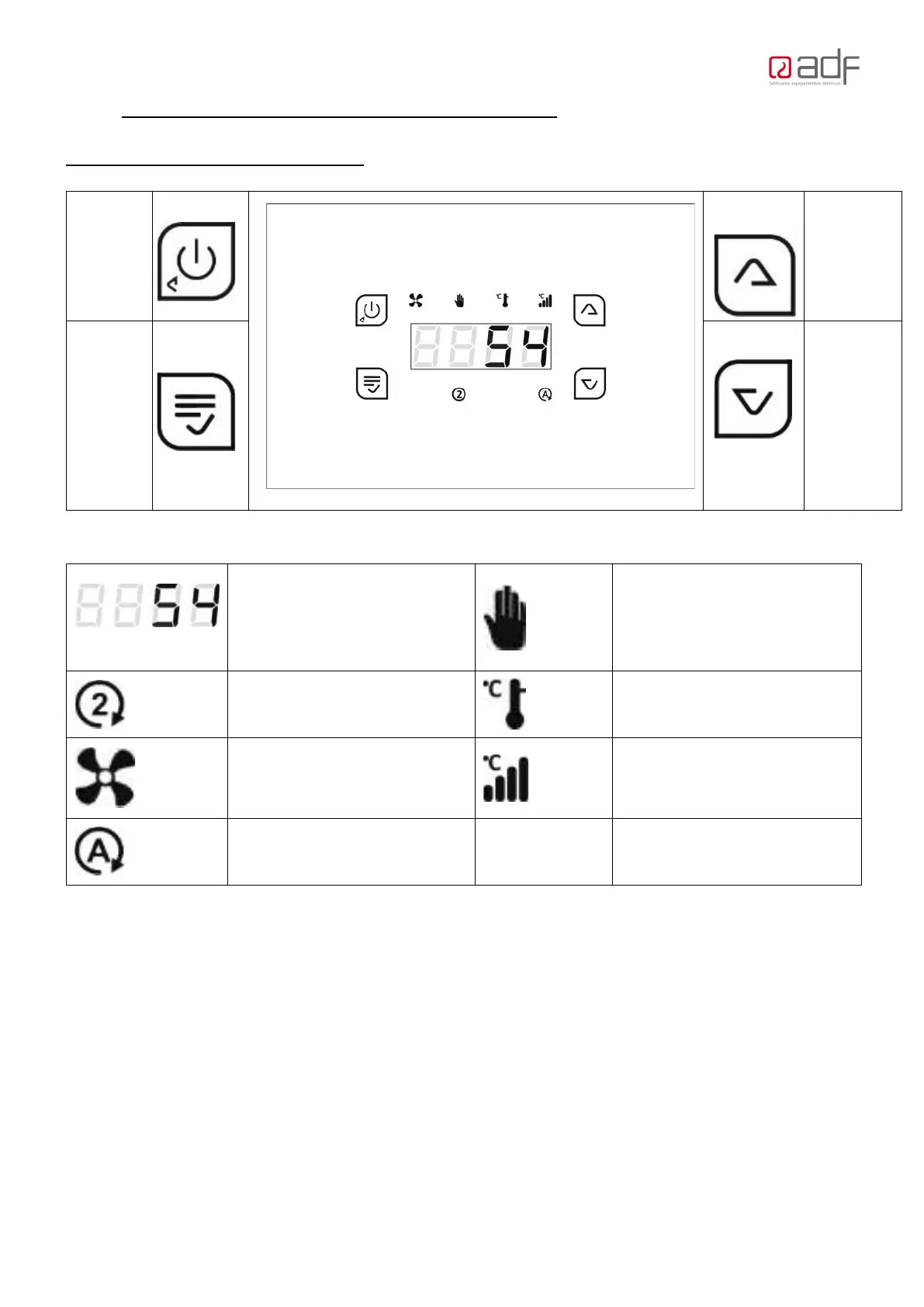
Control Panel, Use and Functions
Exit the
Menu
Up,
Menu
Scroll
MENU
Enter
User
Menu
and
Probes
Menu
Down,
Menu
Scroll
The T
Heater Thermostat (°C)
Man
ual Control Setting
T
he Temp. of 2
nd
Thermostat (If fitted)
Automatic Setting
FLASHING: Fan
Proportional Setting
Damper Activated (N/A in
Australian models)
1.
2 OFF mode: the ON/OFF Button will be lit up only.
1.3 Turn ON: Press the ON button for 3 seconds
1.4 To change the Setting: Hold the Menu key for 3 Seconds, then scroll to the
required setting:
Manual Display = “NAnu”; Adjust the Fan speed using the Scroll buttons. From P02
to P08. To turn down to select P0.
Auto Display = “Auto; The fan will turn on and off at thermostat setting (45 °C). Fan
speed will be at consumers setting. Select your preferred Speed from P02 to P08.
Proportional Display = “ProP”. The fan will change speed automatically for every


 To Next Page