EasyManua.ls Logo

ADI AR-446 - Page 28

Default Icon
44 pages
Print Icon
To Next Page IconTo Next Page
To Previous Page IconTo Previous Page
Loading...
@
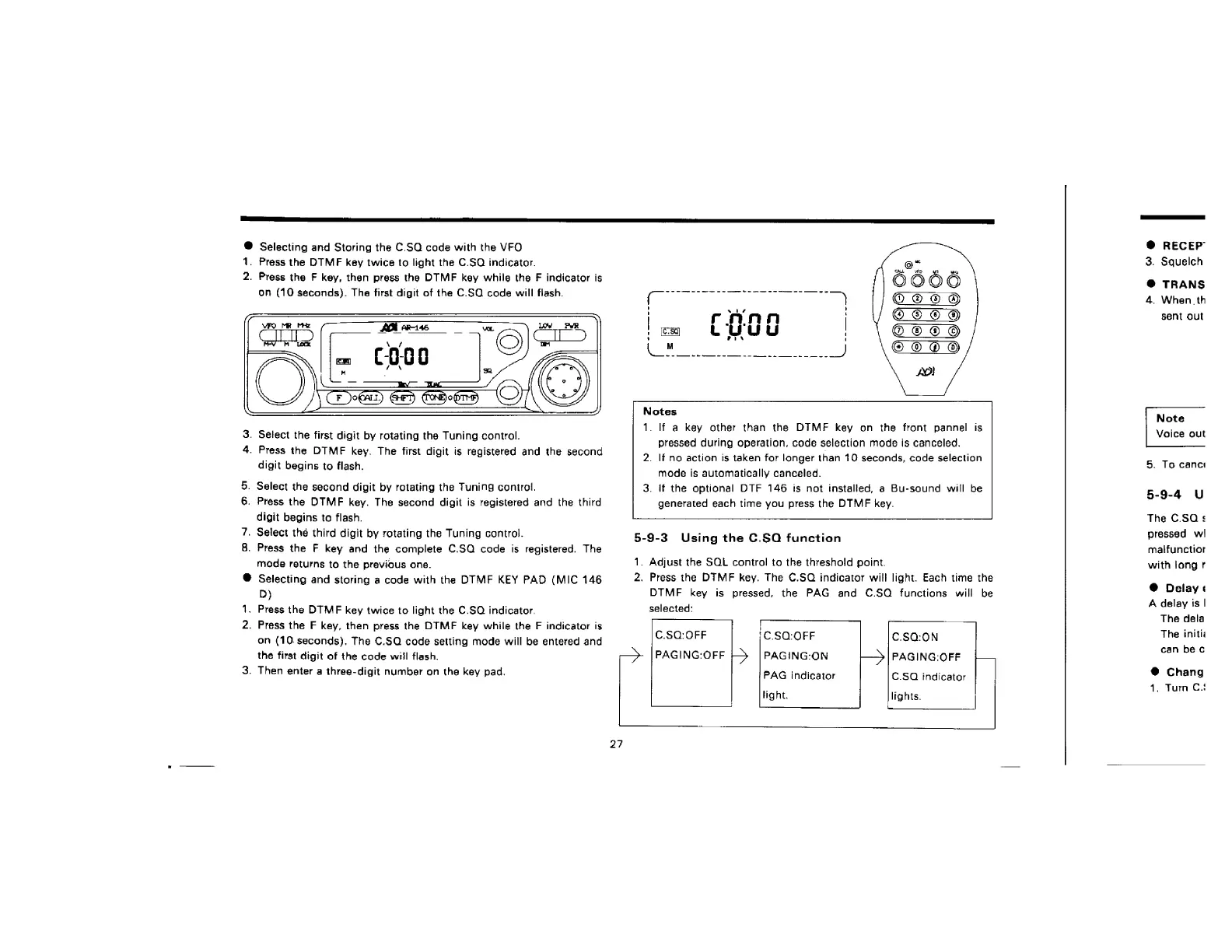
Selecting
and
Storing
the
C.SQ
code
with
the
VFO
1.
2.
Press
the
DTMF
key
twice
to
light
the
C.SQ
indicator.
Press
the
F
key,
then
press
the
DTMF
key
while
the
F
indicator
is
on
(10
seconds).
The
first
digit
of
the
C.SQ
code
will
flash.
.
Select
the
first
digit
by
rotating
the
Tuning
control.
.
Press
the
DTMF
key.
The
first
digit
is
registered
and
the
second
digit
begins
to
flash.
.
Select
the
second
digit
by
rotating
the
Tuning
control.
.
Press
the
DTMF
key.
The
second
digit
is
registered
and
the
third
digit
begins
to
flash.
.
Select
the
third
digit
by
rotating
the
Tuning
control.
.
Press
the
F
key
and
the
complete
C.SQ
code
is
registered.
The
mode
returns
to
the
previous
one.
Selecting
and
storing
a
code
with
the
DTMF
KEY
PAD
(MIC
146
D)
.
Press
the
DTMF
key
twice
to
light
the
C.SQ
indicator.
.
Press
the
F
key,
then
press
the
DTMF
key
while
the
F
indicator
is
on
(10
seconds).
The
C.SQ
code
setting
mode
will
be
entered
and
the
first
digit
of
the
code
will
flash.
.
Then
enter
a
three-digit
number
on
the
key
pad.
ce]
§
=
a
OF
O:
©
Or
7
|
rnnn
|
,
eg
CUUY
OM
-
Notes
_
If
a
key
other
than
the
DIMF
key
on
the
front
pannel
is
pressed
during
operation,
code
selection
mode
is
canceled.
.
lf.
no
action
is
taken
for
longer
than
10
seconds,
code
selection
mode
is
automatically
canceled.
.
If
the
optional
DTF
146
is
not
installed,
a
Bu-sound
will
be
generated
each
time
you
press
the
DTMF
key.
5-9-3
Using
the
C.SO
function
1.
Adjust
the
SQL
control
to
the
threshold
point.
2.
Press
the
DIMF
key.
The
€.SQ
indicator
will
light.
Each
time
the
DTMF
key
is
pressed,
the
PAG
and
C.SQ
functions
will
be
selected:
C.SQ:0FF
PAGING:
OFF
C.S0:0FF
PAGING:ON
PAG
indicator
light.
C.S0:0N
PAGING:
OFF
C.SQ
indicator
lights.
27
@
RECEP
3.
Squelch
@
TRANS
4.
When.
th
sent
out
Note
Voice
out
5.
To
canci
5-9-4
U
The
C.SQ
s
pressed
w!
malfunctior
with
long
@
Delay
«
A
delay
is
|
The
dela
The
initia
can
be
c
Chang
1.
Turn
C:!

Related product manuals