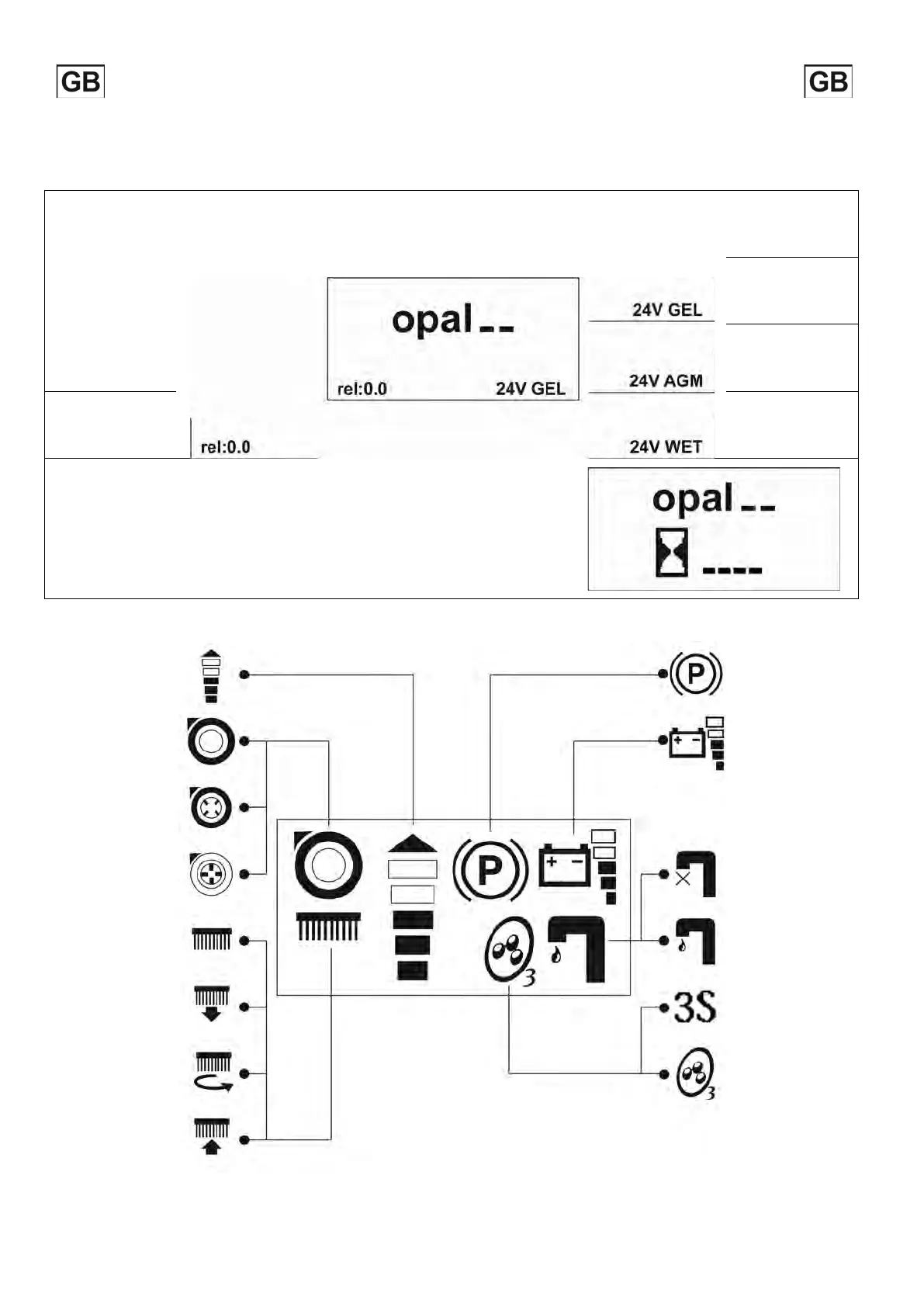
VISUALIZATION WHILE SWITCHING ON
When the machine is switched on, the display shows the following screen which indicates the software release and the battery setting.
BATTERY SETTING
Setting for gel
batteries
Setting for AGM
batteries
SOFTWARE RELEASE
Setting for lead/acid
batteries
HOURMETER
In the second screen the hourmeter is visualized.
To display this screen in any other moment press simultaneously buttons 2 and 5
"LEGEND CONTROL PANEL”).
VISUALIZATION CONTROLS
Maximum speed
indicator
Parking brake
activated
Suction motor off Battery level
Suction motor on
Suction motor in
silent mode
Solenoid valve close
Brushes up Solenoid valve open
Brushes lowering
3S System on
(OPTIONAL)
Brushes working
Ozone system on
(OPTIONAL)
Brushes lifting
The
system can work
this case
symbols are shown in
succession
6



 To Next Page