ADJ Products, LLC - www.adj.com - 18P Hex IP User Manual Page 11
All xtures should be given a DMX starting address when using a DMX controller, so the correct xture
responds to the correct control signal. This digital starting address is the channel number from which
the xture starts to “listen” to the digital control signal sent out from the DMX controller. The assignment
of this starting DMX address is achieved by setting the correct DMX address on the digital control
display on the xture.
You can set the same starting address for all xtures or a group of xtures, or set dierent addresses
for each individual xture. Setting all xtures to the same DMX address will cause all xtures to react
in the same way, in other words, changing the settings of one channel will aect all the xtures
simultaneously.
If you set each xture to a dierent DMX address, each unit will start to “listen” to the channel number
you have set, based on the quantity of DMX channels of each xture. That means changing the settings
of one channel will only aect the selected xture.
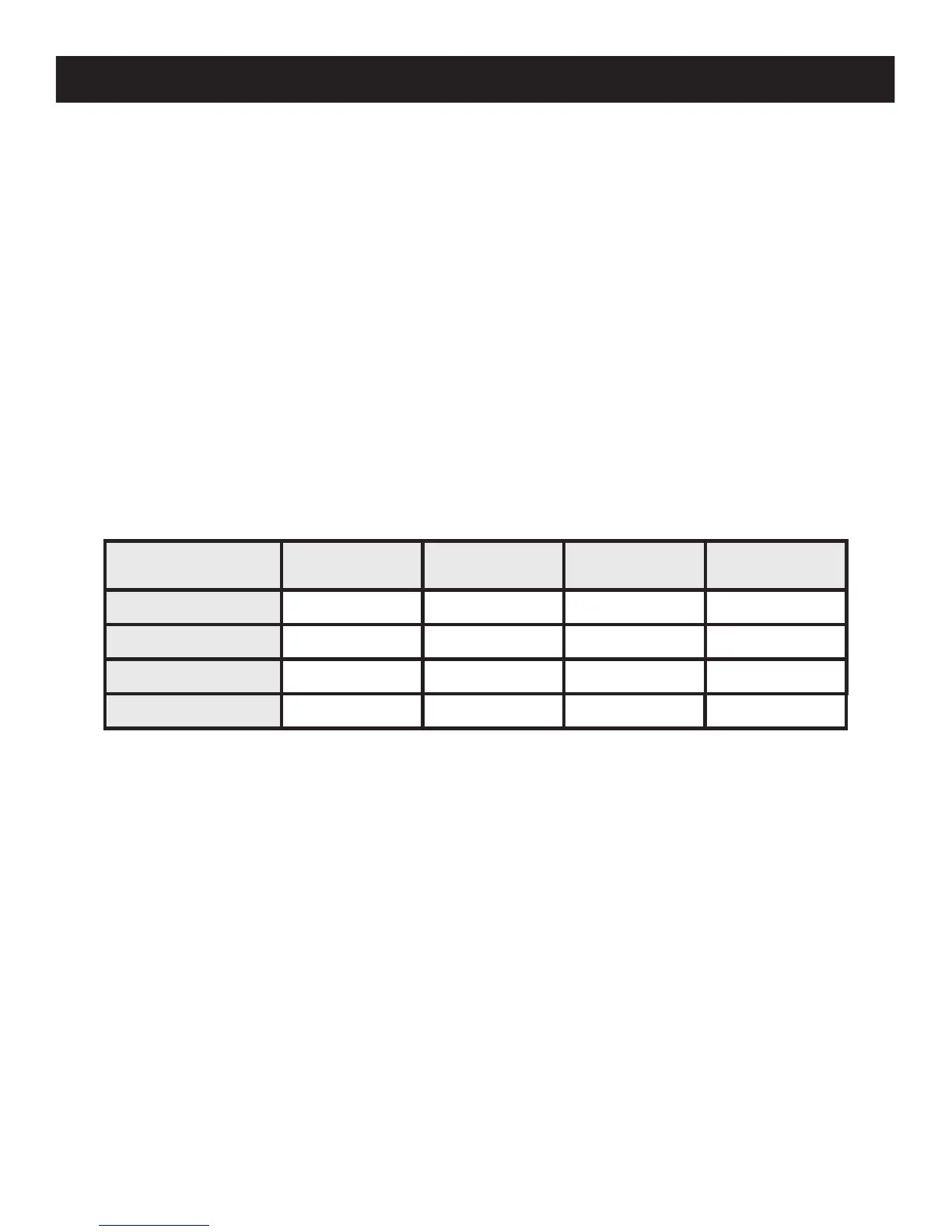
In the case of the 18P Hex IP, when in 13 channel mode you should set the starting DMX address of
the rst unit to 1, the second unit to 14 (13 + 1), the third unit to 27 (14 + 13), and so on. (See chart
below for more details.)
18P Hex IP DMX Addressing
Channel Mode
Unit1
Address
Unit2
Address
Unit3
Address
Unit4
Address
6 channels 1 7 13 19
7 channels 1 8 15 22
8 channels 1 9 17 25
13 channels 1
14 27
40


 To Next Page