119
ADOBE AUDITION 1.5
User Guide
Analyzing frequency range
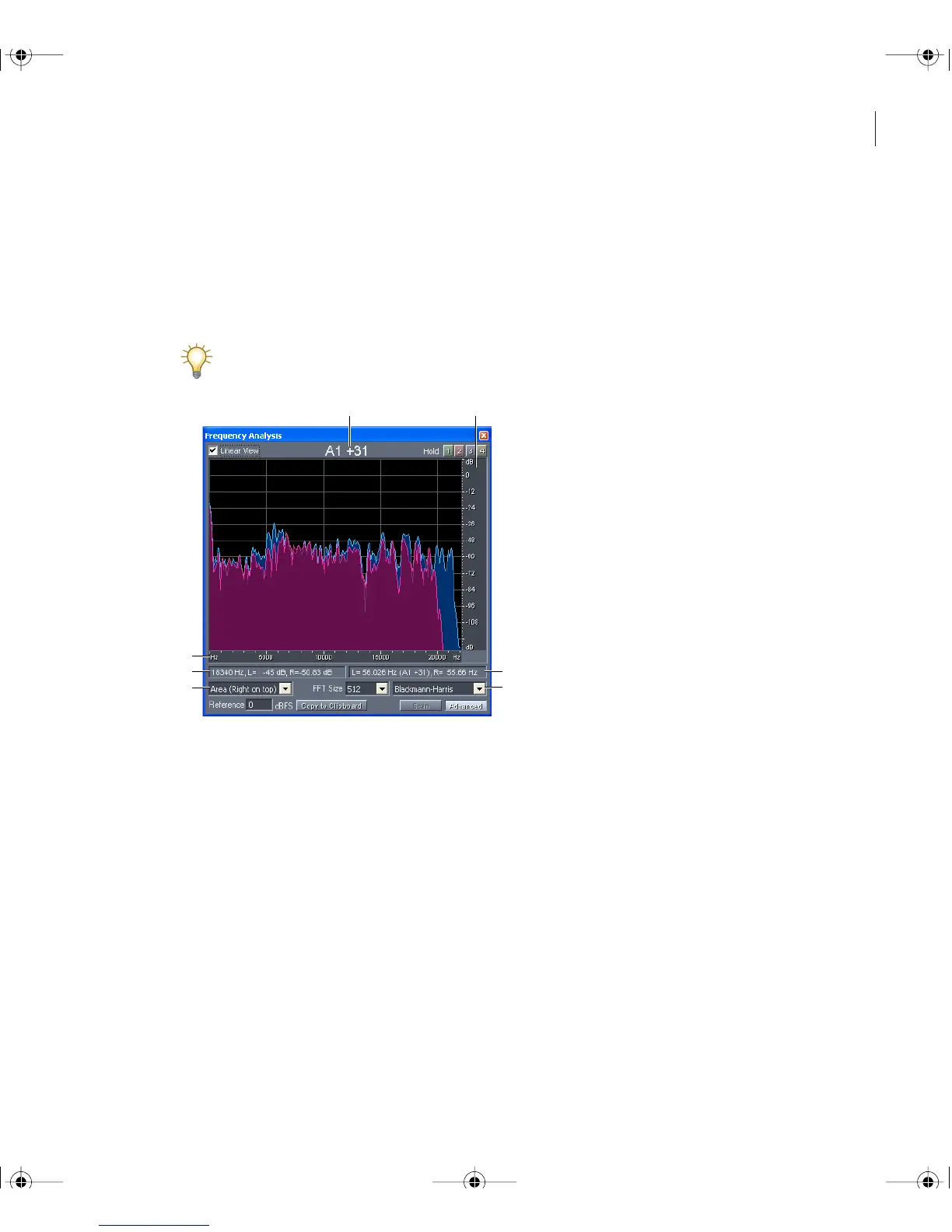
In Edit View, you can use the Frequency Analysis window to analyze frequency range
either statically for a selected area or dynamically during playback. In this window, the
horizontal axis represents frequency (measured in Hz), while the vertical axis represents
amplitude (measured in decibels).
To zoom in on a particular area of the Frequency Analysis graph, use the horizontal and
vertical rulers. See “Zooming graphs for frequency and phase analysis” on page 122.
Frequency Analysis window displaying Advanced options
A. Musical note B. Vertical ruler C. Horizontal ruler D. Left status area
E. Display options menu F. Right status area G. FFT type menu
To analyze frequency range:
1 In Edit View, select or play a range of the waveform.
2 Choose Window > Frequency Analysis, and set options as desired:
Linear View Sets the graph display to a linear horizontal frequency scale when selected or
a logarithmic scale when deselected.
AB
C
D
E
F
G
ug.book Page 119 Tuesday, March 16, 2004 1:29 PM



 To Next Page