EasyManua.ls Logo

Ados T020E Series - User Manual

Ados T020E Series
8 pages
Print Icon
To Next Page IconTo Next Page
Loading...
ADOS S.r.l. - Via Lazio 25 - Buccinasco (Mi) 1316-MPT020M03 - Rev.1 T020E installation and instruction manual Pagina 1 di 8
Weight transmitter T020E
Version: T020E-V T020E-A T020E-S
Analog output 0-10V/4-20mA
Serial out RS232/RS485
Installation and instruction manual
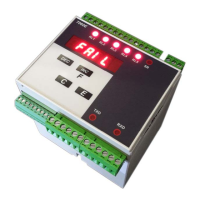
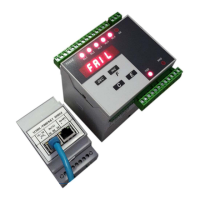
display
INC key (increases)
DEC key (decreases)
ENT key (confirms)
ESC key (cancels)
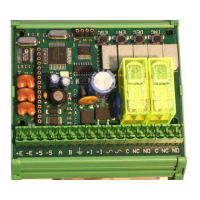
terminasl
With the present document
ADOS S.r.l., Via Lazio 25, 20090 Buccinasco (Mi)
Declares that this T020E fully complies to the essential
requirements
EN 61000-6-4 e EN 61000-6-2
Accordino to EC directive EMC 2004/108/CEE
Power supply 9-48 VDC / VAC
Accuracy 0.01% of the full scale
Linearity 0.01% of the full scale
Thermal Drift 0.005% / °C
Consumption max 250 mA a 12 VDC (3 VA)
Working temperature from –10 °C to +40 °C
Relative humidity
95% not condensated in the case
of version for DIN bars
not relevant to the versions in IP66
box
Load cells excitation
5 V with protection against short circuits
and with reference to internal voltage
Number of cells
connectable
(4 conductors)
4 350 cells
Analog signal from 0.5 to 2.5 mV/V
Conversion rate 55 conversions / second
Display Graduation 10000
Display increments 1-2-5-10-20
Display 5 LED digits
Digital otputs
2 relè 1 CO (SPDT)
3A at 250 VAC or 3A at 30 VDC
Digital input Optoisolated 24VDC
Serial output RS232 or RS485 (selectable)
Analog output 0-10V or 4-20 mA (selectable)
Dimensions
mm 95 x 85 x 65
(version for DIN bars)
mm 110 x 110 x 70
(version in IP66 box)
1. START UP OF THE INSTRUMENT
For a correct start up of the instrument it is necessary to carry out
the following operations:
- set up or check the electrical connections (see paragraph 2)
- set the weighing rate (see paragraphs 3 and 4)
- calibrate the weights (see paragraph 5)
2. ELECTRICAL CONNECTIONS
The instrument must be connected according to the indications in
the following table:
+E + EXCITATION (RED)
-E - EXCITATION (BLACK)
+S + SIGNAL (GREEN)
Load cell wiring
-S - SIGNAL (WHITE)
RS232 RS485 0-10 4-20
A TX A-485 0-10 V 4-20mA
B RX B-485
Output
SGND
Common Common
+I +12/24VDC
Tare input
-I 0VDC
~
9-48 VDC / VAC
Power supply
~
9-48 VDC / VAC
C COMMON relè 1
NC N.C. relè 1
NO N.O. relè 1
C COMMON relè 2
NC N.C. relè 2
Relè outputs
NO N.O. relè 2
In the case where the apparatus uses more than one load cell, the
cells must be wired to a specific junction box (ADOS model 1308),
and the output must be connected to the terminals of T020E.
The use of shielded cable for the wiring of the load cells, the
analog output signal lines and the serial lines is highly
recommended.
Question and Answer IconNeed help?

Do you have a question about the Ados T020E Series and is the answer not in the manual?

Summary

Installation and Instruction Manual

Start Up of the Instrument

Procedure for the initial setup and operation of the weighing instrument.

Electrical Connections

Detailed instructions for connecting the instrument's electrical components and wiring.

Setting of Weighing Scale

Weighing Scale Parameters Explained

Details on DIVIS, SENSI, and DECIM parameters for setting the weighing scale and display.

Configuration of Parameters

Navigating Parameter Configuration

Steps to access, view, and modify instrument configuration parameters using keys.

Parameter Definitions

Explanation of key parameters like MEDIE, FUNR1, FUNR2, SETR1, SETR2, and SERIA.

Calibration of Weights

Zero Calibration Procedure

Steps to perform zero calibration, including display feedback and error handling.

Full Scale Calibration Procedure

Steps to perform full scale calibration using a known sample weight and tester.

System Initialization

Factory Reset and Calibration Reset

Option to reset the instrument to default factory settings and clear calibration values.

Instrument Test

Performing the Instrument Test

Procedure to run a diagnostic test, checking relays and analog output functionality.

Serial Output (HW Selection)

Serial Board Insertion Mode

Information on the physical insertion of the serial board for communication.

RS485 Interface

Details regarding the RS485 serial interface and its connection.

Serial Protocol ASCII ADOS

Communication Modes

Describes Bidirectional Slave and Continuous Transmission modes for serial communication.

Weight Request String Format

Format for ID485 = 0

Defines the ASCII string format for requesting weight data when ID485 is set to 0.

Format for ID485 > 0

Defines the ASCII string format for requesting weight data when ID485 is greater than 0.

Format of Transmitted String

Transmitted String for ID485 = 0

Details the ASCII string format transmitted by the T020E for ID485 = 0.

Transmitted String for ID485 > 0

Details the ASCII string format transmitted by the T020E for ID485 > 0.

Calculation of the Checksum

Checksum Calculation Method

Explains the XOPR binary calculation for checksum characters in transmitted strings.

Analog Output (HW Selection)

Analog Board Insertion Mode

Visual guide for inserting the analog output board.

Analog Output Compensation

Phases of Analog Output Compensation

Overview of the three phases: analog range, zero, and full scale compensation.

Setting of the Analog Range

Procedure to set the weight value corresponding to the maximum analog output.

Zero Analog Compensation

Adjusts the analog output to ensure zero value is exactly at 0V or 4mA.

Full Scale Analog Compensation

Adjusts the analog output to ensure span value is exactly at 10V or 20mA.

Tare Input Function

Tare Input Operation

Details on how the tare input function is activated and its effects.

Ados T020E Series Specifications

General IconGeneral
BrandAdos
ModelT020E Series
CategoryTransmitter
LanguageEnglish

Related product manuals