Need help?
Do you have a question about the Ados T060E and is the answer not in the manual?
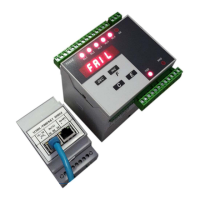
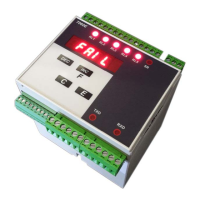
General introduction to the T060E weight transmitter manual.
Describes the main operating characteristics of the T060E weight transmitter.
Details the available options and versions for the T060E transmitter.
Explains the meaning of labels affixed to the T060E instrument.
Describes the power-on sequence and initial display indications of the T060E.
Details the process and importance of calibrating the T060E instrument.
Explains how to handle and display the sum of values from two channels.
Describes how to reset or manage the zero point of the weighing system.
Explains the signal filtering methods (FIR filters) available in the T060E.
Details how weight values are displayed on the T060E, including limits.
Explains the meaning of the LED indicators on the T060E's front panel.
Describes the functions of the buttons on the T060E's front panel.
Explains the fault condition for load cell connection errors.
Instructions for checking the received T060E instrument and its accessories.
Guidelines for safely assembling and mounting the T060E instrument.
Describes where the instrument's connections are made.
Mentions the labels on the rear panel for cabling operations.
Instructions related to checking the power supply voltage on the instrument's tag.
Wiring instructions for T060E versions with 110-230V or 24-48V power.
Wiring instructions for T060E versions with 12-24V power supply.
Details the wiring for connecting the first load cell input.
Instructions for connecting a second optional load cell input.
Provides a wiring example for a single weighing system using load cells.
Provides a wiring example for a double weighing system using load cells.
Outlines basic preventive maintenance checks for the instrument.
States that corrective maintenance must be performed by ADOS staff.
Introduction to the programmable functions of the T060E transmitter.
Describes the basic operational sequence after connections are made.
Lists the available management functions: Configuration, Calibration, Test.
Explains the time-out behavior for keyboard inactivity during configuration.
Describes how to navigate and select parameters for configuration.
Explains how to modify the values of selected operational parameters.
How to set the sensitivity value of the load cells.
How to set the maximum capacity of the weighing system.
How to set the resolution of the weighing system.
Setting for digital filtering to reduce unwanted oscillations.
How to select the reference channel in dual-channel configurations.
How to select the scale factor for dual-channel configurations.
How to assign a function to Relay 1.
How to set the threshold value for Relay 1.
How to set the hysteresis value for Relay 1.
How to set the minimum alarm trigger time for Relay 1.
How to set the minimum time for Relay 1 to return to idle mode.
How to enable the FAIL function for Channel 1.
How to enable the FAIL function for Channel 2.
How to configure the function of serial port 1.
How to configure the function of serial port 2.
How to set the physical interface for serial port 1.
Defines the data format transmitted on serial port 1 in continuous mode.
Defines the data format transmitted on serial port 2 in continuous mode.
How to set the baud rate for serial port 1.
How to set the baud rate for serial port 2.
How to set the RS485 address for serial port 1.
How to set the RS485 address for serial port 2.
How to set the PROFIBUS address.
Outlines the configuration steps for the analogue output.
How to define the type of analogue output (voltage or current).
How to define the function of the analogue output.
How to set the full scale value for the analogue output.
How to set the digital filter value (in Hz) to reduce noise.
How to set an alarm for unbalanced load differences between channels.
Describes the general method for calibrating the weighing system.
How to perform a permanent tare operation and store the reset value.
How to perform zero calibration on the weighing system.
How to perform span calibration on the weighing system.
How to linearize the calibration curve using nine points.
How to perform zero adjustment on the analogue output using a digital multimeter.
How to perform full scale adjustment on the analogue output using a digital multimeter.
How to test the operation of relay outputs and digital inputs.
How to test the functionality of the analogue output.
How to test the signal coming from the load cell inputs.
Management of serial interfaces (RS232/RS485) and their modalities.
Describes the ASCII string format for continuous serial transmission.
Explains how to calculate the checksum for serial data frames.
Describes the ASCII string format for bi-directional serial communication.
Details the format of the weight request command.
Lists the registers available for MODBUS communication.
Explains the coding of the status word bits for MODBUS.
Lists the coils supported for MODBUS commands.
Describes the data fields transmitted from the T060E via PROFIBUS.
Explains the status word coding for PROFIBUS communication.
Lists the commands available in the PROFIBUS command register.
Information regarding the GDS file for PROFIBUS device description.
 General
| Brand | Ados |
|---|---|
| Model | T060E |
| Category | Transmitter |
| Language | English |

 To Next Page