6 PPC-MB-8260AE Startup Manual
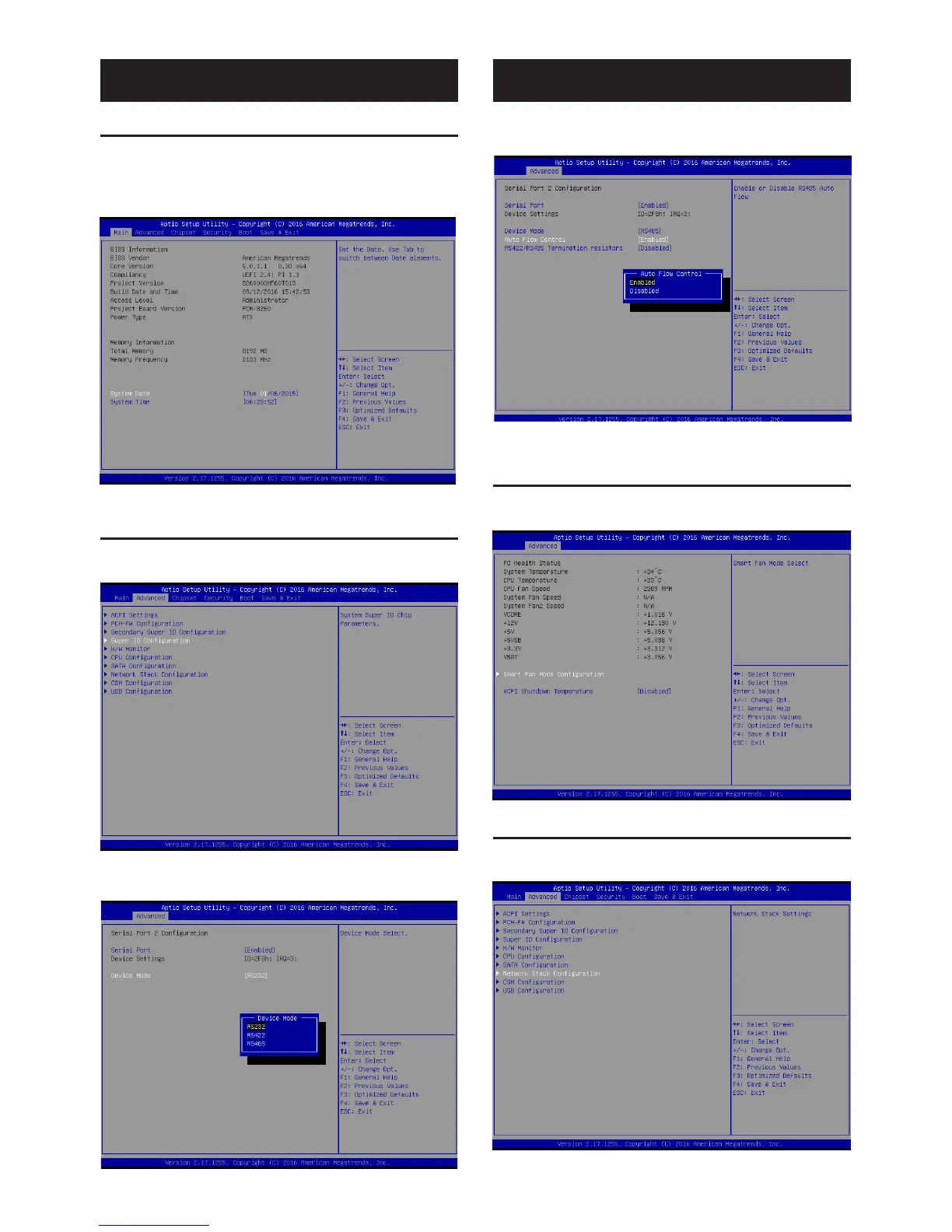
1.1 Entering BIOS Setup
When the power is turned on, press the <Del> button to
enter the BIOS setup screen.
After a setting is configured, press <F4> to save and exit;
otherwise, the configuration will not be saved in the BIOS.
1.2 COM 2 Mode Selection (RS232/422/
RS485)
1. Access the “Super IO Configuration” item from the
“Advanced” tab.
2. Select “Serial Port 2 Configuration”. The COM 2 mode
can be configured via the “Device Mode” item.
BIOS Setup Program
3. Select the “RS485” option. Autoflow and termination
resistors can be enabled or disabled.
1.3 H/W Monitor and Smart Fan Mode
Configuration
1. Access the “H/W Monitor” item from the “Advanced”
tab to check the voltage temperature and fan speed.
1.4 LAN PXE Mode Selection
1. Access the “Network Stack Configuration” item from
the “Advanced” tab.
BIOS Setup Program (Cont.)






 To Next Page