3
UPS User Manual
1. Introduction
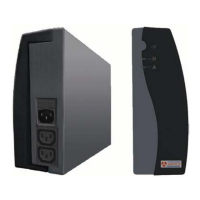
This UPS is specially designed for Personal Computer with multi-functions.
Its light weight, compact design perfect fits to the limited working
environment. The line of UPS is equipped with boost and buck AVR to
stabilize input voltage range. It is also built-in with DC start function.
This function enables the UPS to be started up without AC power supplied.
Although it’s a small UPS, it’s equipped with USB Communication Port to
offer users more benefits. The download software helps users monitor
UPS inside status. The main features of the UPS are listed below:
z Microprocessor control guarantees high reliability.
z Equipped with Boost and Buck AVR.
z Built-in USB Communication Port.
z Free Software Download from the Internet.
(Please check Free Software Download in Installation &
Operation for detail information).
z Green Power Function for energy saving.
z DC Start Function.
z Auto restart while AC recovery.
z Compact size, Light Weight.
z Provides Modem/Phone line surge protection.
2. Safety – CAUTION!!
z This UPS utilizes voltages that may be hazardous. Do not attempt to
disassemble the unit. The unit contains no user serviceable parts.
Only factory service personnel may perform repairs.
z Connection to any other type of receptacle other than a two-pole,
three-wire grounded receptacle may result in shock hazard as well as
violate local electrical codes.
z In the event of an emergency, press the OFF button and disconnect
the power cord from the AC power supply to properly disable the
UPS.
z Do not allow liquids or any foreign object to enter the UPS. Do not
place beverages or any other liquid-containing vessels on or near the
unit.



 To Next Page