5
3. Placement
Install the UPS unit in any protected environment that provides
adequate airflow around the unit, and is free from excessive dust,
corrosive fumes and conductive contaminants. Do not operate your
UPS in an environment where the ambient temperature or humidity is
high. On the other hand, place the UPS away from the monitor at
least 20cm to avoid interference.
4. Computer Connection
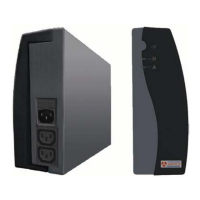
Connect any computer-related devices into the UPS Protected Outputs
on the top of UPS. Battery power is automatically provided in case of
power failure.
5. Turn On/Off
To turn on the UPS unit, press the power switch lightly. To turn off the
UPS unit, press the power switch again.
6. DC Start
All UPS Series are equipped with DC Start. To start the UPS when AC
utility power is not available, simply press the power switch.
7. Green Power Function
All UPS is equipped with Green Power Function. If no load connects
to the UPS, it will automatically shut down in 2 minutes for energy
saving while power failure.
8. Free Download Software – WinPower
Go to Website http://www.alpesek.com
Choose operating system you need for your computer and double
click to download the software automatically.
Type in Serial No: 511C1-01220-0100-478DF2A to install the
software.



 To Next Page