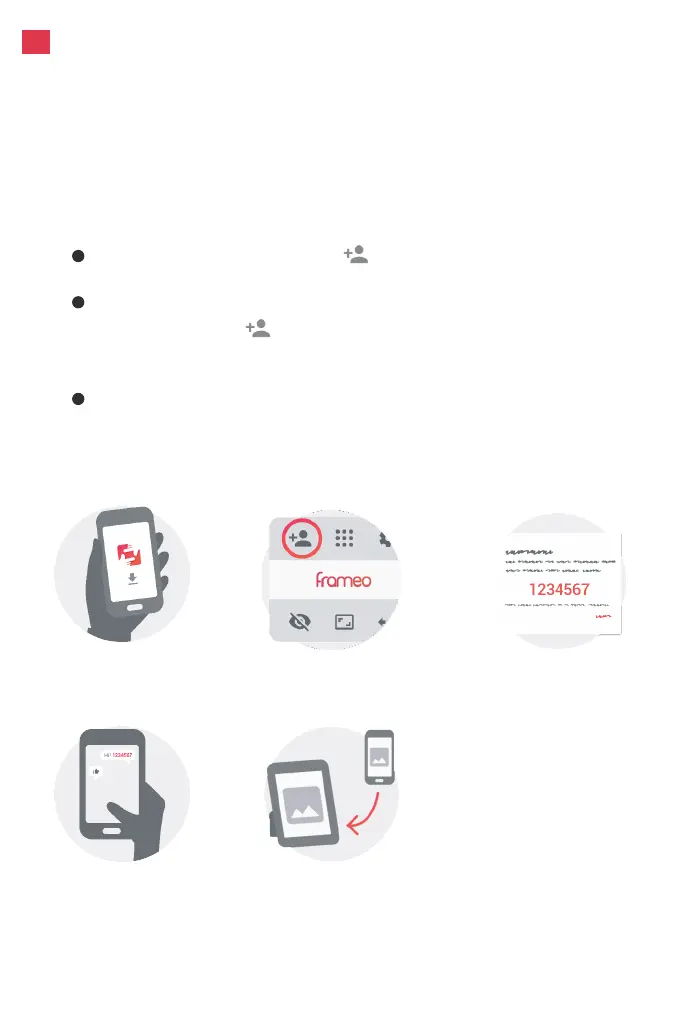
1. Tap the add friend icon on your frame. A box will
appear with a unique code which is valid for 12 hours.
2. Now go to the Frameo app on your phone and click the
add friend icon in the top right corner, then enter the
code from the frame. Your mobile app is now connected
to the frame.
3. Share the frame code with your friends or family. They
can add the frame and start sharing photos to the frame.
There is no limit to the number of mobile users that can
connect to the frame.
In order to send pictures to an AEEZO frame, you need to
connect to the frame using the Frameo App. Follow the steps
below to connect.
5
Download the Frameo
app on your phone
Share the code
Enter the code in
the Frameo app
You can now send photos
from your phone to the frame
Click the add friend
icon on your frame
Connecting to a Frame
En


 To Next Page