To remove the dirt:
1. – Remove immediately:melted plastic, plastic foil, and food with sugar. If not, the dirt
can cause damage to the appliance. Use a special scraper for the glass . Put the
scraper on the glass surface at an acute angle and move the blade on the surface .
– Remove after the appliance is sufficiently cool:limescale rings , water rings, fat
stains, shiny metallic discolorations. Use a special cleaning agent for glass ceramic
or stainless steel.
2. Clean the appliance with a moist cloth and some detergent.
3. At the end rub the appliance dry with a clean cloth.
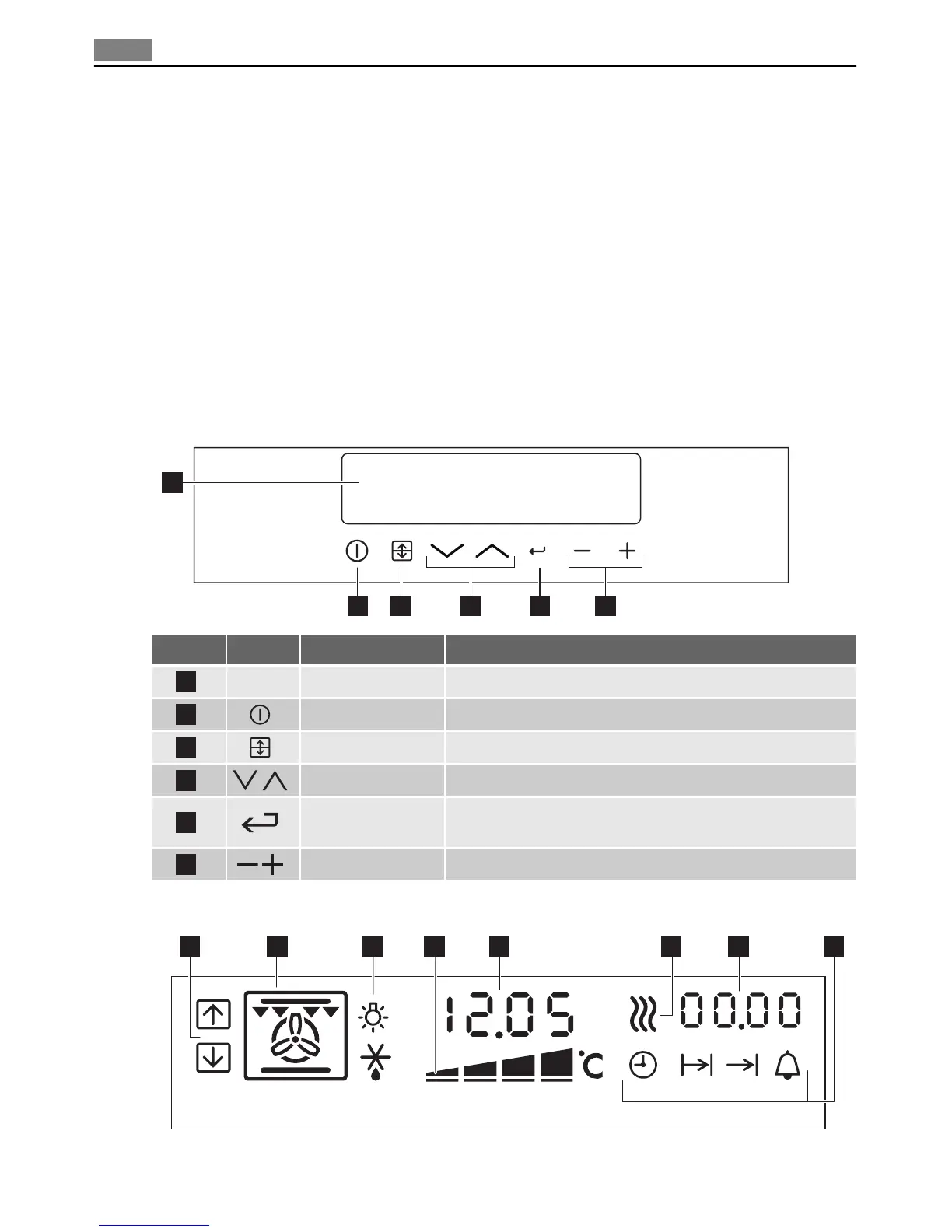
OVEN - CONTROL PANEL
Control panel
2 3 5 6
1
4
Number Button Function Description
1
–
Display To show the current settings of the oven.
2
On/Off To activate or deactivate the oven.
3
Oven selection To switch between top and main oven.
4
Down,Up To set an oven function or programme.
5
Selection/Clock
function
To move between the oven functions and clock func-
tions.
6
Setting buttons To set the temperature and time.
Indicators of display
21 5
6
43
7 8
14 Oven - Control panel


 To Next Page