Operating Instructions
17
Running a washing cycle
Brief instructions
A washing cycle consists of the following steps:
0 1. Set the correct washing program:
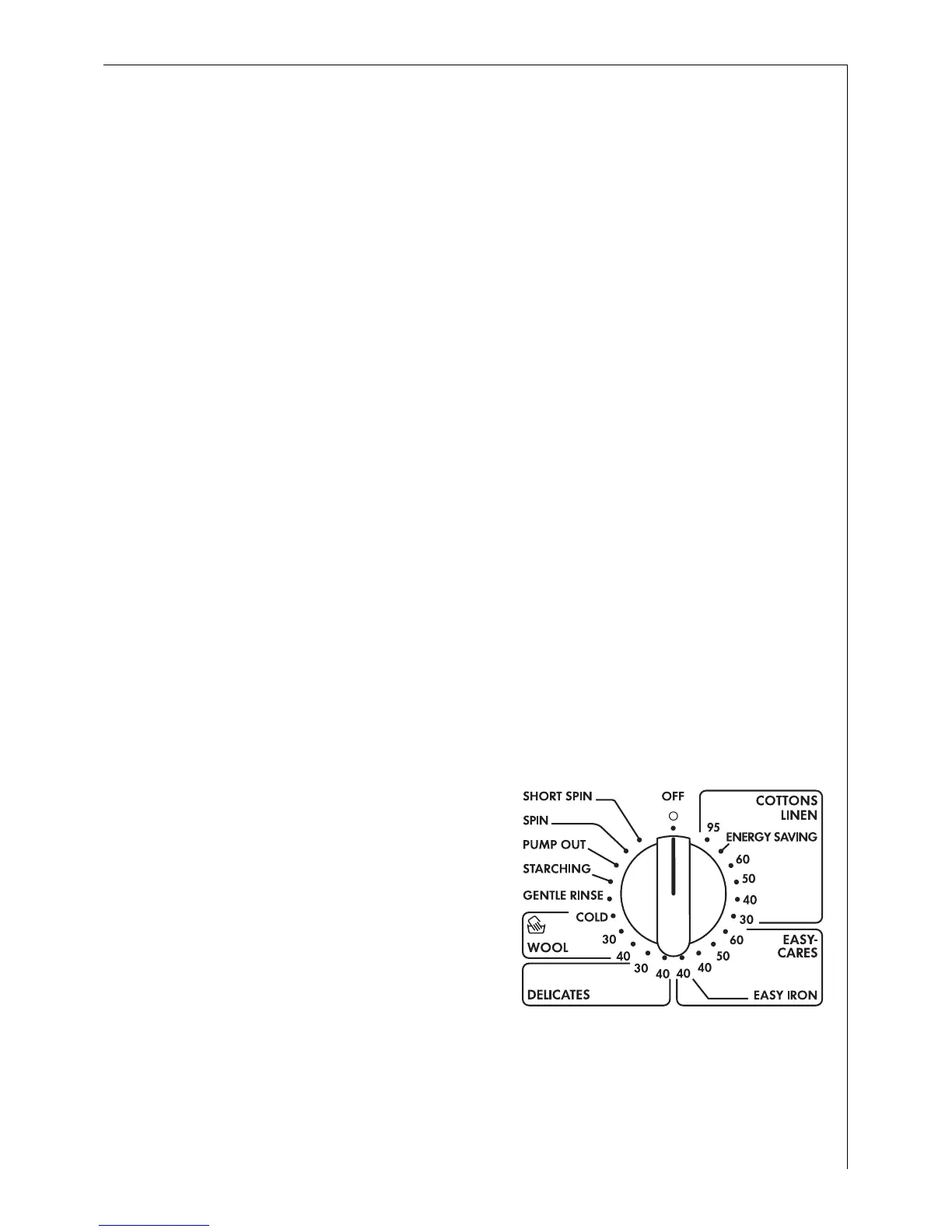
– Select the program and temperature with the program selector.
– Select any program options if required.
2. If necessary, change the spin speed/select RINSE HOLD.
3. Set the DELAY TIMER if required.
4. Open the door and load the washing.
5. Close the door.
6. Add the detergent/conditioner.
7. Start the washing program with the START/PAUSE button.
When the washing program has ended:
Important! If the washing cycle ended with a rinse hold, carry out
PUMP OUT, SPIN, or SHORT SPIN before opening the door.
8. Open the door and remove the washing.
9. Switch off the washing machine: Set the programs selector to OFF.
Setting the Washing Program
3
See "Program tables" for a suitable program, correct temperature and
possible program options to suit the type of washing.
0 1. Set the program selector to the
desired washing program with
the desired temperature.
The expected duration of the
program selected is displayed in
the multi display in minutes.





 To Next Page