Operating Instructions
19
Setting the delay timer / soaking duration
Delay timer
The DELAY TIMER button allows the start of a
washing program to be delayed by 1 hour up
to a maximum of 19 hours.
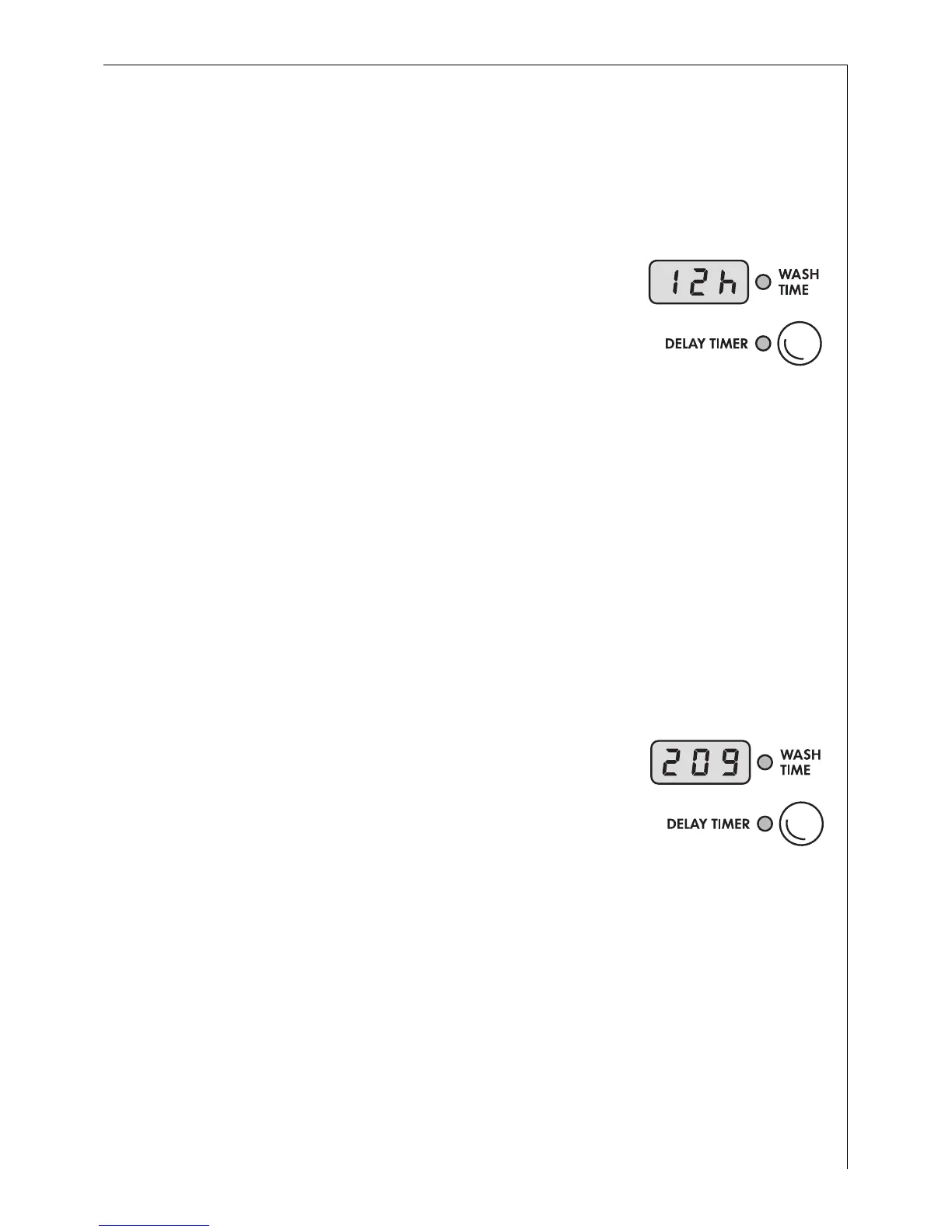
0 To do this, press the DELAY TIMER button
repeatedly until the desired start delay is
shown in the multi display, for example
12h for a 12 hour delay.
If 19h is displayed and you press again, 0h
appears, followed by the duration time of the
set program (displayed in minutes e. g.129).
In this state the start delay timer is not set.
Soaking duration
When the SOAKING button is pressed, you can extend the soaking
period with the DELAY TIMER button (maximum 10 hours and
approx. 20 minutes).
3
Without DELAY TIMER, the soaking period is approximately 30 minutes,
plus a pre-wash time of 20 minutes.
0 To adjust, press the DELAY TIMER button as often as necessary until the
required soaking period is shown in the multi display, e.g.1h (=1 hour).
After approximately 2 seconds, the multi
display shows the duration in minutes.
This duration time is made up as follows:
3
While SOAKING is running, PRE-WASH lights up on the program
progress display.
Selected soaking period e.g. 1h =60 Minutes
+ Heating-up / pre-wash time e.g. Approx. 20 Minutes
+ Duration of the selected wash program e.g. Approx. 129 Minutes
= Displayed value e.g. Approx. 209 Minutes











 To Next Page