4. Turn the control knob to turn the function
on and off.
5. Press .
10. USING THE ACCESSORIES
WARNING!
Refer to Safety chapters.
10.1 Inserting accessories
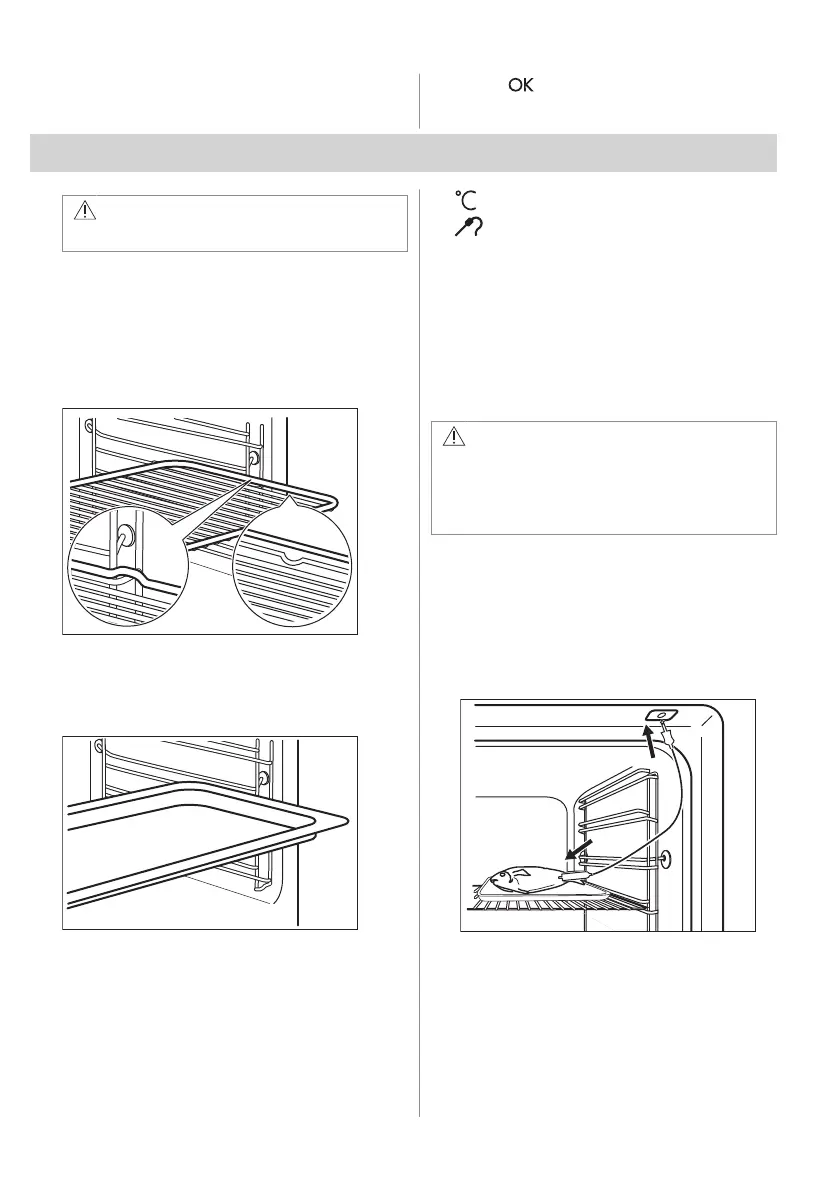
A small indentation at the top increases
safety. The indentations are also anti-tip
devices. The high rim around the shelf
prevents cookware from slipping off the shelf.
Wire shelf
Push the shelf between the guide bars of the
shelf support and make sure that the feet
point down.
Baking tray / Deep pan
Push the tray between the guide bars of the
shelf support.
10.2 Food sensor
It measures the temperature inside the food.
There are two temperatures to be set:
•
- the temperature inside the appliance.
• - the food core temperature.
For the best cooking results:
• Ingredients should be at room
temperature.
• Do not use it for liquid dishes.
• During cooking the needle of the food
sensor must be fully inserted in the dish.
Cooking with: Food Sensor
WARNING!
There is a risk of burns as Food Sensor
and shelf supports become hot. Do not
touch Food Sensor handle with bare
hands. Always use oven gloves.
1. Turn on the appliance.
2. Set a heating function and, if necessary,
the oven temperature.
3. Insert Food Sensor inside the dish:
Meat, poultry and fish
Insert the entire needle of the Food
Sensor into the centre of meat or fish at
its thickest part.
Casserole
Insert the tip of Food Sensor exactly in
the centre of the casserole. Food Sensor
should be stabilized in one place during
baking. Use a solid ingredient to achieve
that. Use the rim of the baking dish to
support the silicone handle of Food
18 ENGLISH



 To Next Page