6. DAILY USE
WARNING!
Refer to Safety chapters.
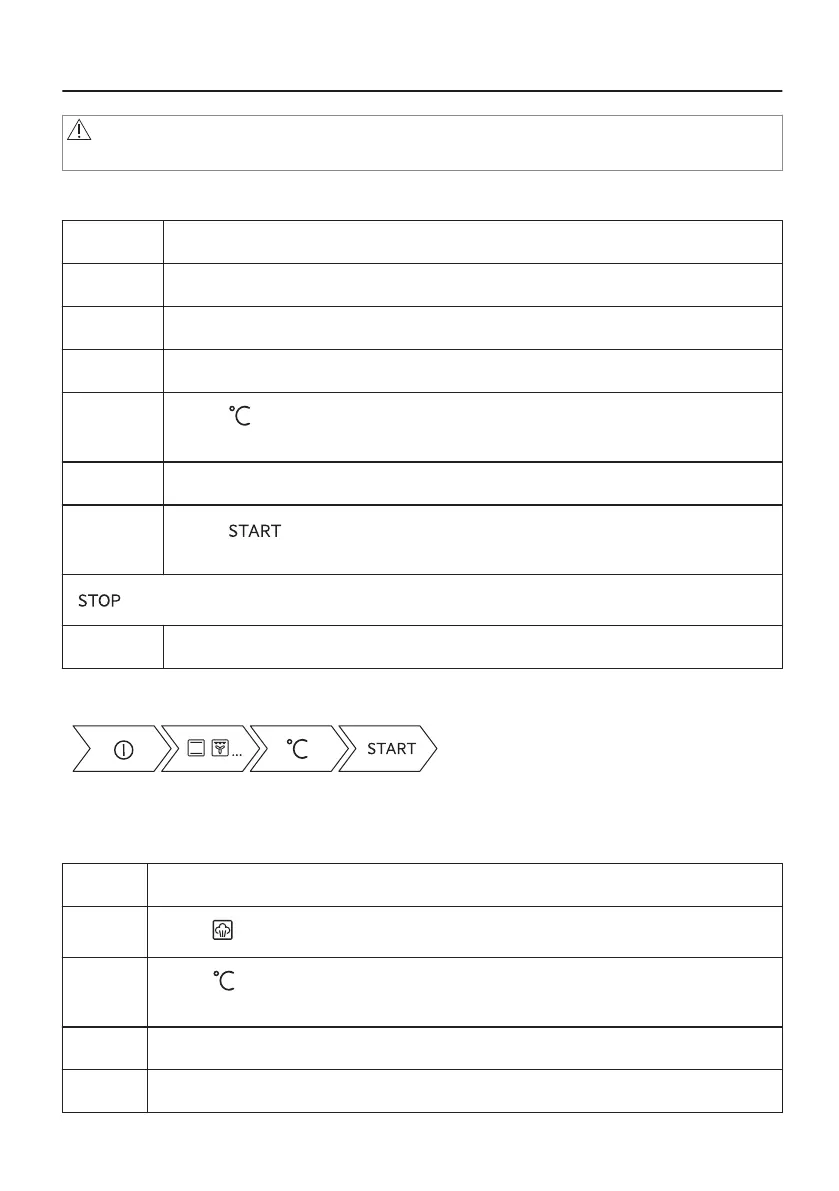
6.1 How to set: Heating functions
Step 1 Turn on the oven.
Step 2 Hold the knob. The display shows the default heating functions.
Step 3 Select the symbol of the heating function and press the knob to enter the submenu.
Step 4 Select the heating function and press the knob.
Step 5
Select: . Press the knob.
The display shows the temperature settings.
Step 6 Turn and press the knob to set: temperature .
Step 7
Press: .
Food Sensor - you can plug the sensor at any time before or during cooking.
- press to turn off the heating function.
Step 8 Turn off the oven.
Take a shortcut!
6.2 How to set: Steam heating function
Step 1 Turn on the oven.
Step 2
Select: . Press the knob to set the steam heating function.
Step 3
Select: . Press the knob to set the temperature. The display shows the temperature
settings.
Step 4 Set the temperature and press the knob to confirm.
Step 5 Press the cover of the water drawer to open it.
20/60


 To Next Page