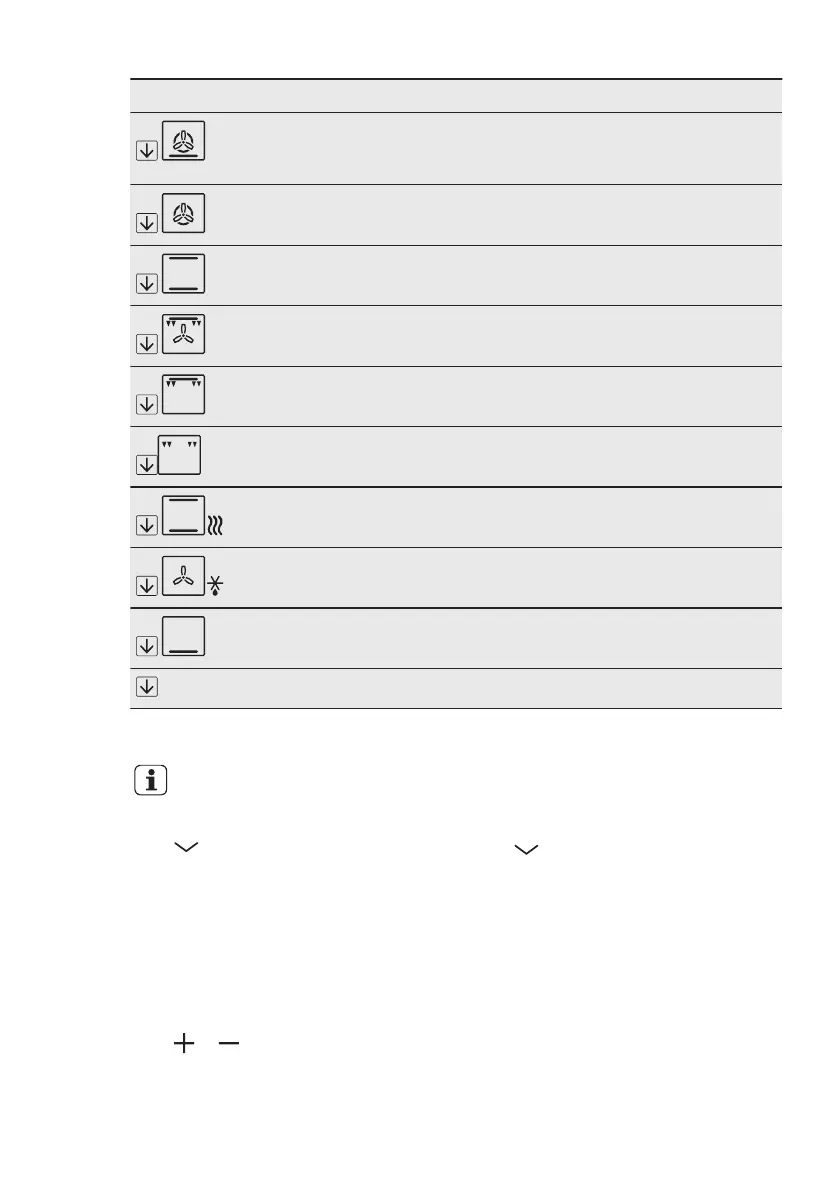
Symbol Oven function Application
Pizza Setting To bake food on 1 shelf position for a more inten-
sive browning and a crispy bottom. Set the tempera-
ture 20 - 40 °C lower than for Conventional Cooking.
Slow Cooking To prepare tender, succulent roasts.
Conventional
Cooking
To bake and roast food on 1 shelf position.
Turbo Grilling To roast larger meat joints or poultry with bones on
1 shelf position. Also to make gratins and to brown.
Fast Grilling To grill flat food in large quantities and to toast
bread.
Grilling To grill flat food and to toast bread.
Keep Warm To keep food warm.
Defrost To defrost frozen food.
Bottom Heat To bake cakes with crispy bottom and to preserve
food.
CATA
Catalysis To help the self-cleaning catalytic oven layer.
6.4 Setting the oven function
You can change the oven
function while the oven
operates.
Press to set an oven function.
The display shows the recommended
temperature.
If you do not change the this
temperature in less than approximately 5
seconds, the appliance starts to heat.
6.5 Changing the oven
temperature
Press or to change the
temperature.
When the appliance is at the set
temperature, an acoustic signal sounds.
6.6 Deactivating the oven
function
Press until no oven function shows in
the display.
6.7 Residual heat indicator
When you deactivate the oven, the
display shows the residual heat.
ENGLISH 11


 To Next Page