English
48
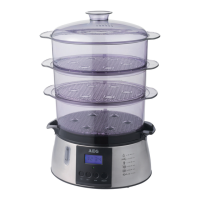
4. Place the desired food into bowl “2”.
5. Place steam bowl “3” on top of steam bowl “2”.
6. Cover the upper bowl with the lid.
Using the rice bowl
1. Put rice or other foods with sauce or liquid in the rice
bowl.
2. Place the rice bowl into a steam bowl.
3. Finally, put the lid on.
NOTE:
Please continue observing our “cooking instructions”.
There you will find suggestions on water quantities for
different rice grades.
Functions
The steamer features different functions:
• Selectthecookingtimeandthesteamerwillstartopera-
tion after approx. 5 seconds automatically.
• Youmayalsosetthetimerforthefoodtobereadyata
preset time.
• Afterthesteamerhascookedforthesetamountoftime,
it will enter a keep-warm mode.
• Overheatprotection:Ifthewaterisusedup,thedevice
will turn off after some time.
Initial operation
• Afterllingwithwater,rstplacethecollectiontrayand
then the steam bowls and the lid.
• Positionthelidwiththesteamopeningontheback.
Mains connection
1. Check if the mains voltage that you want to use matches
thatoftheappliance.Youwillndtheinformationabout
this on the type plate of the basic unit.
2. Check the switch setting of the ON/OFF switch. It must
be disengaged.
3. Connect the device to a properly installed isolated
ground receptacle.
Operating instructions
Instant steam function
1. TurntheapplianceonwiththeON/OFFswitch.Youwill
hear a signal tone. The display and the pilot lamp will
light up blue.
2. Press SET button once. The display will show the default
setting of 5 minutes “00:05”.
3. If you wish to steam cook longer than 5 minutes, set the
cooking time by pressing the minute button MIN repeat-
edly or the hour button HR for 1 hour setting.
4. If the set cooking time is longer than 50 minutes, please
refill with water during operation before the 50 minutes
have elapsed. Otherwise the device will turn off.
NOTE:
• Themaximumtimesettingis1hourand59minutes.
• Duringthisprocessthereadout“STEAMER”(translat-
ed: steamer) will blink on the upper right of the display.
• Ifyouwishtochangeyourinput,pressandholdthe
respective button MIN or HR until the desired values
are displayed.
• Ifnobuttonispressedwithin5secondsafterinput,
the device will start heating water automatically. The
readout “STEAMER” will then illuminate steadily. The
control lamp changes from blue to red.
• Thetimercountsdown.Whenelapsed,5signaltones
will alert you that the cooking has been finished.
Delayed cooking
1. TurntheapplianceonwiththeON/OFFswitch.Youwill
hear a signal tone. The display and the pilot lamp will
light up blue.
2. Press SET button once. The display will show the default
setting of 5 minutes “00:05”.
3. Set the cooking time by pressing minute button MIN
repeatedly or hour button HR for 1 hour setting.
4. Press SET button a second time.
5. Set the time for the device to start cooking, using the
MIN and/or HR buttons.
NOTE:
• Duringthisprocessthereadout“TIMER”(translated:
timer)willashontheupperrightofthedisplay.
• Youmaydelaycookingbymaximum12hoursand
59minutes.
• Ifyouwishtochangeyourinput,pressandholdthe
respective button MIN or HR until the desired values
are displayed.
• Ifnobuttonispressedwithin5secondsafterinput,
the timer will automatically start to count down. The
readout “TIMER” will then illuminate steadily. When
the time of the TIMER has elapsed, the device will auto-
matically turn to “STEAMER” mode and start cooking.
The control lamp changes from blue to red.
WARNING:
Never operate the device unattended. When setting the
timer to delay cooking, set a time that ensures operation
with proper supervision.
Keep-warm mode
• Afterthecookingtimehaselapsed,asignaltonewill
sound 5 times.
• Thedisplaywillshowthereadout“00:00”,andbelowthat
“KEEP WARM”.
• Thecontrollampwillchangefromredtoblue.Thekeep-
warm mode starts.
• Theheaterwillturnonandoffinintervals.Duringheating
the control lamp will light up red.


 To Next Page
 Loading...