11.1 Notes on cleaning
Cleaning
Agents
Clean the front of the oven with a soft cloth with warm water and a mild
detergent.
Use a cleaning solution to clean metal surfaces.
Clean stains with a mild detergent. Do not apply it on the catalytic surfa-
ces.
Everyday Use
Clean the cavity after each use. Fat accumulation or other residue may
cause fire.
Dry the cavity with a soft cloth after each use.
Accessories
Clean all accessories after each use and let them dry. Use a soft cloth with
warm water and a mild detergent. Do not clean the accessories in a dish-
washer.
Do not clean the non-stick accessories using abrasive cleaner or sharp-
edged objects.
11.2 How to remove: Shelf
supports / catalytic panels
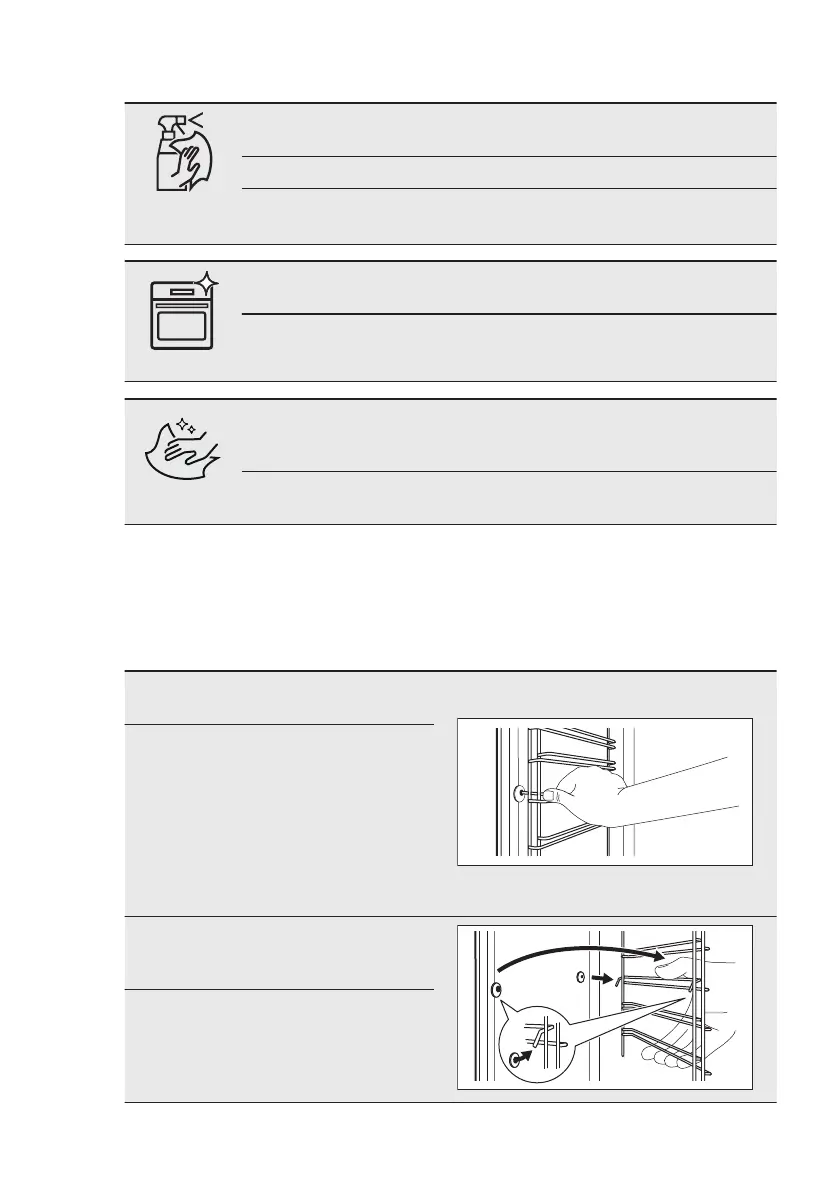
Remove the shelf supports / catalytic
panels to clean the oven.
Step 1 Turn off the oven and wait
until it is cold.
Step 2 Pull the front of the shelf sup-
port away from the side wall.
Hold the rear of the shelf sup-
port and catalytic panel in
place. The catalytic panels
are not attached to the oven
walls. They can fall out when
you remove the shelf sup-
ports.
Step 3 Pull the rear end of the shelf
support away from the side
wall and remove it.
Step 4 Install the shelf supports in
the opposite sequence.
www.aeg.com22


 To Next Page