When AirDry is activated
during the drying phase, the
projection on the floor may
not be completely visible. To
check the remaining time of
the running programme,
look at the control panel
display.
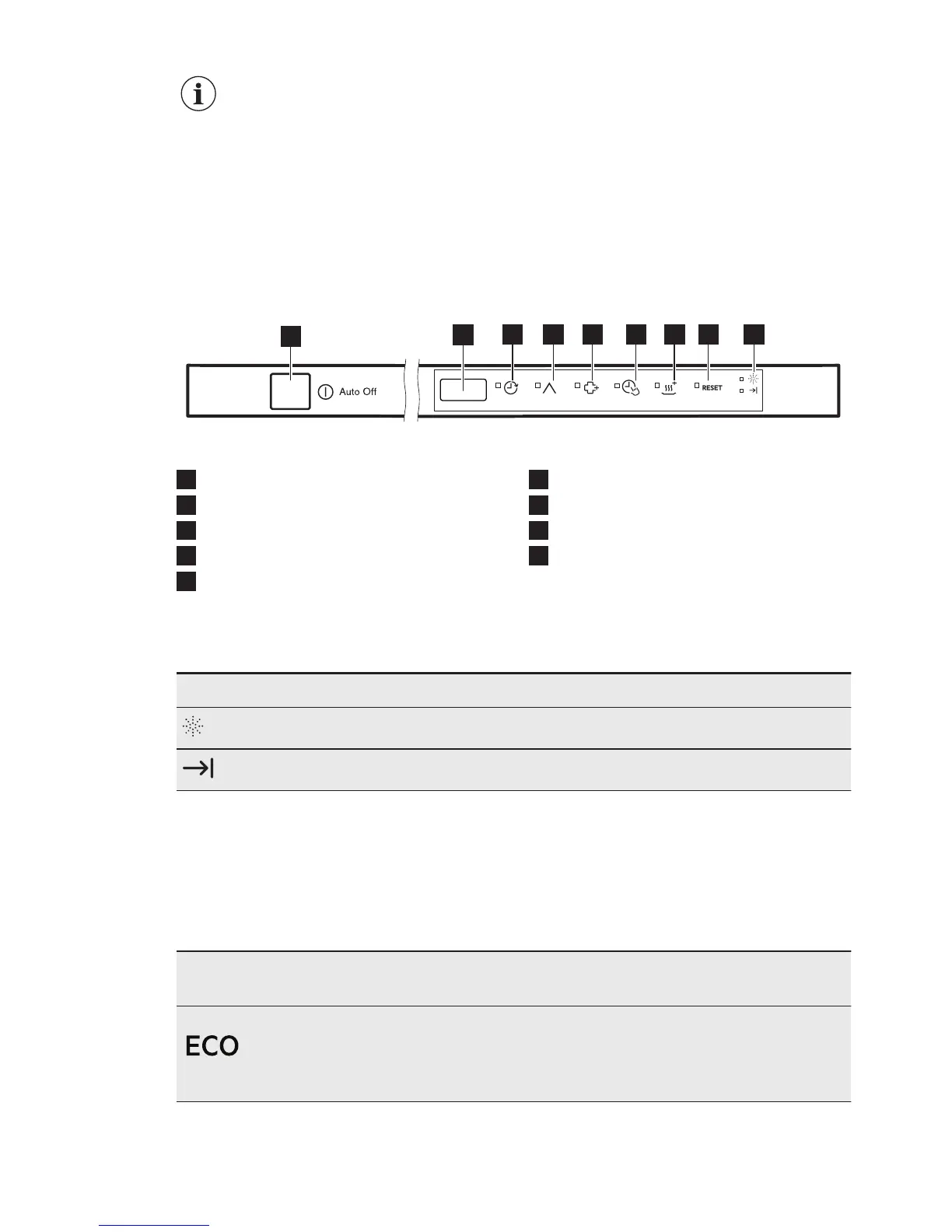
4. CONTROL PANEL
1
On/off button
2
Display
3
Delay touch button
4
Program touch button
5
ExtraHygiene touch button
6
TimeSaver touch button
7
XtraDry touch button
8
RESET touch button
9
Indicators
4.1 Indicators
Indicator Description
Rinse aid indicator. It is on when the rinse aid dispenser needs refilling.
End indicator. It is on when the programme is completed.
5. PROGRAMMES
The numbering of the programmes in
the table (P1, P2, etc.) reflects their
sequence on the control panel.
The order of the programmes in the
table may not reflect their sequence on
the control panel.
Programme Degree of soil
Type of load
Programme phases Options
P1
1)
• Normal soil
• Crockery and
cutlery
• Prewash
• Wash 50 °C
• Rinses
• Dry
• ExtraHygiene
• TimeSaver
• XtraDry
ENGLISH 7



 To Next Page