English
36
Due to the different device manufacturers, models, and
software versions, a full functionality cannot be guaranteed.
Logging on devices (Pairing)
Before you listen to music via the unit, you must pair the
devices.
1. Ensure, that the Bluetooth function is activated in your
player (e.g. mobile phone). For this, refer to the operation
manual of your player.
2. PresstheSOURCEbutton(6/8)repeatedly,until“bLUE”
is shown on the display.
3. Keep the
button(5/20)pressedforapprox.4seconds
to switch the device to pairing mode.
4. Chose the Bluetooth menu in your player and register
the device in your player. For this, refer to the operation
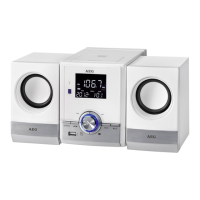
manualofyourplayer.Thedevice“AEGMC4459BT”
will show in your player as a selection.
NOTE:
Only one playback device may be connected with the
music center at one time. If the music center is already
connected with a different playback device, the music
center will not appear in the BT selection menu.
5. Now enter the password “0000” in your player, depend-
ing on the device manufacturers, model, and software
version.
If pairing has been carried out successfully, “CONNECt” is
shown on the display.
For the further procedure, please refer to the user manual
of the playback unit. If possible, adjust the volume of the
externalunittoacomfortablelevel.
NOTE:
• Dependingonthedevicemanufacturer,youneedto
performtheregistration(PAIRING)againtoconnect
the devices.
• TheBluetoothcompatibilitycannotbeensuredfor
devices (e.g. mobile phones) getting released in the
future.
• Toensureanoptimalconnection,makesurethatthe
battery of your player is completely charged.
• Someofthemobilephonebrandshaveanenergy-
saving mode. Deactivate the energy-saving mode as
it can otherwise result in problems during the data
transfer through Bluetooth.
• Tobeabletotransferaudiodata,Bluetoothneedsto
stay activated in your player. Observe the operation
manual of your player.
• Ifamobilephoneonwhichyouareplayingmusic
receives a call, the music will be interrupted. The sound
isnothoweverplayedbackbythespeakers.After
you have completed your phone call, the devices are
reconnectedwitheachother.Youmayhavetopossibly
restart the playback.
Playing CDs/MP3
This is how you play a CD
1. PresstheSOURCEbutton(6/8)untilCDshowsinthe
display.AlternativelyyoucanalsopresstheCDbutton
(17 on the remote control) to select CD mode.
2. In order to open the CD compartment (1), press the
PUSH button.
3. Insert an audio CD with the printed side facing upwards
on to the central cone so that the CD clicks into place and
then close the lid of the CD compartment. The message
“rEAd”willbeshownonthedisplayforashorttime.
For an audio CD: The total number of tracks and the
playing time of the CD is shown.
For an MP3-CD/file: The number of files and titles are
then shown.
4. The CD will play from the first title. The current track,
or
MP3 and the elapsed playing time are shown on the
display.
5. InordertoremoveaCD,pleasepresstheAUTO/STOP
button (9 on the remote control), open the CD compart-
ment and lift the CD out carefully.
AlwayskeeptheCDdeckclosed.
NOTE:
• Whenadiscisinsertedupsidedownorwhennodiscis
inserted, “NO dISC” (no disc) is shown on the display.
• PlaybackofCDsproducedbytheusercannotbe
guaranteed due to the large variety of software and CD
media available.
Description of the CD buttons
(5/20)
Youcanbrieyinterrupt andresumeplaybackusingthisbut-
ton. The symbol ”
“ appears on the display. Pressing again
continues playback.
/
(10/5)
During music playback:
With
youcanjumptothenextorprevioustracketc.
• Ifthebuttoniskeptpresseddown,themachinestartsto
search through the tracks. (The sound is thereby set to
mute.)
The
button can be used as follows:
Pressonce= Thisjumpsbacktotheprevioustrack.
Presstwice= Thisplaysthesongbeforeetc.Ifthebutton
is kept pressed down, the machine starts
to search through the tracks. (The sound is
thereby set to mute.)



 To Next Page