15ENGLISH
WARNING!
Do not use the MultiSwitch
Drawer to store fresh prodoce
as these Items may freeze ahd
ause damage to the fruits and
leafy vegetables stored in the
drawer.
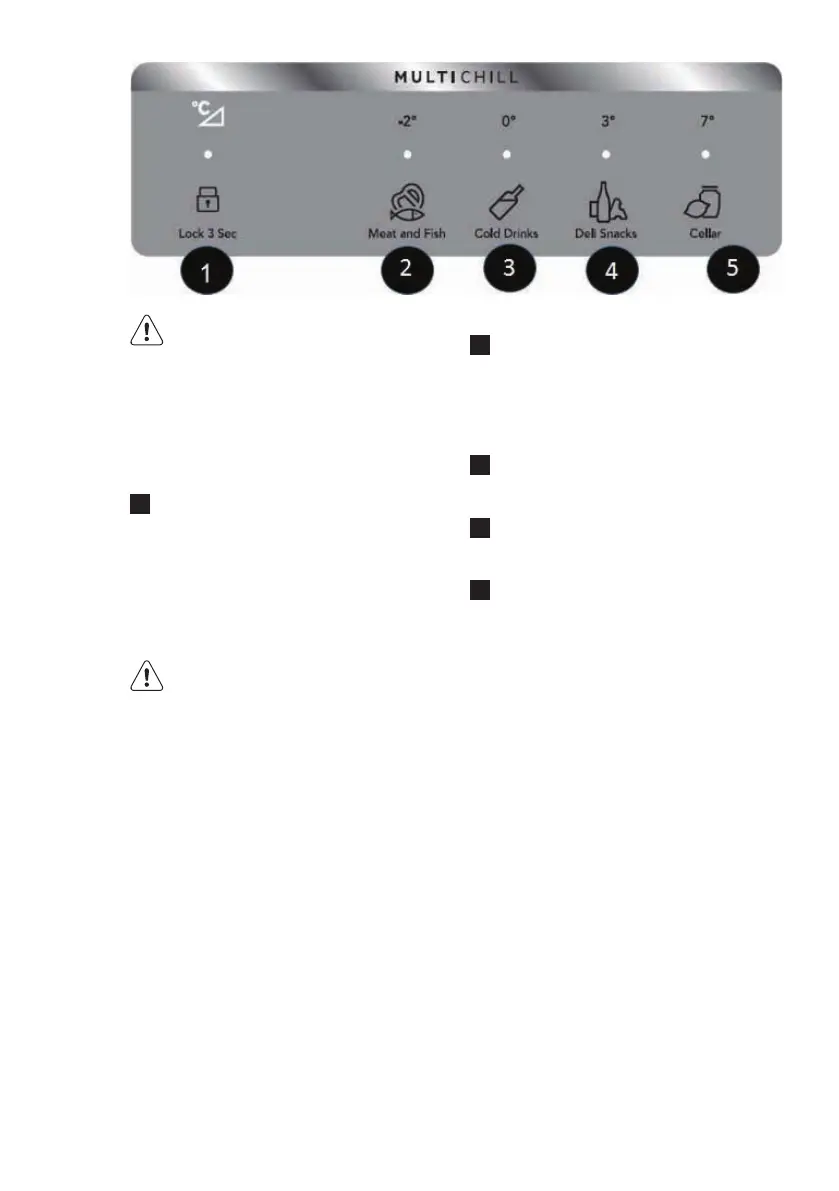
Using Your MultiSwitch Drawer
Controls
1
The drawer automatically defaults
to a locked state to prevent any
unwanted use. To change the drawe’s
settings, it rst needs to be unlocked.
To unlock, press and hold the
UNLOCK icon for 3 seconds. It will
automatically lock after 10 seconds
witllout any interaction.
WARNING!
Do not store glass bottles in
the MultiSwitch Drawer when
the Temperature setting is in
Freezer, Meat/seafood, or Cold
drink modes. The glass may
break and shatter, causing
physical harm and injury.
Refrigerator:
2
Choosing Meat and Fish will set
drawer temperature to -2°C. A tone
will sound to conrm choice. Use this
setting for short term storage. Any
meat to be kept longer than two days
should be frozen.
3
Choosing Cold Drinks will set drawer
temperature to 0°C. A tone will sound
to conrm choice.
4
Choosing Deli/Snacks will set drawer
temperature to 3°C. A tone will sound
to conrm choice.
5
Choosing Cellar will set drawer
temperature to 7°C. A tone will
sound to conrm choice.
7. USING THE DISPENSER
7.1 Using the ice maker after
installation
Before making ice for the rst time, be
sure to prime the water supply system.
Air in new plumbing lines can result in
two or three empty ice maker cycles.
Furthermore, if the system is not ushed,
the rst ice cubes may be discolored or
have an odd avor.
7.2 Priming the water supply
system
1. Begin lling the system by pressing
and holding a drinking glass against
the dispenser.
2. Keep the glass in this position until
water comes out of the dispenser.
It may take about 1½ minutes.


 To Next Page