22 www.aeg.com
10. CHANGING THE FILTER
10.1 Air Filter (select models)
The air lter is located in the top center of
the fresh food compartment.
10.2 Replacing the Air Filter
(TasteGuard)
To ensure optimal ltering of refrigerator
odors, change the air lter every six
months (Replace Air Filter on the
Display indicates replacing the lter
after six months).
1. Remove the air lter cover by
squeezing the top and bottom of the
cover together and removing from
liner.
2. Remove the old lter and discard it.
3. Unpack the new lter and slide it into
the housing. The open face must
(carbon media) of the lter should
be installed facing the air port (hole)
in the multiow.
4. Replace the air lter cover by
squeezing the sides and snapping
it back into place.
5. Press and hold the “Reset Air Filter”
button on the Display for three
seconds. When the indicator turns
o, the status has been reset.
10.3 Ordering Replacement
Air Filters
Use original spare parts only. Please
contact an Authorised Service Centre
10.4 Water Filter
The refrigerator is equipped with a water
ltering system. The water ltering system
lters all dispensed drinking water, as well
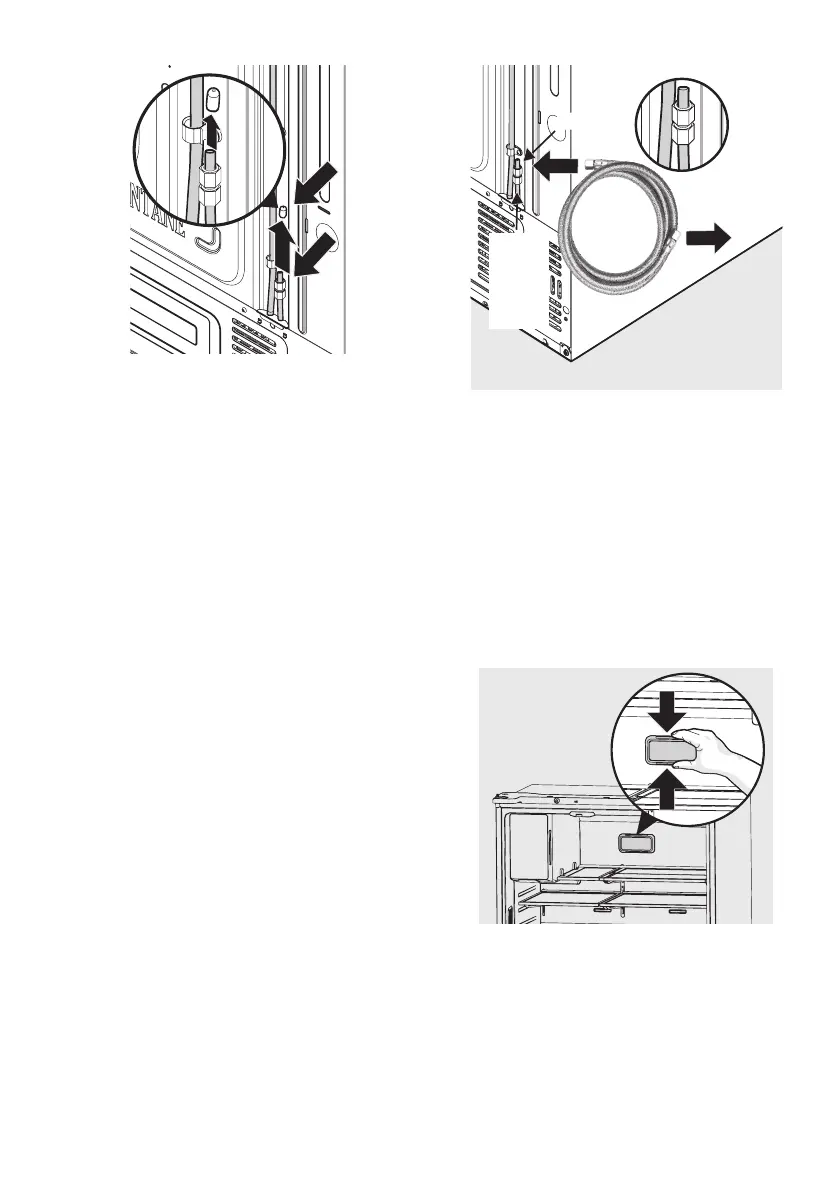
5HPRYH
SODVWLFFDS
IURPZDWHU
LQOHWILWWLQJ
:DWHU,QOHW
)LWWLQJ
~LQFK
WRZDWHU
YDOYH
FRQQHFWLRQWR
KRXVHKROG
ZDWHUVXSSO\
3ODVWLF
WXELQJ
WR
ZDWHU
YDOYH
:DWHU,QOHW
)LWWLQJ
8. After installation of refrigerator and
water line system, select “WATER”
on your control panel and press it for
1‐2 minutes to supply water into the
water tank and dispenser water.


 To Next Page