5.
1)
6.
7. 8.
9.
1)
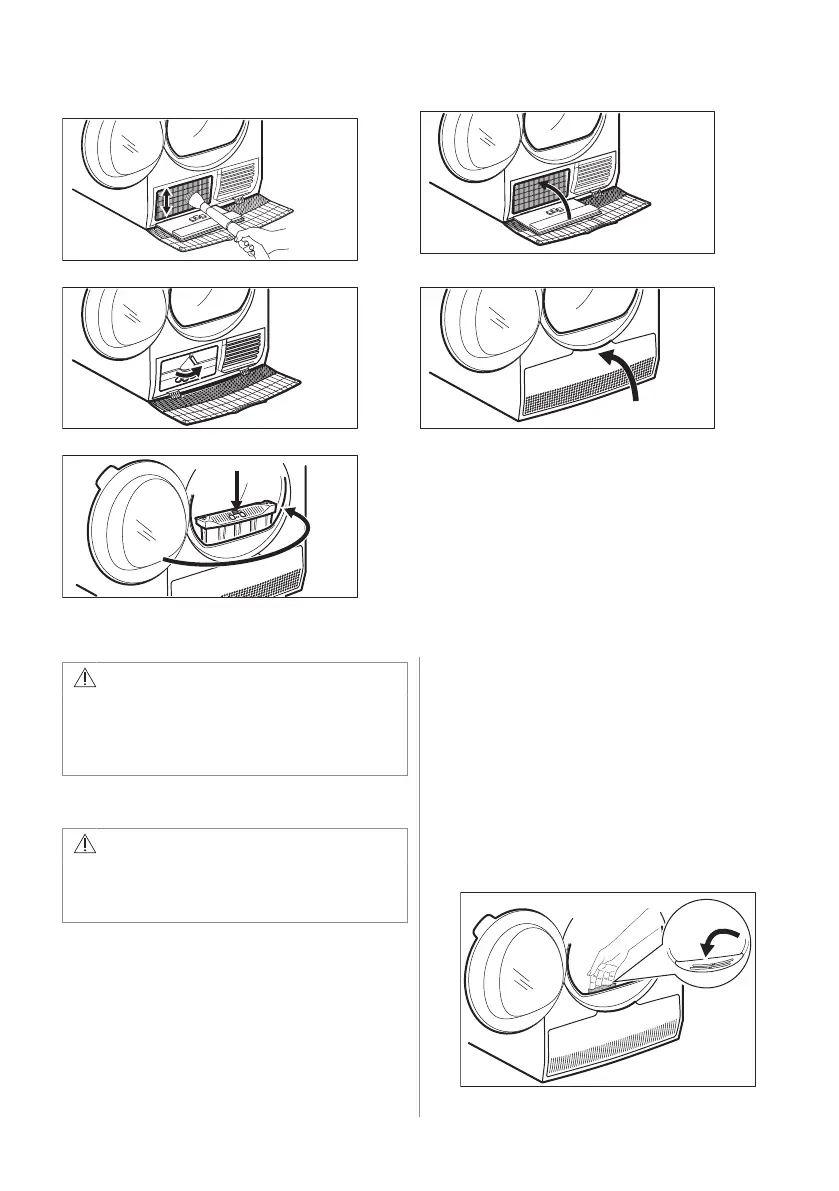
If necessary remove fluff from the filter socket and gasket. You can use a vacuum cleaner.
CAUTION!
Do not touch the metal surface with bare
hands. Risk of injury. Wear protective
gloves. Clean carefully to avoid
damaging the metal surface.
11.4 Cleaning the humidity sensor
CAUTION!
Risk of humidity sensor damage. Do not
use abrasive materials or steel wool to
clean the sensor.
To assure best drying results the appliance is
equipped with metal humidity sensor. It is
placed on the inner side of the door area.
Over usage time the surface of the sensor
may get dirty which deteriorates the drying
performance.
We recommend to clean the sensor at least 3
or 4 times or if you observe the drop of drying
performance.
To clean you can use harder side of dish-
washing sponge and bit of vinegar or dish
soap.
To clean the sensor:
1. Open the loading door.
2. Clean the surfaces of the humidity sensor
wiping off the metal surface several
times.
ENGLISH 19



 To Next Page