6. DAILY USE
Refer to the chapters on safety
Switch the appliance on using the
ON/OFF -1- switch and wait until
the display shows the last
program performed (e.g. P1).
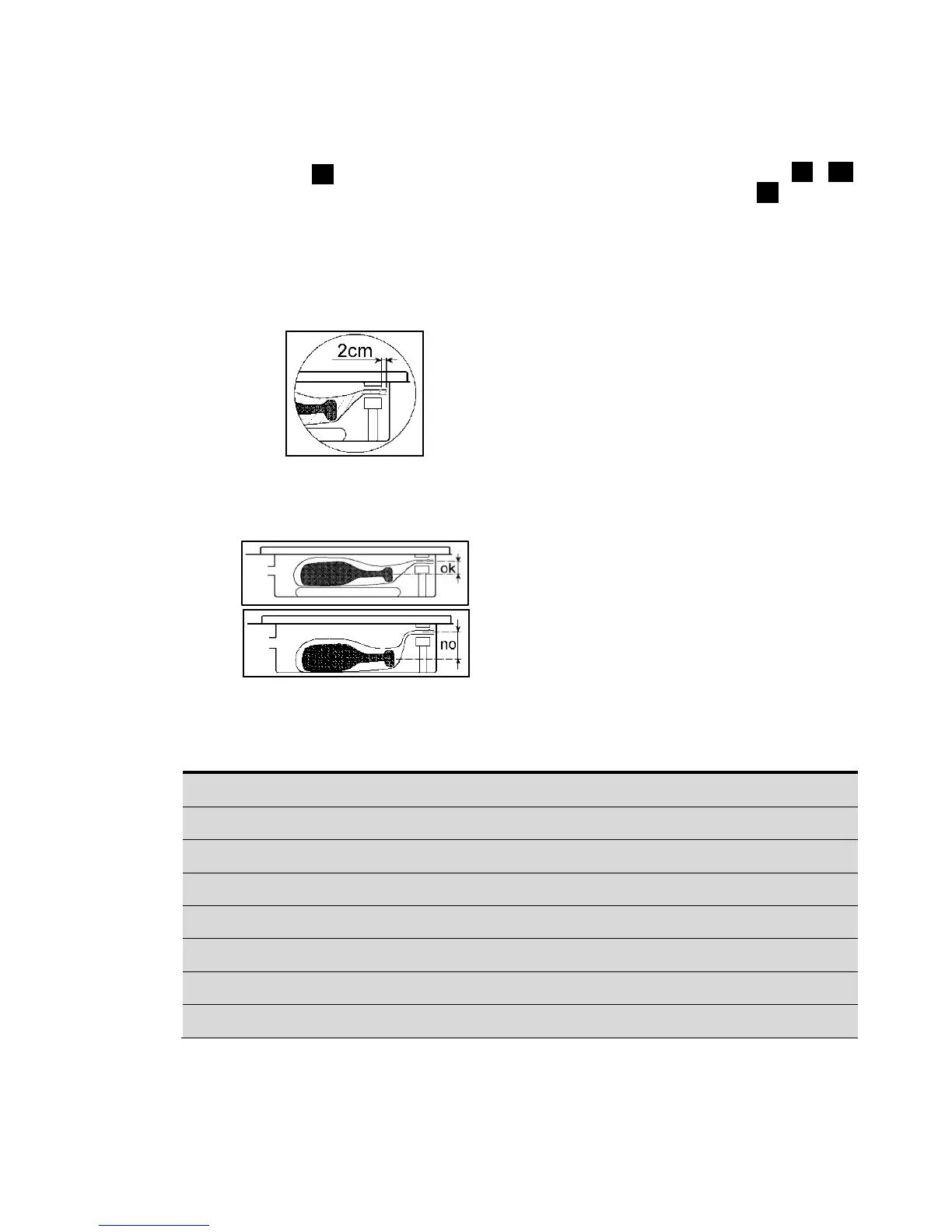
Lift the cover and place the pouch
containing the food to be packed
inside the tank, leaving at least 2
cm beyond the sealing bar (see
figure)
For small products, use the supplied
filler plate, as it helps position the
pouch in the correct position with
respect to the sealing bar.
Close the cover and select the
required program pressing
DECREASE/INCREASE -9-, -10
and then press Start -8-.
During the vacuum stage, the
display shows the progress (in
percentage) until the set value is
reached.
The display now shows the sealing
time, after which the environmental
pressure is restored inside the tank.
Now you can open the cover, as
soon as the display shows the
program number (e.g. P1).
Programs from P1 to P5 can be set
according to the consumer's
requirements.
By default, the set vacuum is 99.9%
and the recommended sealing
time for the supplied pouches is 2
seconds.
These parameters are suitable for the
normal use of the machine.
Refer to the following table for other
settings.
RECOMMENDED VACUUM % TABLE
“Value for food preservation purpose”


 To Next Page