24
The Setup Editor
The AEM DashDesign Setup Editor is used to configure the non-visual objects of a setup i.e. Outputs and
Operations. Some outputs use more than one input depending on the operation used. The setup editor is
accessed by selecting Setup | Display....
Each page of the editor has Insert and Delete buttons which are used to insert or delete an item in that tab.
The following sections describe the various operation types available and how they are used to make an output.
Outputs
Outputs are values, strings or bitmaps that are used by gauges or other outputs. The output that it passes is
determined by the operation that it uses.
To set up a new output:
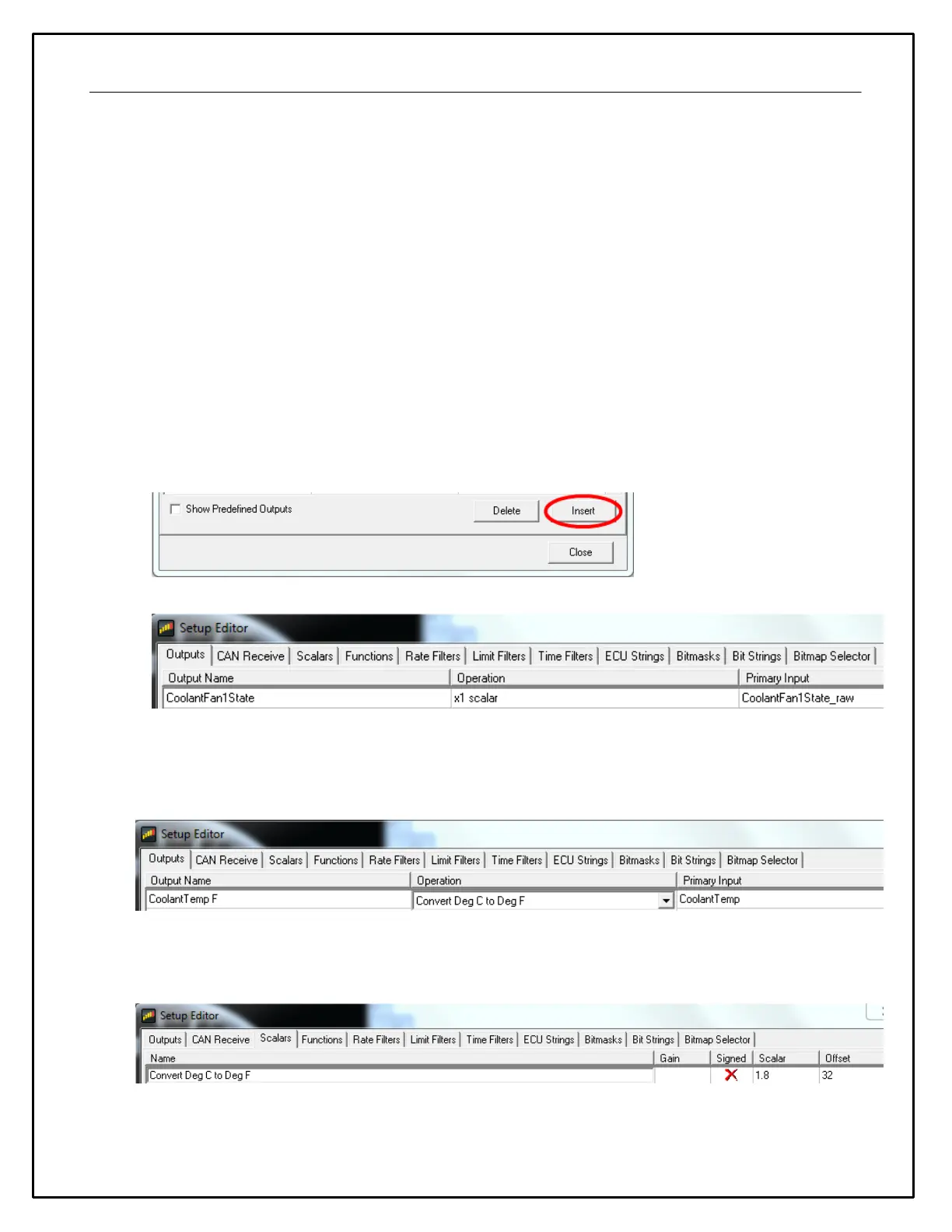
· Click the Insert button in the Outputs tab.
· Enter the name of the new output. This should describe what the output actually generates.
· Select the operation to be used by the output from the drop-down list.
· Select the input from the drop down list.
The example above shows the basic use of a x1 scalar. It uses a raw input and passes it through as itself with
the opportunity to change the name.
CoolantFan1State = (CoolantFan1State_raw)*(1)
The next example shows a simple unit conversion operation.
Find the Convert Deg C to Deg F in the Scalars tab.
This Scalar operation uses a Scalar value of 1.8 and an offset value of 32. Applying this Operation results in
the following math expression.


 To Next Page