45
Must be first character in format
Must be first character in format
Force leading sign character
e.g. +5.3 is displayed instead of 5.3
Indicates an optional digit
Indicates a required digit
Indicates rounding to the nearest 5
e.g. ##5# gives 2450 instead of 2448
Indicates rounding to the nearest 10
e.g. ##0# gives 2400 instead of 2448
Indicates position of decimal place
Gauges using time outputs use a different set of format strings:
· H - Displays the hours in 24 hour format.
· h - Displays the hours in 12 hour format.
· m - Displays the minutes.
· s - Displays the seconds.
· f - Displays tenths of seconds.
· ff - Displays hundredths of seconds.
· fff - Displays thousandths of seconds (only works for lap time via CAN).
· y - Displays the date in dd-mm-yy format
· z - Displays the date with text for the month, eg 01 Jan 09
Thus, the following formats would display the time in the following manner:
· Hms - 24:00:00
· hmsf - 12:00:00.0
· hmsff - 12:00:00.00
· y - 01-01-09
· hmsz - 12:00:00 01 Jan 09
System information can be shown by adding a value gauge to the screen and setting the Label Format
property as follows:
· vV - Shows the version of the color display firmware.
· vs - Shows the serial number of the display.
· vu - Shows the usage (on time) of the display in hours.
· vr - Shows the reset counter - the number of power on events since the last setup upload.
· vc - Shows the filename of the setup file used to program the display (up to 24 characters).
Bar Gauges
There are four types of bar gauge - rectangle and triangle shaped bars in either horizontal or vertical orientation.
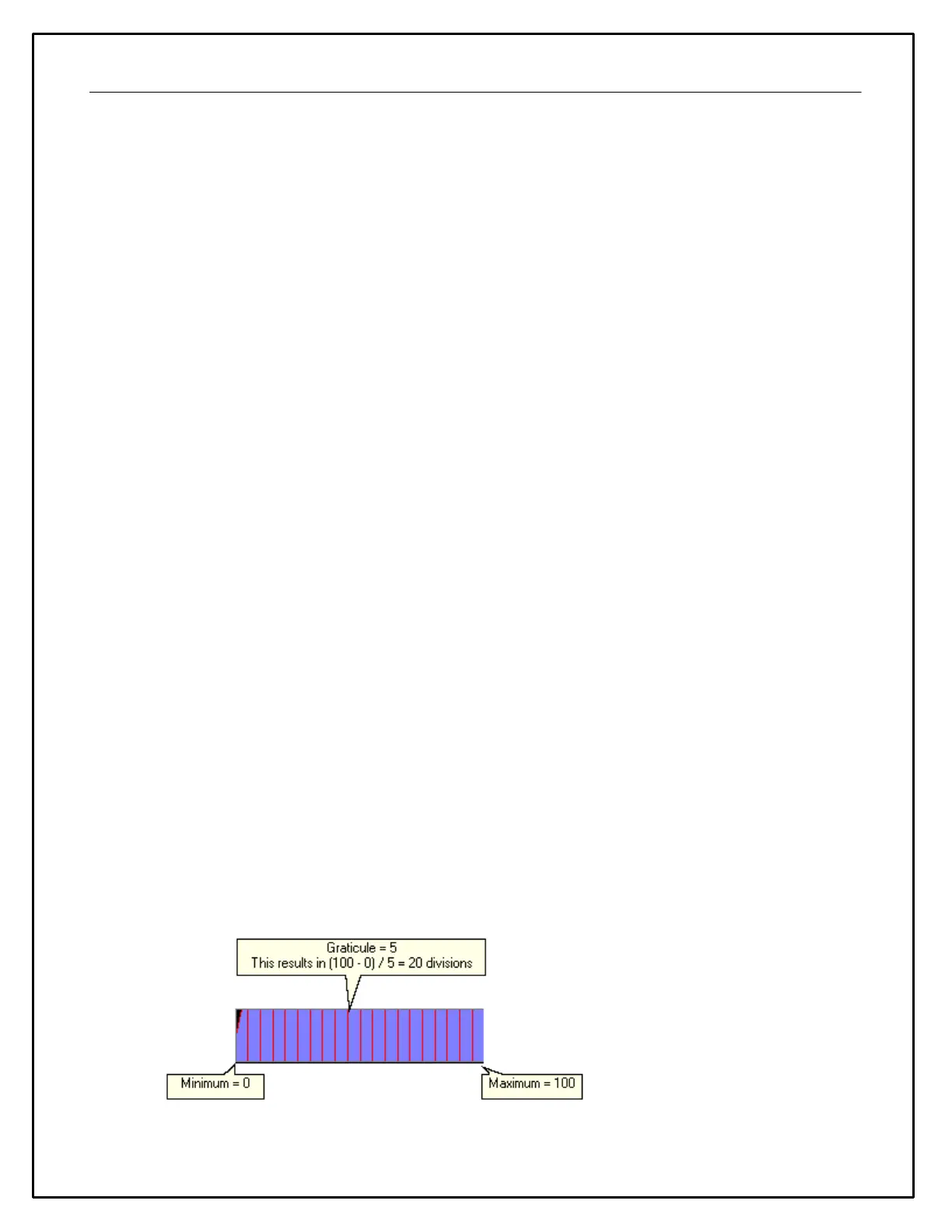
A bar contains a number of graticules that divide the bar up between the minimum and maximum limits as
shown in the diagram below:


 To Next Page