Need help?
Do you have a question about the Aeotec Z-Stick Gen5 and is the answer not in the manual?
Details on SDK version and Z-Wave library device classes.
Specifies operating distance in normal and PA modes.
Describes the physical interface including action and reset buttons.
Details on using the Action Button for adding/removing devices and factory reset.
Explains the function of the reset button for port reset.
Describes how the Z-Stick acts as an adapter in Serial API-Mode.
Details on using the Action Button for adding/removing devices and factory reset in Independence Mode.
Methods for resetting the Z-Stick to its factory default settings.
Instructions for integrating the Z-Stick into an existing Z-Wave network.
Details on using the IMA feature for network health measurement and troubleshooting.
Format and usage of the Set Command for configuration parameters.
Format and usage of the Get Command for retrieving configuration parameters.
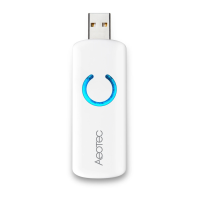
The Aeotec Z-Stick Gen5 is a sophisticated Z-Wave USB adapter designed to simplify the installation and management of Z-Wave networks. This self-powered device offers remote network creation capabilities, operating independently of external power sources or a host microprocessor. Its primary function is to facilitate the inclusion and removal of Z-Wave devices within a network, thereby streamlining the setup process. When connected to a host controller via USB, the Z-Stick Gen5 enables the host to actively participate in the Z-Wave network, acting as a central point of control.
One of the key usage features of the Z-Stick Gen5 is its versatility. It can be seamlessly integrated into any Z-Wave network, working harmoniously with other Z-Wave certified devices from various manufacturers and applications. This ensures broad compatibility and flexibility in network design. A notable aspect of its operation is that all non-battery operated nodes within the network will function as repeaters, regardless of their vendor, which significantly enhances the reliability and range of the network.
The Z-Stick Gen5 offers two primary modes of operation: Independence Mode and Serial API-Mode. In Independence Mode, the device can operate autonomously without being connected to a host controller. This mode is particularly useful for adding or removing Z-Wave devices on the go. To add or include a new Z-Wave device, the user simply unplugs the Z-Stick from the USB connector and taps the Action Button once. The blue LED on the Z-Stick will blink slowly, indicating it's ready for inclusion. The user then brings the Z-Stick to the desired Z-Wave device and presses the button on that device. The Z-Stick's blue LED will blink fast during network neighbor discovery and then stay solid for 2 seconds to confirm successful inclusion. After inclusion, the blue LED returns to slow blinking, signaling readiness for further device additions. The Z-Stick automatically exits removal mode after 30 seconds or can be turned off by tapping the Action Button.
Removing or excluding Z-Wave devices follows a similar process in Independence Mode. The user unplugs the Z-Stick, then presses and holds the Action Button for approximately 2 seconds, which causes the orange LED to blink fast. To remove a device, the user takes the Z-Stick to the device and presses its button. The Z-Stick's LED will turn blue and remain solid for 2 seconds to indicate successful removal. The orange LED then resumes fast blinking, ready for more exclusions.
For maintenance, the Z-Stick Gen5 provides a factory reset function. In Independence Mode, this can be achieved by unplugging the Z-Stick from the USB connector, then pressing and holding the Action Button for 20 seconds. If held for more than one second, the LED will turn red and blink faster. If held for 20 seconds, the LED will turn blue and stay solid for 2 seconds, confirming a successful reset. This action will exclude the Z-Stick from its current Z-Wave network and restore all configuration settings to their default values. The reset function can also be performed via host software when the Z-Stick is in SerialAPI-Mode, requiring the host software to take control of the USB adapter and execute a network reset.
In Serial API-Mode, the Z-Stick Gen5 functions as a Z-Wave adapter when plugged into a host controller's USB connector. In this mode, it is always listening (awake and in RX receive mode) and responds to commands sent by the host processor software through the USB interface. This mode is essential for advanced control and integration with home automation software.
The Z-Stick Gen5 also supports an Installation and Maintenance Application (IMA) feature, which provides valuable insights into network health. When operating as an independent or secondary controller and unplugged from the USB host, the Z-Stick can measure the communication quality between the central controller and other devices in the network. The LED color on the Z-Stick indicates this quality:
When the Z-Stick is in Serial API-Mode and acts as a primary controller, it can also measure network health for each device. This requires installing the IMA tool software on the host (available from Aeotec's support website). The user selects a node device within the software and initiates an IMA test. The software client then displays the test results, using different LED icon colors to represent the network health level, mirroring the physical Z-Stick's indications.
The Z-Stick Gen5's configuration parameters can be managed using Set and Get commands via the Serial API. The Set Command allows users to define values for specific configuration parameters, including the LED indicator light configuration, security network enablement, and RF power level. The Get Command retrieves the current values of these parameters. This detailed control enables users to fine-tune the Z-Stick's behavior to suit their specific network requirements. For instance, the LED indicator can be enabled or disabled, and the RF power level can be adjusted across 10 levels, from weak output to maximum output, to optimize range and power consumption.
Adding the Z-Stick to a pre-existing Z-Wave network is also accomplished through the host software in SerialAPI-Mode. This involves using functions like "Learn," "Sync," or "Add as Secondary Controller" within the host software, allowing the Z-Stick to integrate seamlessly into an established network.
Overall, the Aeotec Z-Stick Gen5 is a robust and versatile Z-Wave USB adapter, offering both independent operation for on-the-go network management and advanced Serial API control for comprehensive integration with host systems. Its intuitive button-based controls and LED indicators provide clear feedback on device status and network health, making it a powerful tool for both novice and experienced Z-Wave users.
 General
| Wireless Protocol | Z-Wave |
|---|---|
| Interface | USB |
| Compatibility | Windows, macOS, Linux |
| Operating Temperature | 0°C to 40°C |
| Operating Distance | Up to 150 meters outdoors |
| Encryption | AES-128 |
| Power Source | USB |
| Z-Wave Frequency | 868.42 MHz (EU); 908.42 MHz (US) |
| Power Supply | 5V DC |
| SDK | Z-Wave SDK |


 To Next Page