EasyManua.ls Logo

Aeotec Zi-Stick - User Manual

Aeotec Zi-Stick
4 pages
Print Icon
To Next Page IconTo Next Page
Loading...
Zi-Stick user guide
Modified on: Mon, 27 Feb, 2023 at 5:17 PM
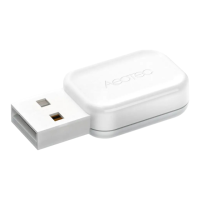
Zi-Stick was developed to control actuators and sensors in a Zigbee 3.0 Network as a self-powered Zigbee 3.0 USB
Adapter.
The technical specifications of Zi-Stick (https://aeotec.freshdesk.com/a/solutions/articles/6000263591) can be viewed at
that link.
Important safety information.
Please read this and other device guides carefully. Failure to follow the recommendations set forth by Aeotec Limited may
be dangerous or cause a violation of the law. The manufacturer, importer, distributor, and/or reseller will not be held
responsible for any loss or damage resulting from not following any instructions in this guide or in other materials.
Keep product away from open flames and extreme heat. Avoid direct sunlight or heat exposure. Improper battery use may
damage the product.
Zi-Stick is intended for indoor use in dry locations only. Do not use it in damp, moist, and/or wet locations.
Question and Answer IconNeed help?

Do you have a question about the Aeotec Zi-Stick and is the answer not in the manual?

Summary

Important Safety Information

Quick Start Guide

Advanced Topics and Resources

Zi-Stick Drivers

Information on obtaining and installing necessary drivers for the Zi-Stick for proper operation.

Compatible Software & Setup Guides

List of third-party software compatible with Zi-Stick and links to their setup instructions.

Overview

The Zi-Stick is a versatile USB adapter designed to facilitate the control of actuators and sensors within a Zigbee 3.0 Network. It functions as a self-powered Zigbee 3.0 USB Adapter, enabling a host controller (such as a PC, Mac, or Raspberry Pi) to act as a primary controller for a Zigbee network. This device is intended for indoor use in dry locations only, emphasizing the importance of keeping it away from damp, moist, and wet environments.

Function Description

The primary function of the Zi-Stick is to bridge the communication between a host controller and a Zigbee 3.0 network. By plugging the Zi-Stick into a host controller, users can establish a central point of control for various Zigbee-compatible devices, including actuators (devices that perform actions, like turning lights on/off or opening/closing blinds) and sensors (devices that detect environmental conditions, like temperature, motion, or door/window status).

Once connected, the Zi-Stick allows the host controller, running appropriate third-party software, to discover, pair with, and manage Zigbee devices. It essentially transforms a standard computer into a smart home hub capable of orchestrating a Zigbee ecosystem. The device leverages the Zigbee 3.0 standard, ensuring broad compatibility with a wide range of Zigbee products and offering enhanced security and interoperability features.

The Zi-Stick is designed to be self-powered, drawing the necessary power directly from the USB port of the host controller. This eliminates the need for an external power supply, simplifying its setup and reducing cable clutter. Its role as a primary controller means it is responsible for initiating and maintaining the Zigbee network, allowing other Zigbee devices to join and communicate within that network.

Usage Features

Setting up the Zi-Stick involves a straightforward process, primarily focused on connecting it to a host controller and configuring the chosen third-party software.

  1. Host Controller Connection: The Zi-Stick is plugged into a USB port on a host controller. This could be a personal computer (Windows, macOS, or Linux-based systems like Raspberry Pi).
  2. Driver Installation (if necessary): While most modern operating systems automatically install the required USB drivers, in some cases, manual driver installation might be needed. The device utilizes a serial bridge driver (specifically, the SiLabs CP2102N Driver), which can be downloaded from the manufacturer's website if not automatically detected.
    • Windows: Once connected, the Zi-Stick typically appears as a "COMX" device (e.g., COM1, COM2) under "Ports (COM & LPT)" in Device Manager.
    • Linux: Users can identify the Zi-Stick as a "ttyUSB0" device by using the dmesg | grep tty command in the terminal.
    • macOS: On macOS, it shows up as a USB Modem device, typically located at "/dev/cu.usbmodem" under "Network" in System Preferences.
  3. Third-Party Software Integration: The core of the Zi-Stick's functionality relies on its integration with third-party smart home software. Popular compatible platforms include Home Assistant and openHAB. Users are guided to open their selected software and follow its specific instructions for connecting a Zigbee USB adapter.
  4. Device Discovery and Management: After the Zi-Stick is recognized by the software, it can be used to discover and pair with other Zigbee devices. The software's interface will typically display devices already paired with the Zi-Stick network. If new devices are added or existing ones are not detected, a rescan function within the software can be used to re-detect them.
  5. Network Control: Once devices are paired, the Zi-Stick, through the host controller and software, enables comprehensive control over the Zigbee network. This includes sending commands to actuators (e.g., turning lights on, adjusting thermostat settings) and receiving data from sensors (e.g., temperature readings, motion alerts).

The Zi-Stick's design prioritizes ease of use, aiming for a plug-and-play experience where possible. Its compatibility with various operating systems and popular smart home platforms makes it a flexible solution for building or expanding a Zigbee smart home.

Maintenance Features

The Zi-Stick is designed for minimal maintenance, focusing on durability and reliable operation within its specified environment.

  1. Environmental Considerations: The most critical maintenance aspect is adhering to the environmental guidelines. The device is intended for indoor use only and must be kept in dry locations. It should not be exposed to damp, moist, or wet conditions, as this can damage the internal electronics and compromise its functionality.
  2. Protection from Extremes: Users are advised to keep the product away from open flames and extreme heat. Direct sunlight and prolonged heat exposure should also be avoided. These precautions help prevent overheating, material degradation, and potential damage to the device's components.
  3. Battery Use (Not Applicable): As a self-powered USB adapter, the Zi-Stick does not contain internal batteries. Therefore, concerns related to improper battery use, which can damage other battery-operated products, are not applicable to this device. This simplifies maintenance by removing the need for battery checks or replacements.
  4. Software Updates: While the Zi-Stick itself is a hardware component, its effective operation is tied to the drivers on the host controller and the third-party smart home software. Keeping these software components updated is crucial for optimal performance, security, and compatibility with new Zigbee devices. Driver updates, if necessary, would typically be provided by the silicon lab manufacturer, while software updates would come from the respective smart home platform developers (e.g., Home Assistant, openHAB).
  5. Physical Care: General care involves ensuring the USB port and the device itself remain free from dust and debris. A gentle wipe with a dry cloth can help maintain its physical condition. Avoid using harsh chemicals or abrasive materials for cleaning.
  6. Troubleshooting: In case of connectivity issues, the first steps often involve verifying that the host controller's drivers are correctly installed and that the third-party software is configured to recognize the Zi-Stick's COM or virtual port. Rescanning for devices within the smart home software can also resolve detection issues.

By following these simple guidelines, users can ensure the longevity and reliable performance of their Zi-Stick, maintaining a stable and responsive Zigbee smart home network. The device's robust design and minimal moving parts contribute to its low-maintenance profile, making it a dependable component in a smart home ecosystem.

Aeotec Zi-Stick Specifications

General IconGeneral
CategoryController
InterfaceUSB
Z-Wave Frequency (EU)868.42 MHz
Z-Wave Frequency (US)908.42 MHz
Z-Wave Frequency (ANZ)921.42 MHz
Z-Wave Frequency (RU)869.0 MHz
EncryptionAES-128
Operating Temperature0°C to 40°C
Operating System CompatibilityWindows, Linux, macOS
SDKZ-Wave SDK
ModelAeotec Z-Stick Gen5
CompatibilityZ-Wave
RangeUp to 100 meters
Storage Temperature-20°C to 60°C
Power5V via USB
TypeZ-Wave USB Stick
Z-Wave Frequency (IL)916.0 MHz

Related product manuals