Channel 2:
Input XLR combination with a socket for a 6.3 mm jack plug and XLR male socket
Line/Mic switch to adjust input sensitivity
Line: sources with line level, instruments with active preamplifiers
and magnetic sound pick-ups, Mic: symmetrical microphone input
with 30 V phantom source
Clip overload indicator
Gain input level control
Bass tone control for bass
Treble tone control for treble
Eff. Pan panorama control to distribute the effects between the channels
Select switch for two effect programmes (reverberation, reverberation/delay)
Return level control for the internal effect
Power power indicator lamp
Master level control for the overall volume
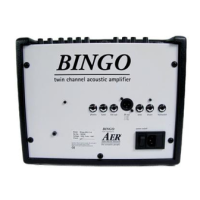
Rear (from left to right):
Phones headphone output
Tuner output for a tuner after the master control
Line-out preamplifier output after the master control
DI-out XLR output before the master control
Send output for an external effect device
Return input for an external effect device or another signal source, for example
CD player
F/S connection for a double foot switch with which the effects can be
switched on and off (See 4. Summary of Operations).
Power combined mains switch with a mains socket and a fuse holder
(1 A slowblow)
4. SUMMARY OF OPERATIONS
➧ Connecting and starting-up:
Check to ensure that the mains voltage at your location corresponds to what is permit-
ted for operating the BINGO. You will find the necessary information on the rear side
under „Dest.“ (country of destination) and „AC-voltage“. Before switching the amp on,
the „Master“ and „Return“ controls should be turned to the zero position (as far left as
they will go) and all other controls to middle position. Then make all necessary cable
connections (mains, instrument and/or microphone). Now you can switch on your
BINGO with the power switch on the rear of the amp. The green power indicator shows
that the amp is operational.
➧ Level control:
You can use the „High/Low“ switch and the „Gain“ control to adjust the various pick-up
systems and signal sources to BINGO. The clip indicator shows that the input signal is
BINGO
3
Part of the action
A





 To Next Page