13
English
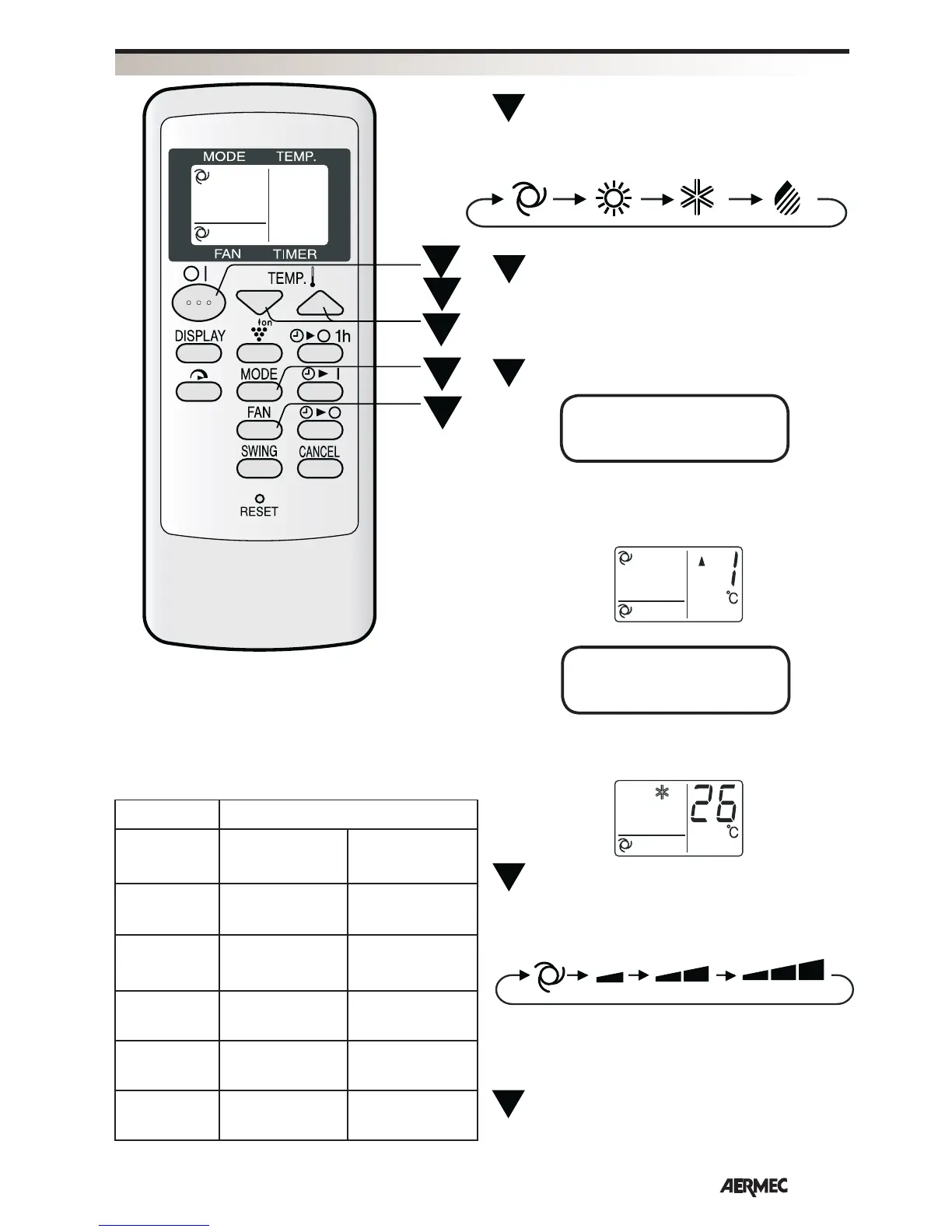
Press the MODE button to select the operation
mode.
AUTOMATIC
HEATING
COOLING
Press the ON/OFF button to switch on the unit.
The red indicator light on the unit will light up.
Press the TEMP. button to set the desired
temperature.
Press the FAN button to set the desired fan speed.
In the DEHUMIDIFICATION mode, the fan speed is
pre-set to AUTOMATIC and cannot be changed.
To switch off the unit, press the ON/OFF button
again.
The red indicator light on the unit will switch off.
TIPS ABOUT THE AUTOMATIC MODE
In AUTOMATIC mode, the temperature setting and
mode are automatically selected according to the room
temperature when the unit is turned on.
Modes and temperature settings
AUTOMATIC SOFT
LOW
HIGH
DEHUMIDIFI-
CATION
1
5
4
3
2
AUTOMATIC/
DEHUMIDIFICATION MODE
COOLING/
HEATING MODE
The temperature can be changed in increments of
1°C within the range of 2°C higher to 2°C lower than
the temperature automatically determined by the air
conditioner.
Automatic operation
Room
temperature
at start
Mode Temperature
setting
Below
21°C
HEATING 23°C
From 21°C
to 24°C
DEHUMIDIFICA-
TION
Room temperature
at start
From 24°C
to 26°C
COOLING 24°C
From 26°C
to 28°C
COOLING 25°C
Above
28°C
COOLING 26°C
The temperature can be set within the range 18 - 32°C.
BASIC OPERATION



 To Next Page